Integrals are one of those math topics that can stop students cold. Whether you’re working through your first calculus course or grinding through an engineering program, having the right calculator in your hands makes a real difference. Not just for getting answers faster, but for actually understanding what’s happening on the screen.
The market is full of graphing calculators, and most of them claim to handle calculus. The truth is, they’re not all built the same. Some make evaluating definite integrals quick and painless. Others make you fight through menus just to get a basic numerical result.
We tested and compared five of the most capable calculators available today, looking specifically at how well each one handles integrals and calculus coursework. Here’s everything you need to walk away with a confident pick.
 How We Selected the Best Calculators for Integrals
Our team evaluated dozens of graphing calculators, narrowing the field down to five that genuinely stand out for calculus and integral work. We focused on how each model performs in the hands of real students and professionals, not just on paper specs.
Here are the factors that guided our selections:
- Integral functionality: How well the calculator handles both definite and indefinite integrals, including numerical computation and symbolic solving where applicable.
- Display quality: Whether the screen is large enough and clear enough to read equations, graphs, and results without strain.
- Ease of input: How naturally you can enter complex expressions, especially integrals with multi-step notation.
- Exam approval: Whether the calculator is permitted on major standardized tests like the SAT, ACT, AP, and IB exams.
- Processing speed: How quickly the calculator evaluates functions and renders graphs, especially for complex calculus problems.
- Memory and storage: Whether the device can hold programs, apps, and data across study sessions.
- Value for money: Whether the price is justified by the features you actually get for calculus-level work.
Every pick on this list earned its spot by delivering real performance where integral work is concerned. The next section breaks down exactly how each one measures up.
Best Calculators for Integrals (2026 Expert Review)
Five calculators made this list, ranging from budget-friendly workhorses to premium machines built for serious STEM students. Each review below gives you the details you need to decide which one fits your situation.
1. HP Prime G2: The Most Powerful Calculator for Advanced Calculus
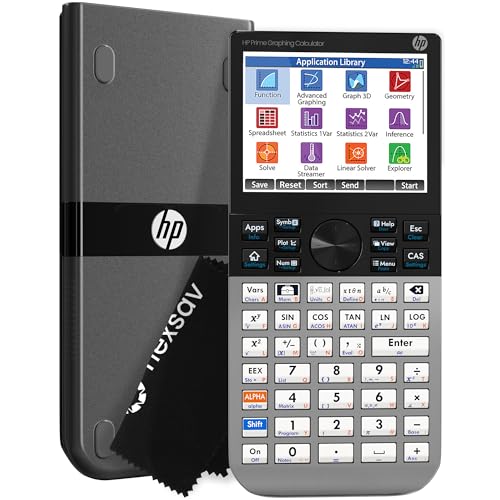
The HP Prime G2 is in a class of its own when it comes to raw calculus capability. It runs a full Computer Algebra System, which means it doesn’t just crunch numerical approximations of integrals. It can solve them symbolically, giving you exact answers in the same way a textbook would. For students in advanced calculus, engineering, or any field where symbolic math matters, that’s a big deal.
The 3.5-inch multi-touch color display is genuinely impressive. You can pinch to zoom on graphs, drag functions around the screen, and switch between symbolic, graphical, and numerical views with dedicated keys. Entering an integral is fast and intuitive, and the results display in proper textbook format, so you’re not decoding calculator shorthand.
Build quality sets the HP Prime G2 apart from most of its competition. The faceplate is brushed metal, the buttons are solid, and the whole device feels dense and well-made. It’s the kind of calculator that holds up in a heavy-use academic environment. It also comes with a slide-on protective cover and a rechargeable lithium-ion battery, so there’s no hunting for AAA batteries the night before an exam.
We found the CAS mode to be particularly strong for integral work. It handles everything from basic definite integrals to improper integrals and integration by parts, with results that match what you’d expect from symbolic math software. The HP Prime also integrates with a companion mobile app and a Windows/Mac emulator, so you can practice and transfer work between devices.
Key Specs:
- Display: 3.5-inch multi-touch color LCD
- Memory: 256MB flash
- CAS: Yes (full Computer Algebra System)
- Power: Rechargeable lithium-ion battery
- Exam approval: PSAT/NMSQT, SAT, IB, select AP exams
- Dimensions: 7.25″L x 3.66″W
- Full CAS for exact symbolic integral solutions
- Large multi-touch display with pinch-to-zoom
- Premium brushed metal build quality
- Companion app mirrors full calculator functionality
- Steeper learning curve than most graphing calculators
- Higher price point than the competition
2. Casio fx-9750GIII: The Best Budget Pick for Calculus Students

If you want serious integral capability without spending a lot, the Casio fx-9750GIII is the one to beat. It handles definite integrals, numerical calculus, graphing, statistics, vectors, and even MicroPython programming, all at a price that’s well below the typical graphing calculator market. For students in pre-calculus through AP Calculus, it covers everything a course will throw at you.
One feature that genuinely stands out is the Natural Textbook Display. Instead of entering integrals in a linear format that looks nothing like what’s in your notes, the fx-9750GIII shows expressions exactly as they appear in a textbook. That makes it much easier to confirm you’ve entered something correctly before hitting calculate.
The calculator runs on four AAA batteries, which is worth knowing if you prefer not to rely on a rechargeable device for exams. Battery life holds up well under heavy use. At 7.5 ounces and with a protective sleeve included, it’s light and easy to carry without feeling cheap. The plastic build is durable enough for everyday student use.
We appreciated the USB connectivity, which lets you transfer programs and files between the calculator and a computer. The eActivities feature is also useful for storing worked examples and notes directly on the device. For an engineering professor’s pick at the low end of the price range, the fx-9750GIII punches well above its cost.
Key Specs:
- Display: Natural Textbook Display LCD, 6.6″L x 3.25″W body
- Memory: 3MB flash
- CAS: No
- Power: 4 AAA batteries (included)
- Exam approval: AP, SAT, ACT, IB
- Weight: 7.5 oz
- Natural Textbook Display for easy integral entry
- Python programming support
- USB connectivity for file transfer
- Strong value for the price
- No CAS mode (numerical integrals only, no symbolic solving)
- Graphing can feel slow compared to higher-end models
3. Texas Instruments TI-84 Plus CE: The Classroom Standard That Still Delivers

The TI-84 Plus CE is the most widely used graphing calculator in American high schools and colleges, and for good reason. Teachers know it, textbooks reference it by name, and most calculus courses are built around its interface. That familiarity has real value. When your teacher explains how to use the integral function in class, they’re almost certainly walking through it on a TI-84.
Calculus functionality covers definite integrals through the MATH menu’s numerical integration tool, along with derivative approximation, graphing multiple functions simultaneously, and statistical analysis. The color display makes it noticeably easier to track multiple graphs at once compared to older monochrome models. At 3.2 inches, the screen is clear and bright with a high-resolution backlit display.
The physical design is thinner and lighter than earlier TI models, which makes it easier to carry in a bag or slide into a desk. It comes with a slide-on cover for protection and a rechargeable lithium-ion battery. Battery life is genuinely long, with most users going days or even weeks between charges during normal school use.
We found the MathPrint feature to be a meaningful upgrade for integral work specifically. It displays expressions in textbook-style format, so you can see your integral notation clearly before evaluating. It’s not a CAS calculator, so you won’t get symbolic antiderivatives, but for numerical definite integrals and graphing, it’s fully capable and deeply familiar to most math instructors.
Key Specs:
- Display: 3.2-inch high-resolution color backlit LCD
- Memory: Supports apps and programs
- CAS: No
- Power: Rechargeable lithium-ion battery (included)
- Exam approval: SAT, ACT, PSAT/NMSQT, AP, IB
- Dimensions: 7.57″L x 3.4″W
- Universal classroom familiarity
- MathPrint textbook-style display
- Excellent rechargeable battery life
- Approved for all major standardized exams
- No symbolic CAS mode
- Charging port is Mini-USB, not USB-C
4. Texas Instruments TI-Nspire CX II: The Best All-Rounder for STEM Students

The TI-Nspire CX II is built for students who need more than just a graphing calculator. It approaches math as an interactive, visual experience. The animated path plot feature shows functions being drawn in real time, which genuinely helps when you’re trying to understand what an integral represents geometrically, not just numerically. Dynamic coefficient values let you drag sliders and watch graphs respond instantly, which is a powerful way to build intuition around calculus concepts.
The document-based operating system is one of the most distinctive features on this list. Rather than clearing your screen between problems, the Nspire saves your work in document files, letting you carry variables, notes, and calculations across multiple pages within a single session. For students working through long problem sets or tracking a multi-step integration process, that kind of organization is genuinely useful.
A built-in trackpad replaces the navigation keys you’d find on most graphing calculators. Combined with a dedicated alphabetical keyboard at the bottom of the device, navigating menus and entering expressions feels more like using a computer than a traditional calculator. It also supports both Python and TI-Basic programming, making it a strong tool for STEM coursework that goes beyond pure math.
The included student software for PC and Mac extends the calculator’s functionality to a larger screen, which is particularly helpful for reviewing or presenting work. Battery life is strong, with the rechargeable battery lasting days between charges in normal academic use.
Key Specs:
- Display: 2.83-inch color LCD with color-coded screen tabs
- Memory: Supports documents, programs, and apps
- CAS: No (CAS version available separately)
- Power: Rechargeable battery (included)
- Exam approval: SAT, ACT, AP, IB (note: CAS version not ACT-approved)
- Dimensions: 3.42″L x 3.42″W
- Animated path plots aid visual understanding of integrals
- Document system keeps work organized across sessions
- Trackpad and full alphabetical keyboard for easier navigation
- Includes student software for PC and Mac
- Steeper learning curve due to menu-heavy interface
- Premium price without CAS symbolic solving in this version
5. Texas Instruments TI-83 Plus: The Reliable Entry Point for Integral Work

The TI-83 Plus has been in math classrooms for decades, and it’s still standing. It handles the core calculus functions students need, including numerical definite integrals, derivative approximation, function graphing, and data analysis. Many college courses still accept or require it, and it remains one of the most stable, predictable calculators you can put in a student’s hands.
The display shows 8 lines of 16 characters at 64 x 96 pixel resolution. It’s not a color screen, and it’s not backlit, but it’s clear and readable in normal lighting. The layout is pragmatic. Buttons are well-spaced and logically organized, and the graphing interface is straightforward enough that most students can navigate it without a manual. Viewing an equation alongside its graph and coordinates simultaneously is a feature that pays off constantly during calculus work.
It runs on four AAA batteries plus a backup lithium battery, and the power management includes automatic shutoff to preserve battery life. A hard slide cover is included to protect the screen and keypad. At under half a pound, it’s one of the lightest options on this list and fits easily in any bag.
We found it to be a no-frills calculator that does exactly what it says. For students who need a reliable tool for introductory calculus, intermediate algebra, or statistics, and who don’t need CAS or Python, the TI-83 Plus is an honest, proven choice. It’s compatible with TI-84 Plus models for file sharing, and its preloaded apps include StudyCards and Vernier EasyData for additional utility.
Key Specs:
- Display: 3-inch monochrome LCD, 64 x 96 pixels
- Memory: 24KB RAM, 160KB Flash ROM
- CAS: No
- Power: 4 AAA + 1 lithium backup battery
- Exam approval: SAT, PSAT/NMSQT, ACT, AP, IB, Praxis
- Dimensions: 7.3″L x 3.5″W
- Proven reliability over many years
- Approved for nearly every major standardized exam
- Simple, predictable interface for entry-level calculus
- Compatible with TI-84 Plus for file sharing
- Monochrome display with no backlight
- No color, no CAS, no Python support
Best Calculators for Integrals: A Quick Rundown
- HP Prime G2: Best overall for advanced calculus and symbolic integral solving with full CAS support
- Casio fx-9750GIII: Best budget pick with Natural Textbook Display and solid integral functionality
- Texas Instruments TI-84 Plus CE: Best for classroom compatibility and exam approval across all major tests
- Texas Instruments TI-Nspire CX II: Best for STEM students who want visual, interactive calculus tools
- Texas Instruments TI-83 Plus: Best entry-level option for introductory calculus and budget-conscious buyers
Final Thoughts
The right calculator for integrals comes down to two things: how far along you are in your math education and how much you need the calculator to do on its own. If you’re working through AP Calculus or an introductory college course, numerical integration is all you need, and several options here deliver that well. If you’re in engineering, advanced math, or graduate-level work, symbolic solving through a CAS becomes genuinely important.
Think about your exam requirements first, then your budget, and finally the features that will actually serve your workflow. A calculator you understand and can use quickly is always more valuable than one packed with features you’ll never touch. Pick the one that fits where you are right now, and you’ll be well equipped for whatever your next exam brings.