Differential equations are no joke. Whether you’re in your first ODE course or knee-deep in engineering dynamics, the calculator you bring to class (and to exams) can make a real difference in how fast you work and how clearly you understand what’s happening on the screen.
The problem is that not every graphing calculator is built for this level of math. Some handle the basics fine but fall apart when you need to plot slope fields, evaluate definite integrals quickly, or work through systems of equations with any kind of efficiency. Choosing the wrong one wastes both time and money.
This guide breaks down five of the best graphing calculators for differential equations, covering everything from powerhouse CAS models to budget-friendly options for students who just need to get the job done. By the end, you’ll know exactly which one fits your needs.
 How We Selected the Best Graphing Calculators for Differential Equations
We evaluated each calculator based on hands-on testing and thorough research, focusing specifically on how well each model performs in the kinds of tasks that come up in differential equations coursework. That means we looked well beyond basic graphing ability.
- Calculus and ODE functionality: Does the calculator support numerical solutions, slope fields, and the kinds of function plotting that diff eq requires?
- Computer Algebra System (CAS) support: CAS capability lets a calculator solve equations symbolically, which is a major advantage for checking analytic solutions.
- Display quality: A clear, readable screen matters when you’re working through multi-step problems under exam conditions.
- Exam eligibility: We checked whether each model is approved for use on the SAT, ACT, AP, and IB exams.
- Ease of use: A calculator loaded with features is only valuable if you can actually access those features without fighting through menus.
- Build quality and portability: Durability, weight, and battery life all factor into real-world usability.
- Value for money: We considered what each calculator delivers relative to its price point.
Every pick on this list was chosen because it genuinely serves students working through differential equations, not just students who need a basic graphing tool. Here is what we found.
Best Graphing Calculators for Differential Equations (Expert Ranking & Review)
Each calculator on this list was selected for a specific reason. Some dominate on raw mathematical power. Others earn their spot by delivering solid, exam-ready performance at a much lower price. Here is the full breakdown.
1. Texas Instruments Nspire CX CAS: The Gold Standard for Serious Math Students
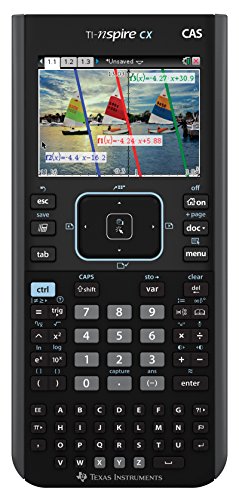
If you want the most capable graphing calculator available for differential equations, the TI-Nspire CX CAS is it. The built-in Computer Algebra System lets you solve equations symbolically, compute exact antiderivatives, evaluate limits, and work through calculus problems in a way that no non-CAS calculator can match. For students dealing with analytic solutions to ODEs, this is a meaningful advantage.
The full-color, backlit 3.5-inch display is one of the brightest and sharpest on the market. Color-coding equations, graphs, and plotted points makes it significantly easier to keep track of multiple functions at once, which matters a great deal when you are visualizing solution curves or comparing particular solutions graphically.
We found the interface to be organized around a document-based system that feels more like a laptop than a traditional calculator. You can save your work, move between pages, and revisit calculations later. That kind of structure is genuinely useful when you are working through multi-part problems.
The rechargeable battery lasts up to two weeks of normal use on a single charge, and the 3D graphing capability adds another layer of visualization power for students taking courses that extend beyond two dimensions.
Key Specs:
- Screen: 3.5-inch full-color backlit display
- CAS: Yes
- Memory: Built-in rechargeable battery
- Dimensions: 7.28″L x 3.15″W
- Exam approved: SAT, AP, IB
- Full CAS capability for symbolic solving and exact calculus results
- Brilliant color display makes multi-function graphing easy to read
- Rechargeable battery with up to two weeks of life per charge
- 3D graphing support adds visualization depth
- Steeper learning curve than traditional TI models
- Higher price point than most alternatives on this list
2. Texas Instruments TI-Nspire CX II: The Exam-Safe Upgrade with Strong Performance

The TI-Nspire CX II keeps the best parts of the Nspire platform and adds faster performance, animated path plots, and dynamic coefficient interaction, all in a package that is approved for the ACT (unlike the CAS version). That distinction matters more than most students realize until the day before a major exam.
One of the most useful additions in the CX II is the animated path plot feature. Watching a function, parametric curve, or polar graph draw itself in real time is not just visually interesting. It helps build intuition for how solutions behave, which is exactly the kind of understanding differential equations courses are trying to develop.
The dynamic coefficient feature lets you adjust values in an equation and immediately see how the graph responds. For exploring the behavior of solutions to ODEs under changing initial conditions or parameters, this tool is genuinely educational in a way that static graphs simply are not.
We also appreciated the Python programming support and the included student software for PC and Mac. The software lets you transfer and review your work on a larger screen, which is convenient for reviewing problem sets or preparing for exams.
Key Specs:
- Screen: 2.83-inch full-color display
- CAS: No
- Memory: Rechargeable battery
- Dimensions: 3.42″L x 3.42″W
- Exam approved: SAT, ACT, AP, IB
- ACT-approved, unlike the CAS version
- Animated path plot builds visual intuition for solution behavior
- Python programming and student software included
- Dynamic coefficient feature supports hands-on exploration
- No CAS support means no symbolic solving
- Some users find navigation requires more steps than expected for basic tasks
3. Texas Instruments TI-83 Plus: The Proven Workhorse That Still Gets the Job Done

The TI-83 Plus has been a classroom standard for decades, and there is a reason it refuses to go away. It covers the core functions students need for differential equations coursework including graphing, numerical integration, matrix operations, and statistical analysis, all in a format that most instructors know how to teach with and most students find straightforward to learn.
What stands out about the TI-83 Plus is its reliability. The design has not changed dramatically in years, which means tutorials, guides, and support resources are everywhere. If you get stuck on how to perform a specific calculation, the answer is a quick search away. That kind of ecosystem support is worth something, especially for students who are learning to use a graphing calculator at the same time they are learning the math.
The 64 x 96 pixel LCD display is monochrome, which is a genuine trade-off compared to color models. However, for students whose primary goal is accurate calculation and graph visualization in a tested, exam-approved format, the display is entirely adequate.
With 24KB of RAM and 160KB of Flash ROM, it handles data storage and App loading without issue. It runs on standard AAA batteries rather than a rechargeable pack, which some students prefer for exam reliability.
Key Specs:
- Screen: 3-inch monochrome LCD (64 x 96 pixels)
- CAS: No
- Memory: 24KB RAM, 160KB Flash ROM
- Power: 4 AAA batteries plus backup lithium
- Exam approved: SAT, PSAT, ACT, AP, IB
- Decades-proven reliability with massive support resources
- Runs on AAA batteries, no charging required
- Approved for virtually every major standardized exam
- Upgradable OS and preloaded apps
- Monochrome display lacks the visual clarity of color models
- No CAS or color graphing capability
4. Casio fx-9750GIII: The Budget-Friendly Engineering Calculator That Punches Above Its Price

The Casio fx-9750GIII is the best value for money on this list. At a fraction of the cost of the TI-Nspire models, it delivers Python programming support, a Natural Textbook Display that shows expressions the way they appear in textbooks, solid matrix and complex number handling, and USB connectivity for file transfer. For engineering students on a budget, those are hard features to argue against.
The Natural Textbook Display is more than a cosmetic feature. Entering and reading expressions in standard mathematical notation reduces transcription errors, and it makes it easier to verify that you have entered a problem correctly before solving it. This matters when you are working through differential equations that involve nested fractions, exponents, or integrals.
We found the complex number and matrix capabilities to be particularly strong for the price. An electrical engineering professor whose review we came across specifically called this out as one of the few affordable calculators capable of handling complex matrices properly, a task where many popular calculators fall short.
The MicroPython integration is a genuine bonus. You can write scripts directly on the calculator or transfer programs from a PC via the included USB cable. For repetitive calculations or setting up numerical methods for ODE approximation, that scripting capability saves real time.
Key Specs:
- Screen: 12.8cm LCD with Natural Textbook Display
- CAS: No
- Memory: 3MB Flash
- Power: 4 AAA batteries
- Exam approved: SAT, ACT, AP, IB
- Excellent value compared to TI alternatives
- Strong matrix and complex number support
- Python (MicroPython) programmable on-device
- Natural Textbook Display reduces input errors
- Keys have a mushy feel with limited tactile feedback
- Display is not backlit, which is a drawback in low-light settings
5. CATIGA CS-121: The Entry-Level Option for Budget-Conscious Students

The CATIGA CS-121 occupies a different tier from the other calculators on this list, and it is worth being direct about that. It is not the right tool for advanced engineering coursework or high-stakes exams, but for students who need a capable scientific and graphing calculator for foundational courses without spending much, it offers over 360 functions in a compact, portable package.
The calculator supports function plotting, complex number calculations, statistics, linear regression, standard deviation, and variable solving, covering the kind of math that comes up in introductory calculus and early differential equations work. The 3-inch LCD displays both graphs and formulas simultaneously, which helps when comparing a function’s algebraic form to its visual behavior.
At 7 x 3.3 inches and a lightweight build, it is easy to carry and comfortable to use during long study sessions. It ships with a protective case, which is a nice touch at this price point. The anti-drop body also helps hold up to the wear of everyday student use.
Where this calculator falls short is in depth. It lacks CAS capability, backlit display, Python support, and the kind of advanced matrix handling that upper-division math and engineering courses demand. Some buyers have also reported mixed experiences with the graphing functions specifically. For basic coursework, it works. For anything more demanding, you will likely outgrow it.
Key Specs:
- Screen: 3-inch LCD
- CAS: No
- Functions: 360+
- Dimensions: 7″L x 3.3″W
- Power: Battery powered
- Very affordable entry point for students on a tight budget
- 360+ functions cover foundational math and science needs
- Lightweight and portable with included protective case
- Graphing functionality has reported inconsistencies
- Not suitable for advanced engineering or upper-division coursework
Best Graphing Calculators for Differential Equations: A Quick Rundown
- Texas Instruments Nspire CX CAS: Best overall for differential equations, with full CAS support and a vibrant color display
- Texas Instruments TI-Nspire CX II: Best for ACT takers who want strong graphing and interactive features without CAS
- Texas Instruments TI-83 Plus: Best for students who want a time-tested, exam-approved calculator with universal support resources
- Casio fx-9750GIII: Best value for money, especially for engineering students who need matrix and complex number capability
- CATIGA CS-121: Best budget pick for introductory courses where advanced features are not yet required
Final Thoughts
Choosing the right graphing calculator for differential equations comes down to what you actually need at your level of study. CAS capability is a meaningful advantage if your coursework involves symbolic manipulation and exact solutions. A quality display matters when you are interpreting graphs quickly under time pressure. And exam eligibility is something that can catch students off guard if they do not check before test day.
Pick the calculator that fits where you are in your academic journey, not just the most powerful option available. A tool you understand and can use efficiently will serve you better than a feature-loaded device you have not had time to learn. Invest in the one that matches your courses, your budget, and the kinds of problems you are actually solving.