Picking the right calculator for economics feels like it should be simple. You need something that handles statistics, works through financial formulas, and doesn’t slow you down during an exam. But walk into any store or scroll through Amazon, and you’ll quickly find yourself staring at dozens of options with no clear winner in sight.
The truth is, not every calculator is built for what economics actually demands. Some are loaded with functions you’ll never touch. Others are missing the exact tools you need for regression analysis, time-value-of-money problems, or cash flow calculations. Getting it wrong is a real cost, both in time and money.
We spent time evaluating five of the most popular options available today, weighing their real-world usefulness for economics students and professionals. By the time you finish reading, you’ll know exactly which one fits your situation.
How We Selected the Best Calculators for Economics
Our team started by mapping out what economics coursework and professional work actually requires. That meant looking beyond spec sheets and paying close attention to how each calculator performs on the kinds of problems that show up in micro, macro, econometrics, and finance courses, as well as on professional certification exams.
Here are the factors we evaluated:
- Statistical capability: The calculator must support regression analysis, standard deviation, and list-based statistics, since these are core to econometrics and data-heavy economics work.
- Financial functions: For applied economics, tools like NPV, IRR, and time-value-of-money calculations aren’t optional. We looked at how well each model handles these.
- Display clarity: A natural textbook display that shows equations as written (fractions, exponents, roots) dramatically reduces input errors under exam pressure.
- Exam approval: Many economics courses and certifications restrict which calculators are allowed. We checked real-world approval status for each model.
- Ease of use: A calculator that takes three menu layers to reach a common function isn’t practical. We prioritized models with accessible, logical layouts.
- Build quality and portability: Economics students carry their calculators everywhere. Durability and compact design both matter.
- Value: We weighed what each calculator delivers against what it costs. Better features at a lower price is always a win.
Every product on this list earned its place by performing well across several of these factors, not just one or two. Here’s what we found.
Best Calculators for Economics (Expert Ranking & Review)
The five calculators below cover everything from budget-friendly scientific options to purpose-built financial tools. Whether you’re in your first economics class or preparing for a professional certification, there’s a strong match for you here.
1. Casio fx-115ES Plus 2nd Edition: The All-Around Workhorse for Economics Students

The Casio fx-115ES Plus 2nd Edition is one of the most capable non-graphing scientific calculators on the market, and it earns its spot at the top of this list for good reason. With over 280 built-in functions, it covers the full spectrum of what an economics student needs, from basic arithmetic and trigonometry to statistics, regression analysis, summation, integration, and matrix operations.
What sets it apart right away is the Natural Textbook Display. Equations appear on screen exactly as they do in your textbook, fractions look like fractions, roots look like roots. That might sound like a small thing, but when you’re working through a complex demand function under time pressure, it significantly cuts down on misreading your own input.
We also found the multi-replay function genuinely useful. You can scroll back through previous calculations, catch a typo, fix it, and recalculate without starting over. For econometrics problem sets where one wrong entry can cascade through an entire calculation chain, this is more than a convenience.
The power system deserves a mention too. Solar Plus technology keeps it running in well-lit classrooms and exam halls, with a battery backup for dimmer environments. You won’t be scrambling for a charger the night before a final.
Key Specs:
- Functions: 280+
- Display: 4-line LCD with Natural Textbook Display
- Power: Solar with battery backup (1 LR44)
- Dimensions: 9″ x 5.5″
- Weight: 6.05 oz
- Covers statistics, regression, matrix, and integration needs in one device
- Natural Textbook Display reduces input errors
- Multi-replay function makes error-checking fast
- Solar power plus battery backup means it’s always ready
- No dedicated “change sign” key (requires a workaround)
- Screen contrast can be harder to read in certain lighting angles
The fx-115ES Plus is a strong foundation, but if you want significantly more functions and a sharper display upgrade, the next pick takes things further.
2. Casio fx-991CW: The High-Function Upgrade With a Display Worth Seeing

If you’re an economics student heading into advanced coursework, or you want a calculator that can grow with you, the Casio fx-991CW is a serious step up. It packs over 540 functions into a compact frame, and the high-resolution 4-tone display is noticeably clearer and easier to read than most calculators in this price range.
The display difference is real. The quad-tone shading makes fractions, matrices, and expressions easier to parse at a glance, and the cursor tracking feels more intuitive when editing longer expressions. For econometrics students who work regularly with matrices and multi-step equations, that clarity reduces a specific kind of eye strain that builds up over long study sessions.
One feature that genuinely impressed us is the memory system. The fx-991CW stores up to 9 variables between sessions, meaning your saved constants and working values survive even after you turn the calculator off. Educators specifically requested this feature from Casio, and it shows in how thoughtfully it’s implemented.
The QR code functionality is a bonus for visualization. Scan the code with your phone and you can graph your results on ClassPad.net without needing a dedicated graphing calculator. For an economics student who needs to visualize a supply curve or a regression output, this is a clever solution that keeps costs down.
Key Specs:
- Functions: 540+
- Display: High-resolution 4-tone LCD, 2.25 inches
- Power: Solar with battery backup (1 LR44)
- Dimensions: 6.3″ x 3″
- Weight: 3.35 oz
- 540+ functions including 4×4 matrix operations and numeric calculus
- Persistent memory across sessions
- QR graphing via ClassPad.net
- High-resolution display with excellent readability
- Menu navigation has a learning curve for new users
- Some exam boards flag it as semi-programmable (verify approval before use)
The fx-991CW is excellent for advanced work, but if your economics course is at the high school or early college level and you want something simpler and more affordable, the next option is built exactly for that.
3. Casio fx-300ES Plus 2nd Edition: The Reliable Entry Point That Doesn’t Cut Corners
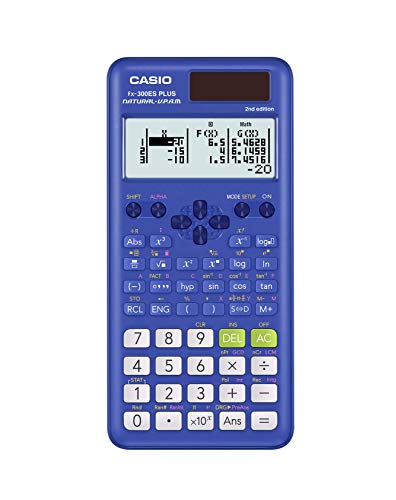
Not every economics student needs 540 functions. For introductory and intermediate courses, the Casio fx-300ES Plus 2nd Edition delivers exactly what you need at a price that won’t sting. With 262 built-in functions and the same Natural Textbook Display found in its more advanced siblings, it handles statistics, regression, fractions, and trigonometry without any fuss.
The build is compact and sturdy. It comes with a slide-on hard case that protects the keys and screen during transport, and the inside of that case includes a quick-reference guide for common mode changes and fraction conversions. That small detail makes a real difference for students who are still getting comfortable with scientific calculators.
Solar power with battery backup keeps it running reliably, and the lightweight frame (under 4 ounces) makes it easy to carry without adding bulk to your bag. We found the button layout approachable and well-spaced, comfortable for both smaller hands and larger ones.
What it doesn’t do is worth knowing. There’s no equation solver, no matrix operations, and no integration function. For a standard introductory economics or statistics course, none of that matters. But if your program moves into econometrics or advanced quantitative methods, you’ll want to consider the fx-115ES Plus instead.
Key Specs:
- Functions: 262
- Display: 2-line Natural Textbook Display
- Power: Solar with battery backup (1 LR44)
- Dimensions: 6.4″ x 3.1″
- Weight: 3.68 oz
- Natural Textbook Display at an accessible price
- Includes protective slide-on hard case
- Solar plus battery backup power
- Compact, lightweight, and exam-approved
- No matrix operations or equation solver
- Two-line display limits how much of a formula you can see at once
The fx-300ES Plus is a smart, honest choice for students who don’t need to overspend. That said, if your economics program leans heavily toward finance, the next calculator takes a completely different approach.
4. Texas Instruments BA II Plus: The Finance-Focused Specialist Every Economics Major Should Know

The Texas Instruments BA II Plus is in a category of its own. While the Casio calculators above excel as scientific tools, the BA II Plus is built specifically for financial and economic analysis. It’s the standard financial calculator approved for the CFA exam, the FRM exam, and the Certified Management Accountants exam, and it’s widely required in university finance and economics programs.
Where it shines is time-value-of-money calculations. Loan amortization, mortgage payments, pension analysis, annuities, bond valuations: all of these are handled through dedicated worksheet modes that walk you through each variable with a prompted display. That guided interface means you spend less time hunting through menus and more time working through problems.
Cash flow analysis is another area where this calculator truly earns its place. NPV and IRR calculations for uneven cash flows, the kind you encounter in capital budgeting and investment analysis, are built directly into its workflow. We found it handled even complex multi-period problems quickly and cleanly.
The one area where users need to exercise patience is the buttons themselves. They require a deliberate, firm press to register correctly, especially when entering data quickly during a timed exam. It’s worth practicing on problem sets so that your input rhythm is natural by exam day.
Key Specs:
- Display: 10-digit alphanumeric, 1-line
- Power: Battery (1 CR123A, included)
- Financial worksheets: Amortization, bond, depreciation, compound interest, cash flow
- Dimensions: 6.49″ x 2.99″
- Weight: 3.8 oz
- Approved for CFA, FRM, and CMA professional exams
- Dedicated TVM keys and financial worksheets
- NPV and IRR for uneven cash flows
- Prompted display guides you through each variable
- Buttons require firm, deliberate pressing
- Not a substitute for a scientific calculator (limited trig and statistical functions)
The BA II Plus is the right tool when your economics work is finance-heavy. If you’re looking for something with graphing capability at a lower price point, the final pick offers a different kind of value.
5. CATIGA CS-121: The Budget Graphing Option for Visual Learners

The CATIGA CS-121 takes a different position in this lineup. It’s a combination scientific and graphing calculator that lets you plot functions, analyze graphs, and solve equations, all on a single device. For economics students who want to visualize demand curves, supply functions, or regression outputs without spending on a premium graphing calculator, it presents an appealing entry point.
The 3-inch screen displays graphs and formulas simultaneously, which genuinely helps when you’re working through a problem and want to see the visual alongside the math. At 7 by 3.3 inches, it’s compact enough to fit in a backpack pocket, and the anti-drop body adds some reassurance for students who are hard on their gear.
Over 360 functions cover fractions, complex numbers, statistics, linear regression, and standard deviation, which handles the core needs of most introductory economics courses. Multiple angle, calculation, and display modes give it flexibility across different subject areas.
Where the CS-121 is more limited is in reliability and depth. The graphing functions work, but some users have reported inconsistencies in performance. It’s also worth confirming with your instructor whether it’s approved for your specific exams, since it’s a newer brand without the long track record of Casio or TI. For a casual learning environment or as a backup, it does its job. As a primary exam tool, it deserves a closer look before you commit.
Key Specs:
- Functions: 360+
- Display: 3-inch LCD, simultaneous graph and formula view
- Power: Battery
- Dimensions: 7″ x 3.3″
- Protective case: Included
- Graphing capability at a budget-friendly price
- Simultaneous graph and formula display
- Includes protective case
- Compact and ergonomic for extended use
- Graphing reliability has been inconsistent for some users
- Exam approval not universally confirmed
Best Calculators for Economics: A Quick Rundown
- Casio fx-115ES Plus 2nd Edition: Best overall for economics students, strong statistical and math functions at a great price
- Casio fx-991CW: Best for advanced coursework, highest function count with a standout display and persistent memory
- Casio fx-300ES Plus 2nd Edition: Best entry-level pick, affordable, reliable, and perfectly capable for introductory economics
- Texas Instruments BA II Plus: Best for finance-focused economics, the gold standard for TVM and cash flow analysis
- CATIGA CS-121: Best budget graphing option, simultaneous graph and formula display at the lowest price point
Final Thoughts
Choosing the right economics calculator comes down to understanding what your coursework actually demands. Statistical functions, display quality, exam approval, and financial tools are the factors that separate a good fit from a frustrating mismatch. A calculator with the right tools for your specific program will save you real time on every problem set and every exam.
Think carefully about where you are in your studies and where you’re headed. A student in an introductory macro course has different needs than someone preparing for the CFA. Pick the calculator that matches your actual workload today, while leaving room for where your economics path is taking you.