Fractions trip people up more than almost any other area of math. Whether you’re a student staring down a page of mixed numbers, a contractor trying to read a blueprint, or a homeowner planning a tile job, doing fraction math by hand is slow and easy to get wrong. A calculator built to handle fractions the right way makes all of that faster, more accurate, and a lot less frustrating.
This guide covers five calculators that each bring something different to the table. Some are built for the classroom. Some belong on a job site. One is specifically designed for young learners who are just getting started with fractions. We tested and researched each one carefully so you don’t have to guess your way through the options.
By the time you finish reading, you’ll know exactly which calculator fits your situation, your budget, and the type of fraction work you actually do. Let’s start with how we made our picks.
 How We Selected the Best Calculators for Fractions
We didn’t just scan a list of bestsellers and call it a day. Our team looked closely at how each calculator handles fraction input and output, what extra functions it brings, and whether it makes the experience easier or harder for the intended user.
Here are the key factors we evaluated:
- Fraction display quality: Does the calculator show fractions the way they appear on paper, or does it force you to read a confusing string of numbers?
- Ease of input: Can you enter feet, inches, and fractional dimensions quickly and naturally, without hunting through menus?
- Conversion capability: How well does it switch between improper fractions, mixed numbers, and decimals?
- Target audience fit: Is the calculator genuinely appropriate for the age group or profession it claims to serve?
- Build quality and portability: Does it hold up to real use, and can you take it where you need it?
- Power reliability: Does it use a sensible power source with good battery life, or will it leave you stranded mid-project?
- Value for money: Does what you pay match what you actually get?
Every pick on this list scored well across the factors most relevant to its category. You can trust these recommendations because they’re based on real-world use cases, not just spec sheets. Here’s a closer look at each one.
Best Calculators for Fractions (2026 Expert Review)
These five calculators represent the best options available right now across a range of use cases, from construction sites to middle school classrooms. Each review breaks down what the product actually does well and where it falls short.
1. Calculated Industries 4065 Construction Master Pro: The Professional’s Gold Standard for Dimensional Fraction Math

If you work in construction and you’ve never used a Construction Master Pro, you’re spending more time on math than you need to. This calculator has been the go-to tool for contractors, framers, remodelers, and estimators for over 30 years, and the Model 4065 is the version that earns that reputation today. It handles all the dimensional math a job site throws at you, in feet, inches, fractions, decimal feet, yards, and metric, including area and volume conversions.
The built-in functions go well beyond basic arithmetic. You get instant right-angle solutions, rafter calculations for hip, valley, and jack configurations, rake-wall layouts, slope and grade, stair layouts, arc and arch solutions, and material estimating for roofing, drywall, studs, concrete footings, and board-feet lumber. These aren’t generic math functions. They are purpose-built for people who build things.
We found the paperless tape feature genuinely useful. Being able to scroll back through the previous 20 entries to double-check your work saves real time on complex estimates. There are also four memory storage locations, and the calculator lets you define your own dimensional preferences. The auto shut-off kicks in after 8 to 12 minutes of non-use to preserve battery life.
The build is solid for job site conditions. It comes with an Armadillo Gear protective cover, two included LR-44 batteries, and a pocket reference guide in both English and Spanish. At 5.75 by 3 inches and 0.51 pounds, it fits in a tool bag without taking up real estate.
Key Specs:
- Calculator type: Construction/Building
- Screen size: 2.6 inches
- Power source: Battery (2 x LR-44, included)
- Dimensions: 5.75″L x 3″W
- Weight: 0.51 lbs
- Warranty: 1 year
- Works directly in feet-inch-fractions, decimal feet, yards, and metric
- Packed with job-site-specific functions for rafters, stairs, arcs, and material estimating
- Includes protective cover, batteries, and bilingual reference guide
- Alternate key functions have small print that can be hard to read
- Takes some time to learn the full range of functions
The Construction Master Pro is a serious tool built for serious work. If your fraction math happens on a job site, nothing on this list comes close to matching it. For students or homeowners who need something more general, the next option covers a lot of ground at a much lower price.
2. Texas Instruments TI-30XS MultiView: The Best All-Around Scientific Calculator for Students

The TI-30XS MultiView is one of the most widely recommended scientific calculators for students, and after taking a close look at it, it’s easy to see why. Its biggest strength is the MathPrint mode, which displays expressions exactly the way they appear in a textbook. Stacked fractions, exponents, and square roots all show up on screen in their natural form, not as a single compressed line of symbols.
The four-line display is what makes this possible. You can enter multiple calculations, see your expression and result at the same time, and scroll back through previous entries. That’s a practical advantage during long study sessions or timed exams, where catching a typo before you hit enter saves minutes. The toggle key lets you flip instantly between fraction and decimal forms, which is useful when a teacher asks you to show work in both formats.
This calculator covers general math, pre-algebra, algebra 1 and 2, geometry, statistics, science, biology, and chemistry. It handles one and two-variable statistics, step-by-step fraction simplification, and lets you explore x-y tables for functions. We found the button spacing and responsiveness to be genuinely comfortable for extended use, and the overall feel is sturdier than the price suggests.
It runs on both solar and battery power, which matters more than people realize. You won’t get caught off guard during an exam when the light in the room is poor, because the battery backup keeps it running regardless.
Key Specs:
- Display: 4-line, 16-character LCD
- Power source: Solar and battery
- Dimensions: 7.25″L x 3.38″W
- Weight: 8.19 oz
- Warranty: 1 year limited
- MathPrint mode shows fractions exactly as written in textbooks
- Toggle key for instant fraction-to-decimal conversion
- Approved for SAT, PSAT, MCAT, ACT, and professional licensing exams
- Solar and battery dual power
- Some functions require multiple keystrokes that take getting used to
The TI-30XS MultiView is the one to get if you’re a student who needs a reliable, exam-approved calculator that handles fractions clearly and naturally. For someone who does more hands-on home improvement work than schoolwork, the next pick offers a more focused approach.
3. Calculated Industries 8510 Home ProjectCalc: The Smarter Way to Plan Home Improvement Projects

The Home ProjectCalc is a specialty calculator built around one central promise: help you buy the right amount of material the first time. It’s aimed at homeowners, DIYers, and tradespeople who regularly deal with feet-inch-fraction measurements and need a faster way to plan material quantities and costs without pulling out a separate app or guessing.
You enter dimensions exactly the way you say them out loud. Four feet, six inches, and five-eighths of an inch goes in as four, feet, six, inch, five, slash, eight. That directness makes it comfortable to use in practice, where stopping to reformat your input breaks your momentum. From there, dedicated function keys let you calculate requirements for paint, wallpaper, tile, and concrete, plus total costs for each.
The 11 built-in tile sizes stand out as a particularly practical feature. You calculate your square footage, select your tile size, and compare quantity and cost across different options in seconds. That kind of direct comparison saves you from working it out on paper or pulling out a phone. We also appreciated the fractional resolution settings, which let you adjust precision from 1/2 inch all the way down to 1/64 inch, and the setting stays saved after you power off.
At 4.75 by 2.9 inches and 0.18 kilograms, this is a genuinely pocketable tool. The swing-around cover doubles as a holder for the included user’s guide, which you’ll actually want to read once to unlock everything it can do.
Key Specs:
- Calculator type: Building/DIY
- Screen size: 2.5 inches
- Power source: Battery (CR1620, included)
- Dimensions: 4.75″L x 2.9″W
- Warranty: 1 year limited
- Dedicated keys for paint, wallpaper, tile, and concrete estimating
- Adjustable fractional resolution from 1/2″ down to 1/64″
- Compact enough to fit in a pocket
- Does not convert inches to millimeters or centimeters directly
- Battery does not auto-shutoff, so manual power-off is required to preserve battery life
The Home ProjectCalc punches above its price for anyone who regularly buys building materials. It keeps you from coming home with too little tile or too much paint, which pays for itself quickly. If your fraction needs are more academic than practical, the next calculator is built with the classroom firmly in mind.
4. Casio fx-300MS Plus 2nd Edition: A Reliable, No-Nonsense Scientific Calculator for Everyday School Use

The Casio fx-300MS Plus 2nd Edition covers the fraction math that comes up in middle school, high school, and even early college courses without asking you to pay for features you don’t need. Its 2-line display shows both your input and your result at the same time, which reduces errors and helps you confirm your work at a glance.
Fraction handling here is clean and practical. You can enter fractions directly using the dedicated fraction key, convert between improper fractions, mixed numbers, and decimals, and store up to nine variables plus a last-answer recall. That’s more memory than most students will ever use, but it’s nice to have. The calculator also covers trigonometric and inverse functions, hyperbolic functions, logarithms, factorials, probability simulations, and two-variable statistics with regression analysis.
The physical build earns points for everyday durability. The included hard protective case snaps the cover around to the back during use, so it doesn’t get in the way, and it protects the screen when the calculator is in a bag or pocket. The keypad layout is familiar to anyone who has used a Casio before, and the solar-plus-battery dual power means you won’t burn through batteries sitting under a classroom lamp.
We found the display legible in most conditions, though the viewing angle matters more than usual here. Reading it straight on is sharp and clear. At an angle, the contrast drops, and a brighter backlight would help. That said, at this price, the fx-300MS Plus 2nd Edition delivers solid function with no real surprises.
Key Specs:
- Display: 2-line, 10-digit LCD
- Power source: Solar and battery (LR44, included)
- Compatible with: AP, SAT, PSAT/NMSQT, ACT exams
- Dimensions: 6.4″L x 3″W
- Warranty: 1 year limited
- Fraction key with easy conversion between mixed numbers, improper fractions, and decimals
- Dual solar and battery power
- Approved for major standardized tests
- Includes hard protective case
- Display contrast drops noticeably when viewed at an angle
The fx-300MS Plus 2nd Edition is a dependable everyday tool for students who need solid fraction capability without the complexity of a more advanced model. If the person using the calculator is younger and just starting to learn fractions, the final pick on this list takes a completely different approach.
5. Casio fx-55PLUS Fraction Calculator: The Best First Fraction Calculator for Young Learners
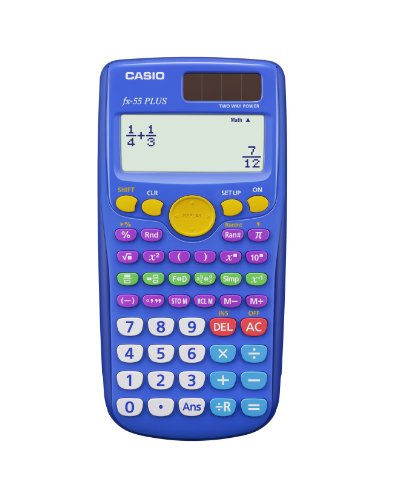
Most calculators treat fractions as one feature among many. The fx-55PLUS treats fractions as the whole point. It was built specifically for elementary and middle school students who are learning fraction concepts for the first time, and the design reflects that focus clearly. A dedicated row of green keys handles all fraction-related functions so young users don’t have to hunt through menus or guess which button to press.
The natural textbook display shows fractions, mixed numbers, and division with remainders exactly as they appear on a worksheet or in a textbook. That visual match between the calculator screen and the printed page helps students build genuine understanding rather than just getting an answer. Switching between improper fractions, mixed numbers, and decimals is a single function, not a multi-step process.
The colorful keypad is not just for looks. It groups related functions visually, which reduces confusion for students who are still building their calculator literacy. The display adjustable contrast is easy to set, which is a small but practical detail that makes the screen easier to read in different lighting. At 9.75 by 6.13 inches, this is one of the larger calculators on the list, with keys sized for smaller hands that are still developing motor precision.
We found it works just as well for adults who want a clean, dedicated fraction tool without the overhead of a full scientific calculator. For a wood shop, a quick home measurement check, or helping a child with homework, the fx-55PLUS handles fraction math in the clearest way possible.
Key Specs:
- Calculator type: Basic/Fraction-focused
- Display: Natural textbook display, LCD
- Power source: Battery (LR44)
- Dimensions: 9.75″L x 6.13″W
- Warranty: 1 year limited
- Dedicated green fraction keys make fraction functions instantly visible
- Natural textbook display shows fractions exactly as written
- Large keys sized for younger users
- Battery only, no solar backup
- Not suited for advanced scientific functions
Best Calculators for Fractions: A Quick Rundown
- Calculated Industries 4065 Construction Master Pro: Best for construction professionals who need full dimensional fraction math on the job site
- Texas Instruments TI-30XS MultiView: Best all-around scientific calculator for students, with exam approval and a four-line MathPrint display
- Calculated Industries 8510 Home ProjectCalc: Best for DIYers and homeowners who need fast material estimating in feet-inch-fractions
- Casio fx-300MS Plus 2nd Edition: Best budget-friendly scientific calculator for everyday school use with solid fraction conversion
- Casio fx-55PLUS: Best dedicated fraction calculator for elementary and middle school students learning fractions for the first time
Final Thoughts
The right fraction calculator comes down to what kind of fraction math you’re actually doing. Construction and renovation work calls for a dedicated building calculator with dimensional input and material estimating built in. Academic use benefits most from a calculator that displays fractions naturally, covers the required exam functions, and holds up through a full school year. For younger students, a focused tool that makes fractions feel less intimidating will do far more good than a feature-heavy device they don’t know how to use.
Think about where you’ll use it, who will be using it, and what level of complexity you actually need. Match those answers to the right tool on this list, and you’ll get accurate results, less frustration, and more confidence every time you pick it up.