Picking the right calculator for engineering coursework or professional use is not as simple as grabbing the first one you see on a shelf. The wrong choice can slow you down during exams, leave you without the functions you need, or just frustrate you every time you pick it up. You need something that handles the math without getting in your way.
Casio has been building scientific calculators for decades, and their lineup covers everything from budget-friendly basics to powerhouse models loaded with hundreds of functions. Whether you are a first-year student tackling algebra or an engineering professional working through complex calculus problems, there is a Casio built for where you are right now.
We tested and researched the top options across the Casio range to put together this guide. By the end, you will know exactly which model fits your needs, your budget, and the kind of work you do every day. Let’s start with how we made our picks.
 How We Selected the Best Casio Calculators for Engineering
Our team evaluated dozens of Casio models against real-world engineering and academic use cases. We looked beyond the spec sheet and focused on how each calculator actually performs under the kind of pressure students and professionals face daily.
Here are the key factors that guided our selection:
- Function count and depth: We assessed whether a calculator’s built-in functions genuinely cover engineering math, including calculus, matrices, statistics, and equation solving, not just basic trigonometry.
- Display quality: A clear, readable screen reduces input errors and speeds up workflows. We paid close attention to display type, resolution, and how well equations are presented.
- Ease of use: Menus and key layouts vary significantly across models. We favored calculators that do not require a manual every time you need a function.
- Power reliability: For exams and fieldwork, running out of power is not an option. Solar with battery backup was a strong advantage.
- Build quality and portability: Engineering students carry their calculators everywhere. Durability, weight, and a protective case all mattered in our evaluation.
- Exam approval: For students, a calculator that is not permitted in standardized tests is of limited value. We checked each model’s exam compatibility.
- Value for money: Price matters. We made sure each pick delivers real performance relative to what you pay.
Every calculator on this list passed our evaluation with high marks on the factors most relevant to engineering use. The following reviews reflect both our hands-on assessment and extensive research into real-world feedback.
Best Casio Calculators for Engineering (Expert Ranking & Review)
The five models below represent some of the strongest options in Casio’s lineup for engineering students and professionals. Each one has been chosen for a specific reason, and together they cover a wide range of needs and budgets.
1. Casio fx-991CW: The Most Powerful Non-Graphing Calculator You Can Buy

The Casio fx-991CW is Casio’s most advanced non-graphing scientific calculator, and it earns the top spot on this list with very little debate. With 540 built-in functions, it covers numeric integration and differentiation, 4×4 matrix operations, complex numbers, vector calculations, inequalities, and a spreadsheet-style data view. That is an enormous amount of capability packed into one device.
The high-resolution 4-tone LCD display is genuinely impressive for a non-graphing calculator. It shows expressions exactly as they appear in textbooks, fractions included, and the quad-tone shading makes cursor tracking easy when editing long expressions. We found that the screen significantly reduces the chance of misreading what you have typed.
The fx-991CW stores up to 9 variables with memory that persists between sessions, which is a thoughtful feature for engineers working through multi-step problems over time. It also gives you access to 47 constants and 40 unit conversions through its Math Catalog, plus QR code functionality to graph results on ClassPad.net when you need a visual.
Build-wise, the calculator has rounded keys that feel responsive and comes with a non-slip hard case. At 3.35 ounces and compact dimensions of 6.3″ x 3″, it is easy to carry to class or a job site without thinking twice about it.
Key Specs:
- Functions: 540+
- Display: High-resolution 4-tone LCD, 2.25 inches
- Power: Solar with LR44 battery backup
- Dimensions: 6.3″L x 3″W
- Weight: 3.35 oz
- 540+ functions cover virtually all engineering and science needs
- Persistent variable memory is a practical, exam-friendly feature
- High-res 4-tone display is among the best on any non-graphing calculator
- QR code feature extends graphing capability via smartphone
- Some functions are buried in menus, which creates a learning curve for new users
- Not universally approved for all exam boards (verify before your exam)
2. Casio fx-115ES Plus 2nd Edition: The FE Exam Favorite

If you are studying for the Fundamentals of Engineering exam, or really any engineering course that requires integration, derivatives, and equation solving, the fx-115ES Plus 2nd Edition should be near the top of your shortlist. It is approved for major standardized tests, packs over 280 functions, and operates on solar power with a battery backup, so power is one less thing to worry about.
The Natural Textbook Display on this model shows fractions, roots, and expressions exactly the way they appear in textbooks. For engineering students spending hours working through calculus and physics problems, that visual clarity genuinely speeds up your work and cuts down on costly input errors.
We were particularly impressed by the function range at this price point. The fx-115ES Plus handles complex number calculations, matrix and vector operations, linear regression, summation, polar-to-rectangular conversions, permutations and combinations, and more. It also has a Multi-Replay function that lets you backtrack through calculations, edit them, and recalculate step by step, which is a real time-saver during problem sets.
The calculator’s physical dimensions are 9″ x 5.5″ and it weighs 6.05 ounces, making it slightly larger than the fx-991CW but still portable. The 16-digit, 4-line LCD display gives you a wide view of your work, and the build feels solid and durable under regular daily use.
Key Specs:
- Functions: 280+
- Display: 16-digit, 4-line LCD, 6.5 cm
- Power: Solar Plus with LR44 battery backup
- Dimensions: 9″L x 5.5″W
- Weight: 6.05 oz
- Approved for FE exam, SAT, ACT, PSAT, and AP tests
- Multi-Replay function makes error-checking fast and easy
- Handles integrals, derivatives, matrices, and equation solving
- Exceptional value for the function count it delivers
- Slightly larger and heavier than other models on this list
- Button feel is functional but not as premium as some competitors
3. Casio fx-300ES Plus 2nd Edition: The Reliable All-Rounder for Everyday Engineering Math

The fx-300ES Plus 2nd Edition does not try to be everything to everyone. What it does instead is cover the functions most students and working engineers actually use every day, and it does so cleanly and affordably. With 262 built-in functions and a Natural Textbook Display, it handles fractions, trigonometry, logarithms, statistics, matrix operations, and equation solving without any fuss.
The build on this one deserves a mention. It comes with a sliding hard case that clips on firmly and includes a helpful quick-reference sticker inside the cover, a small touch that pays off when you need to switch modes in a hurry. The keys are well-spaced and responsive, and we found the overall layout intuitive once you spend a few minutes with it.
One thing that stands out about the fx-300ES Plus is how naturally it handles fraction and radical output. It automatically simplifies fractions and can display results in terms of pi when relevant, which is genuinely useful for any math-heavy engineering work. The display is two-line LCD, showing your input expression on one line and the result on another.
It runs on solar power with a battery backup, meaning you will almost never need to think about charging or replacing a battery. The calculator is approved for a wide range of exams, compact enough to slip into any bag pocket, and priced low enough that picking up a backup unit is not a hardship.
Key Specs:
- Functions: 262
- Display: 2-line LCD, 6.25 cm
- Power: Solar with LR44 battery backup
- Dimensions: 4.67″L x 2.76″W
- Weight: 0.35 lbs
- Auto-simplifies fractions and can display results in terms of pi
- Sliding hard case with built-in quick-reference guide
- Solar with battery backup for worry-free power
- Exam-approved and very competitively priced
- Only a 2-line display, so you see less of a long expression at once
- Does not support numeric integration or differentiation like higher-tier models
4. Casio fx-300MS Plus 2nd Edition: The No-Frills Workhorse for Core Engineering Functions

Not every engineering task requires 540 functions. Sometimes you just need a calculator that covers the fundamentals without any clutter, turns on instantly, and never lets you down. That is exactly what the fx-300MS Plus 2nd Edition is built for.
The dual-line, 10-digit LCD gives you a clear view of both your input and your result at the same time, which is a bigger deal than it sounds. Being able to see the expression you typed while reading the answer means you catch errors fast. The display also benefits from bold, high-contrast characters. One reviewer who regularly uses their calculator in varying lighting conditions specifically praised how legible this screen stays compared to competing models.
The function set here covers trigonometric and inverse hyperbolic functions, factorials, logarithms, probability simulations, two-variable statistics, standard deviation, regression analysis, and full fraction support with conversion between improper fractions, mixed numbers, and decimals. There is also storage for up to 9 variables. For high school through early college-level engineering coursework, this covers the vast majority of what you will face.
Where the fx-300MS Plus really pulls ahead is build quality relative to price. The slim, durable plastic body includes a hard protective case, the ergonomic key layout feels natural in hand, and the solar-plus-battery power system means it will work in any lighting condition. At its price point, it is one of the most trustworthy daily-carry calculators on this list.
Key Specs:
- Display: 2-line, 10-digit LCD, 3 inches
- Power: Solar with LR44 battery backup
- Dimensions: 6.4″L x 3″W
- Weight: 4.8 oz
- Variable storage: 9 variables
- Bold, high-contrast display that reads well in varied lighting
- Covers trig, stats, fractions, and logarithms for core engineering work
- Slim, durable build with a hard protective case included
- Very affordable entry point for a reliable scientific calculator
- No natural textbook display, so fractions appear in linear format
- Function count is lower than other models on this list
5. Casio fx-260 Solar II: The Ultra-Portable Entry Point That Punches Above Its Price
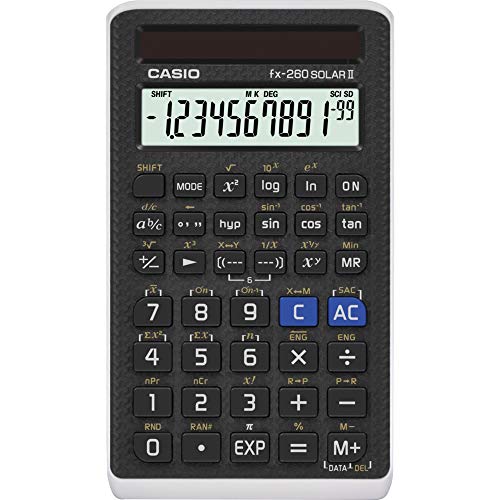
At under ten dollars, the Casio fx-260 Solar II should not work as well as it does. Yet here it is, earning a place on a list of best engineering calculators by doing exactly what it promises: delivering reliable scientific functionality in the most compact, lightest form Casio makes.
This is Casio’s smallest scientific calculator, with a 2.25-inch, 10-digit single-line display and a body small enough to slide fully into a shirt pocket. Despite its size, it handles trigonometric and inverse trig functions, permutations, combinations, factorials, polar-to-rectangular conversions, standard deviation, and logarithms. That is a solid toolkit for foundational engineering and science coursework.
The pure solar power setup is worth talking about. In any normal lighting environment, this calculator runs entirely on light with no battery required. That means no scrambling for a replacement battery before an exam, no dead device in your bag, and no ongoing supply cost. There is a backup battery for low-light conditions, so you are covered either way.
We found the fx-260 Solar II to be an excellent backup calculator, a go-to option for students on a strict budget, and a reliable companion for professionals who need a secondary device for quick field calculations. The sliding hard case protects it in a bag or pocket, and the key layout is classic Casio with well-labeled, easy-to-press buttons. For what it costs, the value is hard to argue with.
Key Specs:
- Display: 10-digit single-line LCD, 2.25 inches
- Power: Solar (primary), 2 AA batteries (backup)
- Dimensions: 5″L x 2.9″W
- Weight: 9 grams
- Casio’s smallest scientific calculator, extremely portable
- Runs entirely on solar power in normal lighting
- Approved for AP, SAT, PSAT, ACT, and NMSQT exams
- Exceptional value for the function range it provides
- Single-line display limits visibility of complex expressions
- No natural textbook display or advanced functions like integration
Best Casio Calculators for Engineering: A Quick Rundown
- Casio fx-991CW: Best overall, with the deepest function set of any non-graphing calculator in the lineup
- Casio fx-115ES Plus 2nd Edition: Best for the FE exam and advanced engineering coursework, with proven exam approval
- Casio fx-300ES Plus 2nd Edition: Best all-rounder for everyday engineering math with a clean natural display and great build
- Casio fx-300MS Plus 2nd Edition: Best no-frills workhorse for core scientific functions at a budget-friendly price
- Casio fx-260 Solar II: Best for portability and value, the most compact option with solid foundational functions
Final Thoughts
Choosing the right engineering calculator comes down to matching the tool to the task. If you are deep in calculus, working with matrices, or preparing for a major engineering exam, investing in a model with a higher function count and a more advanced display will pay off in saved time and fewer errors. If your needs are more straightforward, a simpler model that covers the fundamentals reliably and affordably is often the smarter buy.
Every calculator on this list is a genuine Casio, which means you are getting dependable build quality, solid power management, and a company with a long track record in academic and professional settings. Take an honest look at what your courses or your work actually require, set your budget, and pick the model that meets those two things squarely. The right calculator is one you never have to think about. It just works.