Differential equations have a way of separating the students who are just getting by from the ones who truly understand what’s happening. The math is demanding, and the wrong calculator can make an already tough subject feel impossible. The right one, on the other hand, can turn a confusing system of equations into something you can actually work through with confidence.
We put together this guide after carefully researching the top graphing calculators available today, focusing specifically on what matters most when you’re dealing with ODEs, slope fields, numerical solvers, and everything that comes with a differential equations course. Whether you’re a high school student stepping into AP Calculus or an engineering junior buried in second-order equations, there’s a calculator on this list built for your situation.
Each pick was chosen based on real capabilities, not just marketing promises. By the end of this article, you’ll know exactly which calculator fits your level, your budget, and your coursework.
 How We Selected the Best Calculators for Differential Equations
Our evaluation started with a clear question: which of these calculators can genuinely hold its own when the math gets hard? We looked at over a dozen models before narrowing the list to five, comparing them across the features that actually matter in a differential equations course.
- CAS capability: Whether the calculator can manipulate symbolic expressions, not just crunch numbers, matters a lot when you’re solving equations analytically.
- Graphing quality: Resolution, color, and the ability to plot multiple functions clearly are all critical for visualizing solution curves and phase portraits.
- Processing speed: Slow calculators become a real liability during timed exams. We favored models that keep up without lag.
- Exam approval: Every pick on this list is cleared for use on the SAT, ACT, AP, or IB exams, so you’re not stuck buying a second calculator for test day.
- Ease of navigation: A calculator packed with features is useless if you can’t find what you need under pressure. Intuitive menus matter.
- Memory and storage: Storing programs, functions, and data sets is a real advantage in higher-level courses.
- Value for money: We weighed what each calculator delivers against what it costs, so every pick earns its price tag.
These aren’t just boxes we checked on a spreadsheet. They reflect what students and engineers actually run into when working through real coursework. The five calculators below came out on top across all of them.
Best Calculators for Differential Equations (2026 Expert Review)
The lineup below covers everything from flagship CAS powerhouses to budget-friendly workhorses that still hold their own in college math. Here’s a close look at each one.
1. HP Prime G2: The Fastest, Most Powerful Graphing Calculator You Can Bring to an Exam
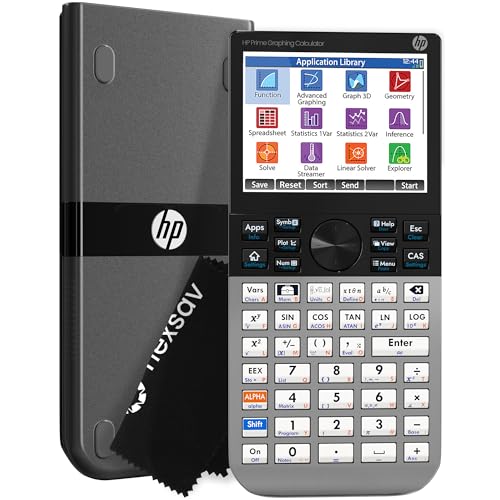
The HP Prime G2 is the calculator you reach for when you want raw power without compromise. It runs a full Computer Algebra System, meaning it can solve differential equations symbolically, not just numerically. That distinction matters enormously when your professor wants exact answers, not decimal approximations.
The 3.5-inch multi-touch color display is one of the best screens on any handheld calculator you’ll find today. Pinch-to-zoom works exactly the way you’d expect, and the ability to sketch and manipulate functions directly on the graph surface makes exploring solution behavior genuinely intuitive. For visualizing the behavior of systems of equations, this screen is in a class by itself.
Build quality is a genuine highlight here. The brushed metal faceplate gives the Prime a dense, solid feel that stands apart from the all-plastic competition. At 7.25 by 3.66 inches, it sits well in your hand and fits easily into a backpack. The slide-on cover protects the screen between classes.
We found the Prime’s ability to switch instantly between symbolic, graphical, and numerical views with dedicated keys to be a standout feature. When you’re working a differential equation and want to cross-check the graph against your analytical solution, that three-view switching feels like a superpower. The rechargeable lithium-ion battery and 256MB of flash memory round out a package that genuinely earns its place at the top of this list.
Key Specs:
- Display: 3.5-inch multi-touch color LCD
- Memory: 256MB flash
- CAS: Yes
- Power: Rechargeable lithium-ion battery
- Exam approval: SAT, PSAT, AP, IB
- Dimensions: 7.25″ x 3.66″
- Full CAS for symbolic differential equation solving
- Multi-touch color screen with pinch-to-zoom
- Brushed metal build feels premium and durable
- Rechargeable battery with no need for replacements
- Steeper learning curve for advanced features
- Micro-USB charging port feels dated
2. Texas Instruments TI-Nspire CX II CAS: The All-Around Favorite for STEM Students

If the HP Prime is a sports car, the TI-Nspire CX II CAS is a reliable, well-engineered sedan that handles everything you throw at it. It carries a full CAS engine and plots solution curves in real time with its animated path plot feature, which is genuinely useful when you want to see how a differential equation’s solutions evolve as parameters change.
The 320 x 240 pixel color screen at 125 DPI delivers crisp, readable graphs even when you’re plotting multiple functions simultaneously. Six different graph styles and 15 colors let you keep your solution curves organized and visually distinct. For a student juggling a system of differential equations, that level of visual clarity makes a real difference.
One feature we kept returning to is the dynamic coefficient slider. You can adjust a parameter in your equation and watch the graph respond in real time. That kind of instant visual feedback is exactly what you want when exploring how initial conditions affect the behavior of a differential equation.
The included TI-Nspire CX Student Software for PC and Mac extends the calculator’s functionality to your computer, which is a genuine bonus for homework. The rechargeable battery can last up to two weeks on a single charge, and the touchpad navigation feels natural after a short adjustment period. It’s exam-approved and widely accepted by professors across engineering and science programs.
Key Specs:
- Display: 320 x 240 pixels, 3.5-inch color screen
- CAS: Yes
- Power: Rechargeable battery (up to 2 weeks)
- Graph styles: 6, with 15 color options
- Exam approval: SAT, ACT, AP, IB
- Dimensions: 7.59″ x 3.62″
- Dynamic sliders for real-time equation exploration
- Animated path plotting for solution curve visualization
- Includes student software for PC and Mac
- Outstanding battery life
- Student software not compatible with Chromebooks
- Touchpad can feel overly sensitive initially
3. Casio fx-9750GIII: The Best Value Pick That Still Handles the Hard Stuff

Spending over $140 on a calculator isn’t in everyone’s budget, and the Casio fx-9750GIII makes a strong case for not having to. At a fraction of the price of the CAS options above, it handles integration, probability distributions, statistics, vectors, and graph plotting across a genuinely wide range of math and science applications.
This calculator doesn’t include a CAS engine, and that’s worth knowing upfront. What it does have is a Natural Textbook Display that shows expressions the way you’d write them on paper, which makes entering and reading differential equation terms much less error-prone. For courses where numerical methods and graphical analysis are the focus rather than symbolic manipulation, the 9750GIII gets the job done.
The Python integration is a feature that sets this model apart from everything else at this price. You can write and run MicroPython scripts directly on the calculator, or transfer programs to and from a PC via the included USB cable. For students in engineering courses who need to automate repetitive calculations, that’s a meaningful advantage.
We were impressed by how well the 9750GIII handles complex numbers and matrices, areas where it punches well above its price point. At 6.6 by 3.25 inches and just 7.5 ounces, it’s also one of the more comfortable calculators to hold for extended sessions. The 3MB of flash memory and 4 AAA batteries keep things practical and portable.
Key Specs:
- Display: Natural Textbook Display, LCD
- Memory: 3MB flash
- CAS: No
- Power: 4 AAA batteries
- Python: MicroPython support
- Exam approval: SAT, ACT, AP, IB
- Dimensions: 6.6″ x 3.25″
- Strong complex number and matrix handling for the price
- MicroPython programmability
- Natural Textbook Display reduces input errors
- Exam-approved across major standardized tests
- No CAS support
- Display lacks backlighting
4. Texas Instruments TI-83 Plus: The Classroom Staple That Still Gets the Job Done

The TI-83 Plus has been a fixture in math classrooms for decades, and it’s still here for a reason. It’s not flashy, it doesn’t have a color screen, and it has no CAS. What it does have is a rock-solid reputation for reliability, near-universal acceptance in classrooms and on standardized exams, and a straightforward interface that most students already know how to use.
For differential equations work, the TI-83 Plus handles graphing, table tracing, and numerical analysis. The 64 x 96 pixel screen displays equations and their graphs clearly enough for coursework, and the split-screen mode lets you view a graph and its corresponding table of values at the same time. That’s a practical feature when you’re analyzing solution behavior numerically.
The calculator runs on four AAA batteries with a lithium backup, so you’re never hunting for a special charging cable before an exam. It stores up to 10 matrices and lists with up to 999 elements, which covers most linear algebra and differential equations work at the introductory level. Its Flash ROM also supports downloadable apps, including tools for statistics, finance, and data collection.
What we appreciate most about the TI-83 Plus is the low barrier to getting started. Most professors teach with it in mind, online tutorials are everywhere, and the keypad layout is intuitive from day one. It’s the safest recommendation for a student who needs a dependable tool without any learning curve overhead.
Key Specs:
- Display: 64 x 96 pixels, monochrome LCD
- RAM: 24KB
- Flash ROM: 160KB
- Power: 4 AAA batteries plus lithium backup
- CAS: No
- Exam approval: SAT, PSAT, ACT, AP, IB
- Universally recognized and accepted in classrooms
- No charging needed, standard AAA batteries
- Split-screen graph and table view
- Monochrome display with limited resolution
- No CAS or color graphing
5. CATIGA CS-121: The Budget Backup That Covers Basic Coursework

Not everyone needs a $140 calculator, especially for introductory courses where the depth of computation is still manageable. The CATIGA CS-121 steps in as the most affordable option on this list, and for students taking their first differential equations course or needing a backup device, it delivers reasonable capability at a very accessible price.
The CS-121 covers over 360 functions including fractions, complex numbers, statistics, linear regression, and variable solving. The 3-inch screen simultaneously displays graphs and formulas, which helps when you need to check your equation against its graphical output. It measures 7.12 by 4.5 inches and weighs only 4.8 ounces, making it light enough to carry anywhere without a second thought.
The anti-drop body is a practical feature for students who are hard on their gear. It also ships with a protective case to keep the screen and buttons safe in a backpack. Multiple modes cover angle measurement, calculation, and display formats, giving you flexibility across different types of problems.
We want to be honest about where this calculator fits. It’s a competent tool for algebra, basic calculus, and introductory differential equations coursework. Advanced symbolic solving and high-resolution graphing are not its strengths. For students in upper-level engineering programs, one of the higher-tier options on this list will serve better. But as an entry-level or backup calculator, the CS-121 represents solid value.
Key Specs:
- Display: 3-inch LCD
- Functions: 360+
- Power Source: LR44 battery (included)
- CAS: No
- Dimensions: 7.12″ x 4.5″
- Weight: 4.8 oz
- Very affordable entry-level price
- Lightweight with anti-drop body and included case
- Covers 360+ functions for basic coursework
- Graphing capabilities have known reliability issues
- Not suitable for advanced symbolic or CAS-level work
Best Calculators for Differential Equations: A Quick Rundown
- HP Prime G2: Best overall for power and CAS capability
- TI-Nspire CX II CAS: Best for STEM students who want top-tier graphing with dynamic features
- Casio fx-9750GIII: Best value for money with Python support and solid complex math handling
- TI-83 Plus: Best for classroom compatibility and ease of use out of the box
- CATIGA CS-121: Best budget option for introductory coursework
Final Thoughts
Differential equations demand a calculator that can keep up, and as this list shows, the right pick depends entirely on what level of coursework you’re tackling. CAS capability is the deciding factor if you’re working through second-order or systems-level equations that require symbolic solutions. If numerical methods and graphing are the core of your work, you have more flexibility on price without sacrificing what actually matters in the classroom.
Pick based on your course requirements first, your budget second, and your comfort with the interface third. A calculator that’s technically impressive but takes too long to navigate under exam pressure won’t serve you as well as a simpler one you can operate fluently. Any of the options on this list, matched to the right student, will help you get through your differential equations course with confidence.