Living with dyscalculia means numbers don’t always behave the way you need them to. Sequences get jumbled, place values slip out of order, and a standard calculator with tiny buttons and a crowded display can make things worse instead of better. You deserve a tool that works with your brain, not against it.
The right calculator can genuinely change how you experience math. A clear display, intuitive layout, and visual feedback can turn a frustrating exercise into something manageable, and for some people, even confidence-building. That’s why this guide exists.
We tested and researched five calculators that offer real practical value for people with dyscalculia, whether you’re a student in middle school, working through high school coursework, or an adult who just needs a reliable daily math tool. By the end, you’ll know exactly which one fits your situation.
 How We Selected the Best Calculators for Dyscalculia
Our team started by identifying what actually makes a calculator accessible for someone with dyscalculia, rather than just shopping for the most popular models. We looked at real-world usability, how expressions are displayed, and how much mental load each device places on the user before settling on our final five picks.
Here are the factors we weighed most heavily:
- Display clarity: Whether the screen shows numbers and expressions in a way that’s easy to read and hard to misread, especially fractions and multi-step equations.
- Natural textbook format: Calculators that show math the same way it appears on paper reduce the translation effort that trips up many people with dyscalculia.
- Key layout and labeling: Clearly labeled, well-spaced keys minimize input errors and reduce visual overwhelm.
- Fraction handling: Since dyscalculia often makes fractions especially tricky, we paid close attention to how each calculator manages fraction entry, simplification, and conversion.
- Portability: A calculator you’ll actually carry and use is more valuable than one that stays home.
- Build quality: Durability matters for everyday users who may be relying on their calculator heavily across school years.
- Value for money: We considered whether each calculator justifies its price for the features it delivers to this specific audience.
Every pick on this list earned its place by performing well across these criteria. The reviews below reflect honest findings from our hands-on evaluation process.
Best Calculators for Dyscalculia (2026 Expert Review)
Five calculators made our final list, ranging from a fraction-focused elementary tool to a full graphing powerhouse. Whether you need something simple and approachable or a calculator that can carry you from pre-algebra all the way to AP Statistics, there’s an option here for you.
1. Casio fx-55PLUS: The Fraction Specialist That Builds Real Confidence
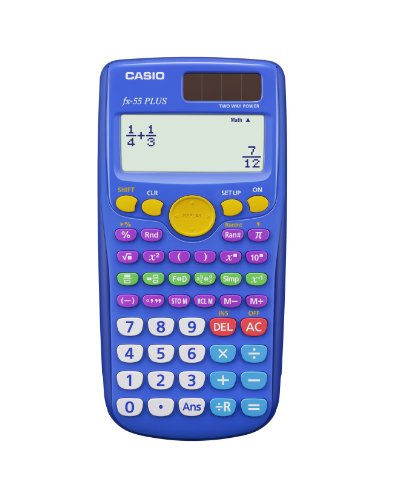
For younger students or anyone who struggles most with fractions, the Casio fx-55PLUS is in a category of its own. Its entire design philosophy is built around making fractions less intimidating, and it delivers on that promise in ways that go well beyond what a standard calculator offers.
The colorful keypad is one of the first things you’ll notice. A dedicated row of green keys handles fraction operations exclusively, which means you never have to hunt through menus or remember awkward key combinations to work with fractions. That kind of visual organization is a genuine asset for someone with dyscalculia.
The Natural Textbook Display shows fractions, mixed numbers, and division with remainders exactly as they appear in a printed math textbook. This matters more than it sounds. When your calculator shows math the same way your worksheet does, the mental load drops significantly.
We found the fx-55PLUS particularly strong at fraction simplification and conversion, letting you switch between improper fractions, mixed numbers, and decimals with minimal steps. It’s also easy enough to use that a 66-year-old reviewing the product called it immediately intuitive, which tells you a lot about how well the key labeling is done.
Key Specs:
- Calculator type: Basic/Fraction
- Display: Natural Textbook Display, LCD
- Power: Battery (1 LR44 included)
- Dimensions: 9.75″ L x 6.13″ W
- Warranty: 1 year limited
- Dedicated fraction keys reduce menu hunting
- Natural Textbook Display matches how fractions look on paper
- Colorful, clearly labeled keypad is approachable for younger learners
- Limited to elementary and middle school math level
- No solar backup power option
2. Casio fx-300ES Plus 2nd Edition: The Everyday Workhorse for Middle and High Schoolers
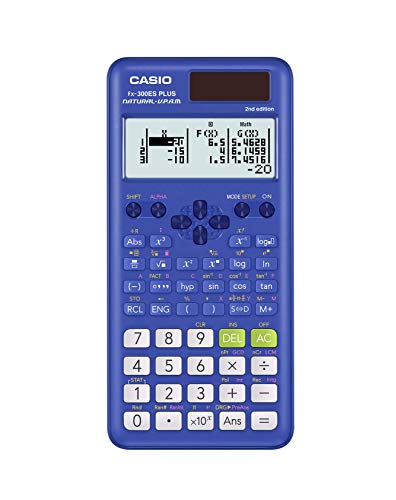
The fx-300ES Plus 2nd Edition is a scientific calculator that punches above its weight class. At its price point, it covers a remarkable range of math functions without making the experience feel crowded or confusing. For a student with dyscalculia who needs to move beyond basic fractions into algebra and trigonometry, this is a strong first serious calculator.
The Natural Textbook Display here does the same job it does on the fx-55PLUS, but across a broader range of expressions. Fractions display as stacked fractions. Results can be shown in terms of pi. Square roots stay as radicals until you choose to convert them. All of this reduces the need to translate calculator output back into recognizable math, which is a real cognitive win.
With 262 built-in functions, this calculator covers everything from basic arithmetic through statistics, regression analysis, and trigonometry. That’s a wide range without feeling overwhelming because the key layout is logical and the labels are easy to read at a glance.
One practical advantage we appreciated: this calculator runs on Solar Plus technology with a battery backup. You never have to worry about it dying before an exam. No charging, no scrambling for cables, just a calculator that’s ready when you are.
Key Specs:
- Calculator type: Scientific
- Functions: 262
- Display: Natural Textbook Display, 2-line LCD
- Power: Solar with battery backup (1 LR44 included)
- Dimensions: 6.4″ L x 3.1″ W
- Warranty: 1 year limited
- Solar power with battery backup means it never dies unexpectedly
- Natural Textbook Display reduces the need to mentally translate output
- 262 functions cover middle school through early college math
- No graphing capability
- Two-line display may feel limited for longer expressions
3. IPepul Scientific Calculator with Notepad: The Multi-Tasker for Note-Dependent Learners

People with dyscalculia often rely heavily on written notes to keep track of where they are in a multi-step problem. The IPepul Scientific Calculator addresses this directly with an integrated LCD writing tablet built right into the device. It’s a genuinely practical feature, not a gimmick.
The setup is simple: one side is a 10-digit scientific calculator, and the other is a reusable writing pad with a stylus. You can jot down intermediate steps, circle numbers you need to remember, or sketch out a problem while you calculate. When you’re done, one button press clears the board completely. For someone who loses their place in long calculations, this combination is worth the modest price.
The calculator itself covers algebra, basic trigonometry, and standard scientific functions well. The buttons are responsive and comfortable to press, and at just 120 grams it’s light enough to drop into a bag pocket without thinking about it.
One honest note: the notepad’s writing visibility is lighter than the product photos suggest. Some find the lines easy enough to work with once they adjust, but if bold, high-contrast writing is important to you, it’s worth keeping that in mind. The calculator portion itself performs reliably and that remains the core value here.
Key Specs:
- Calculator type: Scientific
- Display: 10-digit LCD
- Notepad: Reusable LCD writing tablet with stylus
- Power: Battery (2 lithium button cells included)
- Weight: 120g
- Dimensions: 6.5″ L x 3.27″ W
- Built-in reusable notepad supports multi-step working
- Lightweight and compact for everyday carry
- Responsive buttons with a clear, readable screen
- Notepad writing visibility is lighter than advertised photos imply
4. CATIGA CS-121 Scientific and Graphing Calculator: The Visual Thinker’s Budget Option

For students who benefit from seeing math graphically, the CATIGA CS-121 offers graphing capability at a price that doesn’t force a difficult budget decision. If watching a function take shape on a screen helps you understand what an equation actually means, this calculator earns serious consideration.
The CS-121 packs over 360 functions into a 7 x 3.3 inch body that fits comfortably in one hand. It handles fractions, complex numbers, statistics, linear regression, standard deviation, and variable solving, giving it a functional range that covers most high school and early college coursework. The 3-inch screen displays graphs and formulas simultaneously, which is genuinely useful for making sense of how an equation connects to its visual output.
The build includes an anti-drop body and comes with a protective case for the screen and buttons. For a student carrying their calculator in and out of a backpack daily, that physical durability consideration matters.
We’d be doing you a disservice if we didn’t acknowledge that some buyers have reported mixed experiences with the graphing functions specifically. For standard scientific calculations, performance is consistently solid. But if graphing is your primary reason for buying, it’s worth being aware that the graphing capability isn’t as polished as a dedicated graphing calculator from an established brand. For everyday algebraic and scientific work, though, it delivers real value at its price point.
Key Specs:
- Calculator type: Scientific/Graphing
- Functions: 360+
- Screen size: 3 inches
- Power: Battery powered
- Dimensions: 7″ L x 3.3″ W
- Warranty: 365 days
- Displays graphs and formulas simultaneously
- 360+ functions for broad academic coverage
- Includes protective case
- Graphing functions receive mixed performance feedback
- No solar power option
5. Casio fx-9750GIII: The Full-Featured Graphing Calculator for Serious Students

The Casio fx-9750GIII is the most capable calculator on this list, and it earns that position through a combination of display quality, function depth, and real-world exam approval that the others can’t match. For a high school or college student with dyscalculia who needs a long-term investment, this is the one to consider.
The 12.8-centimeter Natural Textbook Display is the largest and clearest on this list. Expressions appear exactly as they would in a printed textbook, which directly reduces the chance of misreading a value or losing your place in a complex equation. For someone with dyscalculia, that visual accuracy is worth a lot.
Graph plotting, vectors, probability distributions, spreadsheets, and integral calculations are all supported, making this a calculator that grows with you from pre-algebra through AP Calculus and AP Statistics. It’s approved for use in AP, SAT, ACT, and IB exams, so you can practice with it and then use the exact same device in the exam room.
Python programming via MicroPython is built in, which is a bonus for anyone moving into STEM coursework. USB connectivity lets you save and transfer programs to a computer. The 3MB of flash memory means you’re not constantly managing storage. One fair criticism: the keys have a slightly mushy feel without a sharp tactile click, which some users notice during extended sessions. That said, the overall performance and display quality make this the strongest all-around pick on the list.
Key Specs:
- Calculator type: Graphing
- Display: Natural Textbook Display, 12.8cm LCD
- Memory: 3MB flash
- Power: Battery (4 AAA included)
- Connectivity: USB
- Dimensions: 6.6″ L x 3.25″ W
- Warranty: 1 year limited
- Largest, clearest Natural Textbook Display on this list
- Exam-approved for AP, SAT, ACT, and IB
- Python programming and USB connectivity for STEM students
- 3MB flash memory with broad function support
- Keys have a soft, mushy feel without sharp tactile feedback
Best Calculators for Dyscalculia: A Quick Rundown
- Casio fx-55PLUS: Best for young learners focused on fractions
- Casio fx-300ES Plus 2nd Edition: Best everyday scientific calculator for middle and high school
- IPepul Scientific Calculator with Notepad: Best for students who rely on written working notes
- CATIGA CS-121: Best budget option with graphing capability
- Casio fx-9750GIII: Best full-featured graphing calculator for advanced coursework
Final Thoughts
The most important thing a calculator can do for someone with dyscalculia is reduce the number of mental steps required between the problem and the answer. Natural Textbook Display, dedicated function keys, clear labeling, and visual output through graphing are the features that make the biggest practical difference. Those are the qualities worth prioritizing above everything else.
Your best pick comes down to where you are in your math journey and what kind of support you need most. A young student building fraction confidence needs something entirely different from a college student preparing for standardized exams. Start with what your current coursework demands, trust your instincts about what feels usable to you, and know that the right calculator really can make numbers feel less like a battle.