Business calculus is no walk in the park. Between limits, derivatives, integrals, and statistical analysis, the course demands a calculator that can keep up with you, not slow you down. The wrong tool can cost you time on exams and leave you fumbling through menus when you should be solving problems.
That’s why picking the right calculator matters more than most students think. Whether you’re a freshman stepping into your first calculus course or a working professional going back to sharpen your math skills, your calculator should feel like an extension of your thinking. This guide covers five of the best options available right now, across a range of budgets and use cases.
Each pick here was chosen with the business calculus student specifically in mind: someone who needs reliable graphing, solid statistical tools, financial functions, and exam approval all in one device. Read on, and you’ll walk away knowing exactly which calculator fits your situation.
 How We Selected the Best Calculators for Business Calculus
Our team spent considerable time comparing calculators across performance, function depth, usability, and real-world classroom fit. We didn’t just look at spec sheets. We evaluated how each device handles the kinds of tasks that come up repeatedly in business calculus courses, from plotting cost functions to computing definite integrals under time pressure.
Here’s what guided our evaluation:
- Function coverage: Does it handle derivatives, integrals, statistics, matrices, and financial calculations without missing anything essential for business calculus?
- Exam eligibility: Is it approved for use on standardized tests like the SAT, ACT, AP, and IB exams where applicable?
- Display quality: Can you read equations and graphs clearly without squinting, and does the screen show enough information at once?
- Ease of use: How quickly can a new user find key functions, and how steep is the learning curve for someone unfamiliar with the interface?
- Build quality: Does the device feel sturdy enough for daily use, and are the keys responsive and well-placed?
- Value for money: Does the price reflect what you’re actually getting in terms of capability and durability?
- Power reliability: Is the battery life dependable enough to last through long study sessions and exams without a surprise shutdown?
Every calculator on this list earned its place because it delivered on most of these factors in a meaningful way. Some are better suited for students who want full-featured graphing power. Others are built for those who need solid scientific functions at a fraction of the cost. The individual reviews below will help you match the right option to your specific needs.
Best Calculators for Business Calculus (Expert Ranking & Review)
The five calculators below range from budget-friendly scientific models to premium graphing powerhouses. Each one brings something distinct to the table, so there’s no single “right” answer for everyone. Here’s our honest breakdown of each.
1. TI-Nspire CX II: The Premium All-Rounder That Does It All

The Texas Instruments TI-Nspire CX II is the closest thing to a complete math workstation you can carry in a backpack. It handles everything business calculus throws at you, from graphing cost and revenue functions in real time to performing statistical regression and data analysis, all in a single device with a vivid color display.
What separates this from most graphing calculators is the document-based operating system. You can organize your work into labeled pages, share variables across different sections of a problem, and save everything for later review. For business calculus students managing multiple topics at once, that structure is genuinely useful.
The 2.83-inch color LCD screen makes a real difference when you’re comparing multiple graphs or interpreting data visually. Color-coded screen tabs and updated app icons improve navigation, and the animated path plot feature lets you watch function graphs draw themselves in real time, which helps build intuition around curve behavior.
We also found the Python and TI-Basic programming support to be a notable bonus for STEM-oriented students. The rechargeable battery lasts for days between charges, the device includes companion software for PC and Mac, and it is approved for use on the SAT, ACT, AP, and IB exams. The learning curve is real for newcomers, but the payoff is a device that stays useful well past a single course.
Key Specs:
- Display: 2.83-inch color LCD
- Power: Rechargeable battery
- Exam approved: SAT, ACT, AP, IB
- Software included: PC/Mac student software
- Programming: Python and TI-Basic
- Full-color display with excellent graph clarity
- Document system keeps work organized across sessions
- Rechargeable battery with strong longevity
- Approved for major standardized exams
- Steeper learning curve than most calculators in this category
- Higher price point than the other options on this list
2. Texas Instruments TI-83 Plus: The Classroom Staple That Still Delivers

Few calculators have held their ground in academic settings as long as the TI-83 Plus. It has been a fixture in high school and college math courses for decades, and for good reason: it covers the essential functions for business calculus reliably and without any unnecessary complexity.
The TI-83 Plus graphs up to 10 functions simultaneously and displays them alongside their tables on a split screen, which is handy when you’re checking the relationship between a function and its values. It handles matrices, statistical plots (scatter, histogram, box-and-whisker, and more), regression analysis, and financial functions including TVM and cash flow calculations.
The 3-inch, 64 x 96-pixel LCD screen is clear enough for everyday coursework, and the key layout is intuitive once you’ve spent a few sessions with it. You can view an equation, its graph, and coordinate values all at the same time, which helps connect the algebra to the visual without switching screens.
One of its strongest practical advantages is widespread familiarity. Most professors and tutors know this device inside and out, which makes getting help much easier. The 160KB Flash ROM allows for upgradeable software, and compatibility with TI-84 Plus models means resources and programs are easy to find. It runs on standard batteries and ships with a hard slide cover for protection.
Key Specs:
- Display: 3-inch LCD, 64 x 96 pixels
- RAM: 24KB
- Flash ROM: 160KB
- Power: 4 AAA + 1 lithium backup
- Exam approved: SAT, PSAT, ACT, AP, IB, Praxis
- Widely accepted in classrooms and on exams
- Split screen shows graphs and tables simultaneously
- Familiar interface with strong tutorial support online
- Compatible with TI-84 Plus programs and apps
- Monochrome display, no color differentiation between graphs
- Older processor feels slower compared to newer models
3. RENUS 8-Pack Scientific Calculator: The Budget-Friendly Classroom Pick
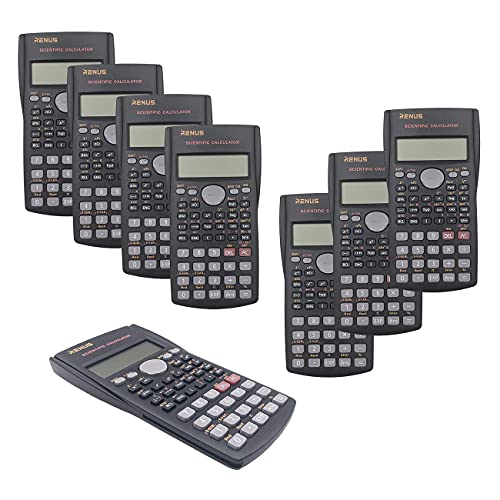
Not every business calculus student needs a graphing calculator from day one. If your course primarily relies on algebraic computation, statistical work, and logarithmic or trigonometric functions, the RENUS 2-Line Engineering Scientific Calculator covers those bases at a fraction of the cost of a graphing model.
This pack of eight calculators is particularly appealing for instructors, study groups, or students who want a reliable backup. Each unit handles 240 functions across three modes: standard arithmetic, standard deviation, and regression calculations. Linear regression, standard deviation, combinations, permutations, hyperbolic functions, and coordinate conversions are all present, which covers most of the non-graphing computational work in a business calculus course.
The 2-line, 12-digit display shows both the input expression and the result simultaneously, which helps catch entry errors before you commit to an answer. We appreciated that the display supports superscripts and shows formulas in a readable format. The replay function also lets you scroll back through previous calculations to catch mistakes without restarting.
The build is functional rather than premium. The plastic casing is lightweight, and a few users in classroom settings have noted that the battery covers can come loose over time. That said, the AAA batteries are standard and easy to replace, each unit includes batteries in the box, and the ergonomic slide cover protects the keypad during transport. It’s approved for standardized tests including the SAT, PSAT, and AP Chemistry and Physics exams, making it a capable choice for students who don’t yet need full graphing capability.
Key Specs:
- Functions: 240
- Display: 2-line, 12-digit LCD
- Dimensions: 6.1 x 3.3 x 0.6 inches
- Power: 2 AAA batteries (included)
- Quantity: 8 calculators per pack
- Excellent value with 8 units included
- Replay function helps review and correct entries
- Batteries included and easy to replace
- Approved for SAT, PSAT, and AP exams
- No graphing capability
- Battery covers can loosen with heavy use
4. CATIGA SS-991EX: The Fast, Function-Dense Scientific Option

If you want a scientific calculator that punches above its weight class in terms of raw computing speed and function depth, the CATIGA SS-991EX is worth a close look. It closely mirrors the Casio fx-991EX in both layout and capability, offering 552 functions in a solar-and-battery-powered package that performs integration and other complex calculations faster than most calculators in its price range.
The SS-991EX handles spreadsheet-style calculations, 4×4 matrix operations, vector calculations, complex numbers, equation solving, calculus operations, and statistical analysis. For business calculus specifically, the ability to compute definite integrals almost instantly is a practical advantage during timed exams. The display renders formulas in a natural textbook format, so what you see on screen matches what you’d write by hand.
The 3-inch high-resolution LCD is 32% larger than standard two-line calculators and can show graphs and equations at the same time. We found the button layout clear and logically arranged, with function keys that are easy to locate once you’ve worked through the basics. The dual power system means you’re not scrambling for batteries during an exam if the solar cell is getting enough ambient light.
One thing to note: this calculator’s memory clears whenever you switch modes or power off, which is a limitation shared with the Casio model it mirrors. The slide cover on some units has been reported to fit loosely. But at its price point, the processing speed and function depth make it one of the better values in the non-graphing category for students who need more computational muscle than a basic scientific calculator provides.
Key Specs:
- Functions: 552
- Display: 3-inch high-resolution LCD
- Power: Solar + battery backup
- Matrix support: Up to 4×4
- Warranty: 365 days
- Fast processor, especially for definite integrals
- Natural textbook display format
- Dual power source for uninterrupted use
- Broad function set covering calculus, statistics, and finance
- Memory clears on mode switch or power-off
- Slide cover fit reported as loose on some units
5. CATIGA CS-121: The Accessible Graphing Option for Beginners
UNAVAILABLEThe CATIGA CS-121 sits in an interesting spot. It’s classified as a graphing calculator and covers business, scientific, and engineering use cases, but it costs significantly less than the major-brand graphing options. For students who need basic graphing capability alongside over 280 functions and don’t want to spend a lot, it fills a practical niche.
The CS-121 covers fractions, statistics, complex number calculations, linear regression, standard deviation, permutations, and variable solving. It’s listed as suitable for Pre-Algebra through AP Calculus and AP Statistics, and the manufacturer specifically calls out Finance and Business as supported subjects. A programmable system is built in, which allows for more flexible use as course material advances.
The 3-inch LCD is large enough to show graphs and equations at the same time, and the 7 x 3.3-inch physical footprint makes it comfortable to hold and use for extended sessions. We found the intuitive interface to be a genuine plus for students who are new to graphing calculators and don’t want to spend hours learning a menu system before getting any work done.
That said, the graphing functions have received mixed feedback from users, with some reporting difficulty finding specific operations. The build is lightweight plastic, and a small number of buyers have noted that it feels less substantial than pricier models. It is approved for standardized testing, which adds to its appeal as a first graphing calculator for a student on a careful budget.
Key Specs:
- Functions: 280+
- Display: 3-inch LCD
- Dimensions: 7.12 x 4.5 inches
- Power: 2 CR2 batteries
- Calculator type: Business, Scientific, Graphing
- Graphing capability at an accessible price
- Intuitive interface, easier for beginners
- Covers finance and business functions explicitly
- Approved for standardized testing
- Graphing functions can be difficult to navigate
- Build quality feels less durable than premium options
Best Calculators for Business Calculus: A Quick Rundown
- Texas Instruments TI-Nspire CX II: Best overall for students who want premium color graphing, exam approval, and long-term versatility
- Texas Instruments TI-83 Plus: Best for familiarity and classroom compatibility, a proven graphing workhorse with strong exam credentials
- RENUS 8-Pack Scientific Calculator: Best value for non-graphing coursework, especially for classrooms or study groups needing multiple units
- CATIGA SS-991EX: Best for fast computation and deep function coverage without the cost of a full graphing calculator
- CATIGA CS-121 (CS121): Best budget entry into graphing capability, suited for beginners who need basic visual function support
Final Thoughts
Choosing the right calculator for business calculus really comes down to what your course demands, your exam requirements, and how much complexity you’re ready to manage. If your professor requires graphing or your exams allow it, spending more on a capable device pays off over time. If you’re working through mostly algebraic and statistical problems, a strong scientific calculator gets the job done without the overhead.
Think about where you are in your studies and where you’re heading. A student planning to move through multiple math courses will benefit from a more capable device upfront. Someone taking a single required calculus course might be better served by something simpler and more affordable. Whatever you choose, make sure it’s approved for the exams you’ll be taking, and give yourself time to learn it before you actually need it to count.