Picking the right graphing calculator for mechanical engineering is not as straightforward as it looks. The wrong one will leave you fumbling through menus during an exam, struggling with matrix operations in a thermodynamics class, or wishing you had more memory when you need it most.
Mechanical engineering throws a wide variety of math at you. Calculus, linear algebra, differential equations, statics, dynamics — the list goes on. Your calculator needs to keep pace with all of it without slowing you down or requiring a manual every time you need a new function. That combination of power and usability is rarer than you’d think.
We spent time researching and comparing the most popular graphing calculators on the market today, focusing on what actually matters for engineering students and working engineers. By the end of this guide, you’ll know exactly which calculator fits your needs, your budget, and your coursework.
 How We Selected the Best Graphing Calculators for Mechanical Engineering
Our team evaluated dozens of graphing calculators before narrowing the list down to five. We focused on real-world engineering use cases rather than general student popularity, which meant going beyond basic graphing to look at how each device handles the kind of math engineering programs actually demand.
Here are the key factors we considered:
- Matrix and complex number support: Engineering courses rely heavily on matrix operations and complex number calculations. We looked at how each calculator handles these natively.
- Graphing capability: We assessed the quality, speed, and readability of each device’s graphing functions, including how well they handle multiple equations simultaneously.
- Programmability: The ability to write and store custom programs or scripts makes repetitive engineering calculations far more manageable. We evaluated both built-in and user-defined programming options.
- Exam approval: Many engineering programs require calculators approved for exams like the SAT, ACT, AP, and IB. We confirmed approval status for each product.
- Build quality and durability: Engineering students put their tools through real wear and tear. We looked at materials, key feel, and overall construction.
- Display quality: Clear, readable screens matter more than you’d think, especially when working with large matrices or multi-function graphs.
- Value for the price: We weighed each calculator’s feature set against its cost to identify where you get the most for your money.
Every calculator on this list earned its place based on these standards, not on name recognition alone. The reviews ahead will give you a clear picture of where each one shines.
Best Graphing Calculators for Mechanical Engineering (Expert Ranking & Review)
The five calculators below cover a range of budgets and use cases, from the budget-conscious first-year student to the engineering senior who wants the most capable device money can buy. Here is exactly what we found.
1. Texas Instruments TI-Nspire CX II: The Feature-Packed Powerhouse for Serious Engineering Students

The TI-Nspire CX II is built for students who need more than just graphing. It handles calculus, statistics, geometry, spreadsheets, and even Python programming, making it one of the most capable devices you can carry into an engineering classroom. For a student working through calc sequences, thermodynamics, and linear algebra in the same semester, that kind of versatility is genuinely useful.
What sets this calculator apart from most of its competitors is the document system. You can save and organize your work across multiple pages and subjects, then share those files with your computer using the included student software for PC and Mac. That alone makes it a stronger long-term investment than calculators that treat each session as a blank slate.
The physical design backs up the software capabilities well. A built-in trackpad lets you navigate menus faster than a traditional directional pad, and the keyboard includes dedicated alphabetical keys that support standard shortcuts like copy and paste. The color display is crisp and easy to read, which matters a lot when you are tracing function graphs or reviewing a set of plotted data points during a timed exam.
We found the animated path plot feature particularly helpful for visualizing how functions behave in real time, something that gives engineering students a clearer sense of what their equations actually mean in practice. The rechargeable battery holds up well through long study sessions, and the calculator is approved for the SAT, ACT, and AP exams. One honest note: the menu structure can feel layered, and new users will likely need some time to get comfortable with the interface before it clicks.
Key Specs:
- Display: 2.83-inch color LCD
- Power: Rechargeable battery
- Programming: Python and TI-Basic
- Memory: Built-in flash storage
- Exam approved: SAT, ACT, AP, IB
- Color display with animated graphing and dynamic coefficient tools
- Document system lets you save and organize work across subjects
- Python and TI-Basic programming built in
- Includes student software for PC and Mac
- Steep learning curve for new users
- Menu navigation requires multiple steps for basic functions
2. Casio fx-9750GIII: The Best Budget Calculator That Can Actually Handle Engineering Math

Most budget graphing calculators fall apart the moment an engineering student tries to run a matrix calculation or input a complex number in polar form. The Casio fx-9750GIII is a genuine exception. At a fraction of the cost of premium models, it handles complex math, matrix operations, vectors, probability distributions, and spreadsheets with impressive reliability.
The Natural Textbook Display is a real advantage in day-to-day use. Expressions appear on screen exactly the way they look in your textbook, which reduces the chance of misreading a formula during a high-stakes exam. That feature alone makes the learning curve here much gentler than you might expect from a calculator at this price.
One reviewer with an electrical engineering background specifically called out the fx-9750GIII as the least expensive calculator they would genuinely recommend for engineering work. The complex number and matrix capabilities were the deciding factor. MicroPython support adds another dimension for students who want to automate repetitive calculations, and USB connectivity makes it easy to transfer programs to and from a computer.
Build quality is honest rather than luxurious. The plastic body is light and durable, the battery life is impressive over months of daily use, and the included sleeve keeps it protected in a bag. The display is not backlit, so be aware of that if you tend to work in dimly lit spaces.
Key Specs:
- Display: 12.8 cm LCD (Natural Textbook Display)
- Power: 4 AAA batteries
- Memory: 3MB flash
- Programming: MicroPython, USB connectivity
- Exam approved: AP, SAT, ACT, IB
- Genuine matrix and complex number support for engineering use
- Natural Textbook Display makes input and reading much easier
- MicroPython programmability
- Excellent battery life
- Display is not backlit
- Key feedback is soft, which some users find unsatisfying
3. Texas Instruments TI-84 Plus CE: The Most Widely Recognized Calculator in Engineering Classrooms

Few calculators have the classroom footprint of the TI-84 Plus CE. Teachers know it, professors know it, and most engineering programs are built around its function set. If your course materials, study groups, and professor walkthroughs all reference the TI-84 interface, working on the same device removes one layer of friction from an already demanding workload.
The color display is a meaningful upgrade over older monochrome models. You can graph multiple equations simultaneously and use color-coding to tell them apart at a glance, which is genuinely helpful when comparing functions or checking intersection points. The high-resolution backlit screen stays readable in a variety of lighting conditions, from a dimly lit library carrel to a bright exam room.
The physical build is slim and lightweight compared to earlier TI models. At just over seven ounces, it fits easily into a pocket or the front of a backpack without adding noticeable weight. The rechargeable battery can go up to a month on a single charge under typical use, which means you are unlikely to reach for the charger more than once a month. Preloaded apps cover the full range of standard engineering math including statistics, trigonometry, calculus tools, and data analysis.
Key Specs:
- Display: 2.8-inch high-resolution color LCD, backlit
- Power: TI rechargeable battery (up to one month)
- Memory: Ample for programs and applications
- Programming: Python-enabled
- Exam approved: SAT, ACT, AP, IB
- Widely familiar interface reduces learning time in most engineering programs
- Vibrant color backlit display with color-coded graphing
- Slim, lightweight build
- Up to one month of battery life per charge
- Charging port is Mini-USB rather than USB-C
- Some users find menu navigation takes time to master
4. Texas Instruments TI-83 Plus: The Time-Tested Workhorse for Engineering Fundamentals

The TI-83 Plus has been a fixture in math and engineering classrooms for decades, and it earns that reputation honestly. The key layout is practical and predictable, and once you learn where functions live, you can move through calculations quickly without hunting through menus. Many engineering students who learned on this calculator find they can operate it almost without thinking, which is exactly what you want under exam pressure.
This calculator handles the core mathematical functions mechanical engineering students need throughout their undergraduate years. Calculus tools, trigonometric functions, logarithms, hyperbolic functions, matrix storage and analysis, statistical regression, and data plotting are all built in. It also stores and analyzes up to 10 matrices, with list storage supporting up to 999 elements per list, making it capable enough for the kind of structured data work engineering courses require.
The monochrome screen and older form factor are honest tradeoffs for a calculator at this price point. You get 64×96 pixel resolution and a clear eight-line display that is readable in good lighting. The FLASH ROM memory allows software updates and additional apps to be added over time, so the device can grow with your coursework to some degree.
Key Specs:
- Display: 64×96 pixel monochrome LCD
- Memory: 24KB RAM, 160KB Flash ROM
- Power: 4 AAA batteries plus one lithium backup battery
- Matrix support: Up to 10 matrices
- Exam approved: SAT, PSAT, ACT, AP, IB, Praxis
- Proven, familiar interface that most engineering professors expect
- Strong matrix and statistical function set
- Approved for virtually every major standardized exam
- Durable design with decades of proven classroom use
- Monochrome display with no backlighting
- Older technology; lacks color graphing and Python support
5. HP Prime G2: The Most Powerful Graphing Calculator for Advanced Engineering Work
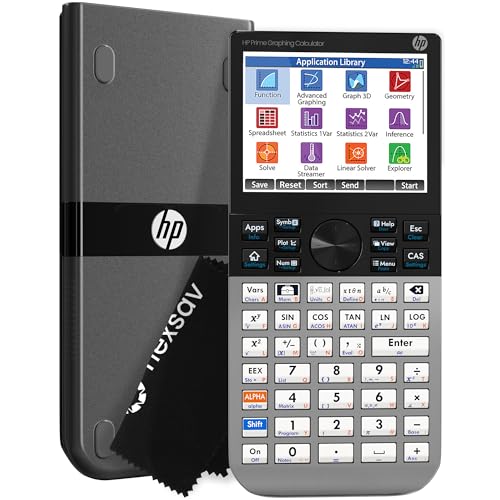
The HP Prime G2 sits at a different level than the other calculators on this list. A 3.5-inch full-color multi-touch display, a full computer algebra system, 256MB of flash memory, and processing speed that one engineering graduate student compared to having a lightweight version of Matlab in your pocket — this is a calculator for students who want the absolute most from their hardware.
The touchscreen is responsive and practical, not just a gimmick. You can pinch to zoom on graphs, sketch functions with your finger, and interact with plots in ways that simply aren’t possible on a traditional button-only device. The CAS functionality allows the calculator to handle symbolic algebra, derivatives, integrals, and equation solving in ways that go well beyond numerical approximation, which gives mechanical engineering students a significant advantage when checking work or exploring complex problems.
Build quality is a clear differentiator here. The faceplate is brushed metal rather than plastic, giving it a density and solidity that feels noticeably different from every other calculator on this list. Keys are hardened rubber with a satisfying feel. A mobile app for iOS and Android mirrors the full calculator experience, and a Windows and Mac emulator lets you work on your computer and transfer directly to the device.
We found the learning curve real but manageable. The HOME side of the calculator functions like a conventional device and is easy to pick up quickly. The CAS side takes more time, but once it clicks, it opens up a level of mathematical capability that no other calculator here can match. Battery life is the most common concern among long-term users, so keeping a spare battery on hand for exam days is a practical precaution.
Key Specs:
- Display: 3.5-inch full-color multi-touch LCD
- Memory: 256MB flash
- CAS: Full computer algebra system
- Build: Brushed metal faceplate
- Exam approved: PSAT, SAT, AP, IB
- Full CAS for symbolic algebra, calculus, and advanced math
- Large multi-touch color display with pinch-to-zoom
- Brushed metal build quality; feels premium and durable
- Mobile app and PC emulator for seamless workflow
- Battery life can be inconsistent with heavy use
- Steeper learning curve than other calculators on this list
Best Graphing Calculators for Mechanical Engineering: A Quick Rundown
- TI-Nspire CX II: Best overall for feature depth, document management, and long-term engineering coursework
- Casio fx-9750GIII: Best value for money with genuine engineering-grade matrix and complex number support
- TI-84 Plus CE: Best for classroom compatibility, color display, and month-long battery life
- TI-83 Plus: Best for students who want a proven, budget-friendly device with broad exam approval
- HP Prime G2: Best for advanced engineering work requiring full CAS, touchscreen, and maximum processing power
Final Thoughts
Choosing a graphing calculator for mechanical engineering comes down to three things: the math your program demands, the exams you need to pass, and how much you want to spend. A calculator with strong matrix support and complex number handling will serve engineering students far better than one optimized for basic graphing. Display quality, programmability, and battery life are worth weighing carefully too, since you will be using this tool daily for years.
Pick the calculator that fits where you are right now and where your coursework is heading. The best device for a first-year student working through calculus is not necessarily the best one for a junior in dynamics or a senior preparing for the FE exam. Know your needs, trust your budget, and choose accordingly. The right calculator will earn its place in your bag every single day.