Picking the right calculator for electrical engineering is not as simple as grabbing whatever is on sale. The math you deal with in EE courses and on the job, things like complex impedance, matrix operations, Laplace transforms, and numerical integration, demands a tool that can actually keep up. A basic four-function calculator will not cut it, and even a mid-range scientific model can leave you stuck at critical moments.
This guide covers five calculators that make a real difference in the field and in the classroom. We tested and researched each one with EE students, exam prep, and professional lab work in mind. By the time you finish reading, you will know exactly which calculator fits your situation, your budget, and the exams or certifications you are working toward.
The lineup spans every price point, from a sub-twenty-dollar powerhouse to a full-featured graphing machine, so there is something here for every stage of your engineering journey.
 How We Selected the Best Calculators for Electrical Engineering
Our team spent time digging into the actual needs of electrical engineering students and professionals before settling on this list. We looked beyond marketing copy and focused on real-world performance in EE-specific tasks, including AC circuit analysis, differential equations, and systems of linear equations.
Here are the factors that guided our evaluation:
- Function depth: We prioritized calculators with robust support for complex numbers, matrices, integration, differentiation, and equation solvers, all of which are non-negotiable for EE work.
- Exam eligibility: Many engineering exams, including the FE (Fundamentals of Engineering) exam, restrict calculator models. We checked which units are approved for high-stakes testing.
- Display quality: A clear, textbook-style display reduces input errors and speeds up verification, especially under exam pressure.
- Ease of navigation: A powerful calculator that takes forever to operate is a liability in a timed test. We factored in how quickly you can reach key functions.
- Build and portability: EE students carry their calculators everywhere. Durability and a reasonable form factor matter.
- Value for money: We weighed what each calculator delivers against what it costs. More features do not always justify a higher price.
- Power reliability: Solar-assisted models and those with strong battery life get a boost here, since a dead calculator in the middle of an exam is the stuff of nightmares.
Every pick on this list earned its place because it does something specific exceptionally well for engineers. Read on to find out which one matches your needs.
Best Calculators for Electrical Engineering (2026 Expert Review)
The five calculators below cover the full spectrum, from an affordable exam-approved scientific model to an advanced graphing unit with a touchscreen and computer algebra system. Each review gives you an honest look at what the calculator does well and where it falls short.
1. HP Prime G2: The Premium Graphing Powerhouse for Serious Engineering Work
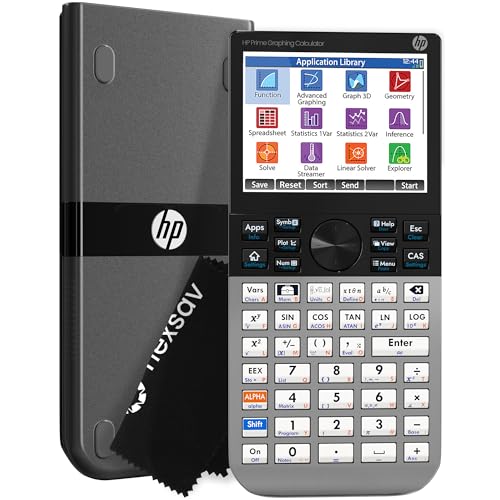
At the top of this list sits the HP Prime G2, and for good reason. This is one of the most capable calculators you can legally bring into a classroom or exam room. It runs a full Computer Algebra System (CAS), supports dynamic geometry, advanced graphing, and even a built-in spreadsheet application. For electrical engineering students working through circuit analysis, signal processing, or systems theory, that kind of depth is a genuine asset.
The 3.5-inch multi-touch color display sets it apart from almost everything else at this level. You can pinch to zoom on graphs, manipulate functions interactively with your finger, and switch between symbolic, graphical, and numerical views with dedicated keys. We found that this visual flexibility is especially useful when analyzing frequency response curves or plotting transfer functions.
The build quality reflects its price. The faceplate is brushed metal, the device feels dense and solid in your hand, and the footprint is compact enough to slip into any bag. It runs on a rechargeable lithium-ion battery and includes a slide-on cover and cleaning cloth in the box. With 256 MB of flash memory, you have plenty of room for programs, exam configurations, and saved data.
Connectivity is another strength. The HP Prime Mobile App mirrors full calculator functionality on iOS and Android, which means you can practice on your phone and transfer your work directly to the physical device. The HP Prime Wireless Kit also allows real-time classroom collaboration. One note: some users report that the micro-B USB port feels dated compared to modern Type-C charging, and the learning curve for mastering the CAS side is real but manageable with time.
Key Specs:
- Display: 3.5-inch multi-touch color LCD
- Memory: 256 MB flash
- Power: Rechargeable lithium-ion battery
- Dimensions: 7.25″ x 3.66″
- Exam Approved: PSAT/NMSQT, SAT, IB, select AP exams
- Full CAS with symbolic, graphical, and numerical views
- Large multi-touch color display with pinch-to-zoom
- Mobile app mirrors full functionality
- Solid brushed metal build with included accessories
- Steep learning curve for advanced features
- Micro-B USB charging feels outdated
2. Casio fx-991CW: The Best Mid-Range Scientific Calculator for Engineering Students

If you want serious computing power without the graphing calculator price tag, the Casio fx-991CW is the one to beat. It packs 540 functions into a compact, solar-powered body that costs a fraction of what the HP Prime runs. For EE students in courses where graphing calculators are not permitted, this is a top-tier choice.
The high-resolution 4-tone LCD display is a standout feature here. It shows more information at once than standard two-tone screens, with sharper cursor visibility and cleaner equation rendering. Casio’s Natural Textbook Display means fractions, integrals, and derivatives look exactly as they do in your textbook, which cuts down on misreading and input errors.
The function set is legitimately deep. You get 4×4 matrix operations, numeric integration and differentiation, vector calculations, inequality solving, and a spreadsheet-style data view. The built-in Math Catalog gives quick access to 47 constants and 40 unit conversions, including quantities that come up constantly in electrical engineering work. One standout feature is persistent memory between sessions, which means your stored variables survive a power cycle.
The QR code functionality is a clever bonus. Scan the code generated by your calculator and view a graphed result on ClassPad.net from any smartphone, which effectively gives you graphing output without the graphing calculator price. Some users note the menu system takes a bit of getting used to, and a few exam environments have flagged it as potentially semi-programmable, so verify your specific exam’s calculator policy before test day.
Key Specs:
- Functions: 540+
- Display: High-resolution 4-tone LCD
- Power: Solar with LR44 battery backup
- Matrix support: Up to 4×4
- Dimensions: 6.3″ x 3.0″
- Massive 540-function set including 4×4 matrices and calculus
- High-resolution display with persistent memory between sessions
- QR code graphing via smartphone
- Solar-powered with battery backup
- Menu navigation has a learning curve
- Exam eligibility varies by institution
3. Texas Instruments TI-36X Pro: The Go-To Calculator for the FE Exam

The TI-36X Pro has earned a reputation as the calculator of choice for engineering students preparing for the Fundamentals of Engineering exam, and that reputation is well deserved. It handles every function you will need on that exam, including complex number math, matrix operations up to 3×3, vector calculations, polynomial equation solving, and numerical integration and differentiation. All of this in a compact, non-graphing package that most engineering programs permit.
What makes the TI-36X Pro genuinely impressive is the MultiView four-line display. Unlike basic scientific calculators that show only one line at a time, this display lets you see your current equation, previous results, and even a function table simultaneously. The MathPrint mode renders fractions, integrals, and exponents exactly as they appear in textbooks, which is a meaningful upgrade for anyone working through complex circuit equations by hand.
One thing we particularly liked is how the TI-36X Pro handles exact math. Enter the square root of 8 and you get back a simplified radical rather than a decimal approximation. It handles pi symbolically, simplifies fractions automatically, and gives you an exact operator key if you want the decimal form instead. For EE courses where professors demand exact answers on paper, this feature alone justifies the buy.
The calculator’s build is solid and slightly slimmer than graphing models, making it easy to slip into a laptop bag. The interface design borrows heavily from TI’s graphing calculators, so if you have used a TI-84 before, you will feel at home quickly. The chrome-colored arithmetic buttons receive consistent feedback as being harder to read at a glance, a minor but real usability issue.
Key Specs:
- Display: 4-line MultiView with MathPrint
- Solvers: Numeric equation, polynomial, and system of linear equations
- Power: 1 Lithium Metal battery
- Dimensions: 7.22″ x 3.27″
- Matrix support: Up to 3×3
- Approved for the FE exam and most engineering programs
- Exact math output including simplified radicals and pi-symbolic answers
- Intuitive TI interface with graphing-calculator-style input
- Slim, portable form factor
- Chrome arithmetic buttons can be hard to read at a glance
- No graphing capability
4. Casio fx-115ES Plus 2nd Edition: The Best Budget Pick for Engineering Coursework

For students who need a capable engineering calculator without spending a lot, the Casio fx-115ES Plus 2nd Edition is a strong value pick. It covers over 280 functions, including complex number calculations, matrix and vector operations, simultaneous equations, and integration and differentiation. That covers a huge portion of what you will actually need in electrical engineering coursework, all for well under twenty dollars.
The Natural Textbook Display on the fx-115ES Plus is one of Casio’s best features at any price point. Equations render exactly as they appear in your textbook, with proper fractions stacked vertically and exponents positioned correctly. The 4-line, 16-digit LCD display gives you enough room to track your work without losing context between steps. For a calculator in this price range, the clarity is genuinely impressive.
Solar Plus technology with battery backup means you almost never have to worry about running out of power. The Multi-Replay function lets you backtrack through your calculation history, edit expressions, and recalculate without starting from scratch. We found this particularly useful when hunting down errors in multi-step circuit problems.
The one limitation worth noting is the absence of a quick notation toggle. Switching between standard and scientific notation requires going through a mode menu rather than using a dedicated key, which can slow you down in a timed exam. The white body also tends to show grime faster than darker models. But for a calculator that handles calculus, statistics, and engineering math at this price, those are easy tradeoffs to make.
Key Specs:
- Functions: 280+
- Display: 4-line, 16-digit Natural Textbook Display LCD
- Power: Solar Plus with LR44 battery backup
- Memory: 9 user-accessible variables
- Dimensions: 9.0″ x 5.5″
- Exceptional value for a 280-plus function engineering calculator
- Natural Textbook Display for easy equation reading
- Solar-powered with battery backup for reliable operation
- Multi-Replay for easy error correction
- No quick toggle between standard and scientific notation
- Light body color shows dirt quickly
5. CATIGA CS-121: A Budget Graphing Option Worth Considering Carefully

The CATIGA CS-121 sits in interesting territory. It combines scientific and graphing functions into a single package at a mid-range price, making it tempting for students who want graphing capability without the cost of a name-brand model. The 3-inch LCD screen displays graphs and formulas simultaneously, and the calculator supports over 360 functions, including fractions, complex numbers, linear regression, and standard deviation.
The CS-121’s build is aimed at portability. At 7 x 3.3 inches and light enough to fit in one hand comfortably, it is a practical size for all-day study sessions. An anti-drop body and included protective case add some durability for students who carry their gear through a full school day.
Where the CS-121 gets more complicated is in real-world reliability. Users report mixed results with the graphing functions in particular, with some finding them inconsistent or harder to operate than expected. It also has a higher return rate than the other models on this list, which is something worth factoring in before buying. For straightforward scientific calculations in algebra, trig, and introductory engineering courses, it performs adequately. For advanced EE work or high-stakes exams, the more established models on this list will serve you better.
Key Specs:
- Functions: 360+
- Display: 3-inch LCD (graphs and formulas simultaneously)
- Power: Battery powered
- Dimensions: 7.0″ x 3.3″
- Warranty: 365-day limited
- Combines graphing and scientific functions at a budget price
- Compact, ergonomic form factor with protective case included
- 360-plus functions for general coursework
- Graphing functionality is inconsistent based on user feedback
- Not the best choice for advanced EE work or professional exams
Best Calculators for Electrical Engineering: A Quick Rundown
- HP Prime G2: Best overall for advanced electrical engineering work, with a full CAS, multi-touch color display, and 256 MB of memory.
- Casio fx-991CW: Best mid-range scientific calculator, with 540 functions, 4×4 matrix support, and smart QR graphing via smartphone.
- Texas Instruments TI-36X Pro: Best for FE exam prep, with exact math output, polynomial solvers, and broad exam approval.
- Casio fx-115ES Plus 2nd Edition: Best budget pick, with 280-plus functions, Natural Textbook Display, and solar power at a very low price.
- CATIGA CS-121: Best budget graphing attempt, offering combined scientific and graphing functions at a mid-range price for general coursework.
Final Thoughts
The right calculator for electrical engineering comes down to where you are in your studies and what you need it to do. If you are preparing for a licensing exam like the FE, exam eligibility narrows the field quickly and puts the TI-36X Pro in a strong position. If you are working through upper-level coursework and want the most capable tool available, investing in a full-featured graphing model with CAS support pays off in time saved and problems solved.
Whatever you choose, prioritize the functions you will actually use every day. An overpowered calculator you cannot operate quickly is not helping you on a timed test. A budget model that handles your current coursework reliably is worth more than a premium device that sits in your bag unused. Match the tool to the task, and your work will be cleaner, faster, and far less frustrating.