Civil engineering is one of those fields where the wrong number can mean real consequences. Whether you’re working through structural load calculations, fluid mechanics, or preparing for the FE exam, you need a calculator that keeps up without slowing you down.
The problem is that not every scientific calculator is built the same way. Some are loaded with functions you’ll never touch. Others look the part but fall short when the math gets serious. Getting the choice wrong means fumbling through menus mid-exam or missing features you actually need on the job.
This guide breaks down five of the best calculators for civil engineering students and professionals, covering everything from display quality to exam eligibility. By the end, you’ll know exactly which one fits your needs.
 How We Selected the Best Calculators for Civil Engineering
Our team spent time researching, comparing, and evaluating dozens of scientific calculators against the real demands of civil engineering coursework and professional practice. We focused on models that could handle the math that actually shows up in the field and in the exam room.
Here’s what we looked at:
- Function depth: How well the calculator handles calculus, matrices, equation solvers, unit conversions, and complex numbers relevant to civil engineering work.
- Display quality: Whether equations appear clearly, especially in textbook format, and how readable the screen is under different lighting conditions.
- Exam eligibility: Whether the calculator is permitted on standardized exams like the FE and PE, which have strict approval requirements.
- Ease of use: How quickly a new user can find and execute the functions they need without fighting through layers of menus.
- Build and portability: Physical durability, key feel, and whether the form factor suits both classroom and field use.
- Power reliability: Whether the calculator uses solar, battery, or a combination, and how that affects long-term dependability.
- Value for money: Whether the price reflects what the calculator actually delivers in terms of capability and build quality.
Every pick on this list earned its spot through a combination of these factors. These are calculators we’d confidently hand to a first-year civil engineering student or a working professional prepping for licensure.
Best Calculators for Civil Engineering (Expert Ranking & Review)
The five calculators below range from entry-level to highly advanced, covering different budgets and use cases. Each one brings something distinct to the table, so read through carefully before deciding.
1. Casio fx-991CW: The Most Capable Non-Graphing Calculator You Can Buy

The Casio fx-991CW is the top pick for civil engineering students who want serious computing power without crossing into graphing calculator territory. It packs over 540 functions into a compact body, including numeric integration, differentiation, 4×4 matrix operations, and a spreadsheet-style data view. For courses covering structural analysis, statistics, and calculus, this single device covers an enormous amount of ground.
The high-resolution 4-tone LCD screen is a genuine upgrade over older Casio models. It renders fractions, radicals, and multi-line expressions in natural textbook format, which means you spend less time translating what you see on screen into what’s in your notes. We found the display to be one of the clearest in this price range, with quad-tone shading that makes cursor tracking noticeably easier during long calculation sessions.
Build quality is solid. The rounded key design and non-slip hard case make it feel like a tool that will survive four years of engineering school. We also appreciated the QR code feature that lets you graph results on ClassPad.net using your phone, which partially bridges the gap between scientific and graphing calculators.
One thing worth knowing upfront: the menu-based navigation takes some getting used to. Many functions are tucked away in submenus rather than dedicated buttons, so there’s a learning curve if you’re coming from a more button-heavy calculator. Once you’ve built the habit, though, the workflow becomes efficient. It’s also worth confirming exam eligibility at your specific institution before test day.
Key Specs:
- Functions: 540+
- Display: High-resolution 4-tone LCD, Natural Textbook Display
- Power: Solar with LR44 battery backup
- Screen Size: 2.25 inches
- Weight: 3.35 oz
- Exceptional function depth for the price, including 4×4 matrix and calculus tools
- Clearest display in the non-graphing category with four-tone shading
- QR code feature adds graphing capability via smartphone
- Menu-heavy navigation requires time to learn
- Exam eligibility varies by institution; confirm before relying on it
2. Texas Instruments TI-36X Pro: The Exam-Ready Workhorse

If you’re preparing for the FE exam, the TI-36X Pro deserves serious attention. Texas Instruments built this calculator with engineering students in mind, and it’s approved for use on many standardized exams where graphing calculators are not permitted. That alone makes it a practical staple for anyone working toward professional licensure.
The four-line MultiView display lets you see multiple calculations on screen at once, which is more useful than it might sound. When you’re solving a system of equations or checking steps in a longer derivation, being able to see your previous entries and results without scrolling back is a genuine time-saver. Expressions display in MathPrint format, so fractions, integrals, and stacked notation all appear the way they do in textbooks.
One feature that stands out from the competition: the TI-36X Pro performs exact arithmetic by default. Enter the square root of 8 and it returns a simplified radical, not a decimal approximation. For courses where exact answers matter, like calculus or linear algebra, this is a meaningful advantage that most calculators at this price point simply don’t offer.
The calculator includes a polynomial solver, a system of linear equations solver, and a numeric equation solver. Vector and matrix operations go up to 3×3. There’s also a function table feature that outputs y-values for a given x-interval, which partially substitutes for graphing capability. We found the button layout slightly unusual compared to other scientific calculators, with the arithmetic operators shifted from their typical positions, so expect a brief adjustment period.
Key Specs:
- Functions: Numeric integration, differentiation, matrices (up to 3×3), vectors, three equation solvers
- Display: 4-line MultiView with MathPrint
- Power: Battery (1 Lithium Metal, included)
- Screen Size: 3 inches
- Weight: 5.28 oz
- Approved for many standardized exams including the FE
- Exact arithmetic output for simplified radicals and pi expressions
- Three built-in solvers cover equations, polynomials, and linear systems
- Button layout differs from most scientific calculators and takes adjustment
- No solar power option
3. Casio fx-115ES Plus 2nd Edition: Proven, Reliable, and Broadly Capable

The Casio fx-115ES Plus 2nd Edition has built a reputation as one of the most trusted scientific calculators for engineering and science students. It covers over 280 functions, including complex number calculations, matrix and vector operations, summation, integration, and a full suite of equation solvers for simultaneous, quadratic, and cubic equations. That’s a strong lineup for a calculator in this price range.
The Natural Textbook Display shows fractions, roots, and expressions exactly as they appear in your textbook, which reduces input errors and makes reviewing your work faster. The 16-digit, 4-line LCD screen gives you enough room to see a full expression and its result at the same time. Solar Plus technology with a battery backup means you’ll rarely think about power management in the middle of an exam.
What makes this model particularly practical is its multi-replay function. You can backtrack through previous calculations, edit an expression, and recalculate without re-entering everything from scratch. For engineering problems that involve iterative calculations or error-checking, that’s a real workflow benefit. We’ve found it handles physics, statistics, and calculus coursework with equal ease.
One thing to note: there’s no quick shortcut for toggling between fixed-point and scientific notation. Switching requires going through a mode menu, which adds a couple of steps when you need to reformat an answer on the fly. This is a small but recurring friction point for users who work frequently across both formats.
Key Specs:
- Functions: 280+
- Display: 16-digit, 4-line Natural Textbook LCD
- Power: Solar Plus with LR44 battery backup
- Screen Size: 6.5 cm
- Weight: 6.05 oz
- Multi-replay function makes error-checking and editing fast
- Strong equation-solving capability including simultaneous, quadratic, and cubic
- Solar Plus with battery backup for dependable power
- No quick toggle for scientific notation; requires menu navigation
- White model shows fingerprints and grime more visibly with regular use
4. Casio fx-300ES Plus 2nd Edition: The Budget-Friendly Starting Point
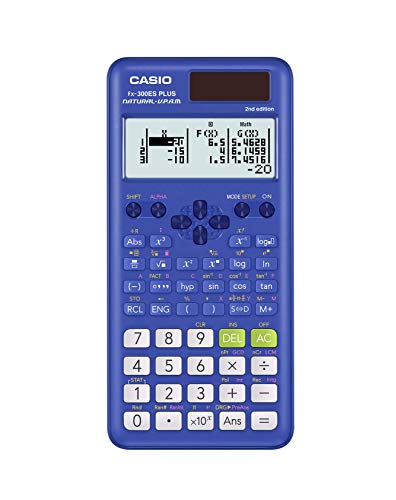
Not every civil engineering student needs the full power of a 540-function calculator right away. For introductory coursework in algebra, trigonometry, geometry, and basic statistics, the Casio fx-300ES Plus 2nd Edition delivers solid capability at a price that’s hard to argue with. It’s a well-made entry-level option that holds its own in any general math or pre-engineering course.
The Natural Textbook Display is one of the highlights here. Fractions, exponents, and expressions all render in the format you’d see in a printed textbook, which makes input more intuitive and output easier to verify. The two-function table feature lets you define and evaluate f(x) and g(x) over a given interval, which is useful for exploring function behavior without access to a graphing calculator.
The fx-300ES Plus 2nd Edition comes with a protective sliding hard case that keeps the keypad clean and scratch-free in a backpack. Solar Plus power with battery backup means reliable operation in any lighting condition. The keys are well-spaced and responsive, making it comfortable to use for extended study sessions.
What this calculator doesn’t have is where the trade-off lives. There are no matrix operations, no integration or differentiation tools, and no complex number mode. For upper-division civil engineering courses, those absences become significant. Think of this one as the right tool for years one and two, with the understanding that you’ll eventually want something more capable as your coursework advances.
Key Specs:
- Functions: 262
- Display: Natural Textbook Display, 4-line LCD
- Power: Solar Plus with LR44 battery backup
- Screen Size: 6.25 cm
- Dimensions: 6.4″ x 3.1″ x 0.5″
- Natural Textbook Display at a budget-friendly price
- Solar Plus with battery backup for uninterrupted use
- Protective sliding hard case included
- No matrix operations, integration, or complex number calculations
- Not suited for upper-division engineering coursework
5. Sharp EL501X2BWH: The Compact, No-Frills Option for Basic Needs

The Sharp EL501X2BWH sits at the most accessible price point on this list, and it’s worth including for students who need a dependable backup calculator or are just starting out in math-heavy coursework. It covers 146 essential scientific and math functions, including trigonometry, logarithms, powers, roots, factorials, and one-variable statistical calculations.
What makes this model genuinely useful for engineering-adjacent work is its N-base calculation support. It handles conversions between decimal, hexadecimal, octal, and binary, which is a feature that shows up in electrical engineering and systems programming contexts but is rarely found on calculators this affordable. It also includes a complex number mode and statistical functions, covering more ground than its modest function count might suggest.
The 10-digit, one-line LCD display is straightforward and easy to read, especially for users who prefer seeing a clean single result rather than a multi-line expression. The hard plastic cover provides solid protection for everyday transport, and the lightweight build (just 2.6 oz) makes it genuinely pocketable. We found the key spacing and tactile response to be comfortable for routine calculations.
The limitations are real, though. A one-line display means you can’t preview your full expression before executing it, which increases the chance of unnoticed input errors. There are no equation solvers, no matrix operations, and no calculus tools. For a civil engineering student beyond the first year, this calculator will hit its ceiling quickly. It earns its spot on this list as a capable entry-level option or reliable backup, not as a primary tool for serious coursework.
Key Specs:
- Functions: 146
- Display: 10-digit, 1-line LCD
- Power: Battery (2x LR44, included)
- Screen Size: 2 inches
- Weight: 2.6 oz
- N-base conversion (DEC, HEX, OCT, BIN) at a low price
- Compact and lightweight for easy portability
- Includes protective hard case
- One-line display limits expression review before execution
- No matrix, calculus, or equation-solving functions
Best Calculators for Civil Engineering: A Quick Rundown
- Casio fx-991CW – Best overall for civil engineering students; broadest function set in the non-graphing category
- Texas Instruments TI-36X Pro – Best for FE exam prep; exam-approved with exact arithmetic output
- Casio fx-115ES Plus 2nd Edition – Best balance of capability and value; strong equation-solving with reliable power
- Casio fx-300ES Plus 2nd Edition – Best budget pick for intro coursework; solid display and solar power at low cost
- Sharp EL501X2BWH – Best entry-level or backup option; affordable with N-base conversion built in
Final Thoughts
The right calculator for civil engineering depends on where you are in your academic journey and what you plan to use it for. Students in upper-division coursework or prepping for the FE exam need robust function coverage, including calculus tools, matrix operations, and solvers. Students in introductory courses can get by with something simpler and invest in a more capable model later.
Display quality matters more than most people expect. Being able to see your expression in textbook format reduces input errors and speeds up verification, especially under exam pressure. Power reliability, physical durability, and exam eligibility are also worth factoring in before you buy. Whatever your current level, there’s a calculator on this list that fits your situation. Choose based on where you are now and what’s coming next in your program.