Passing the PE exam is one of the biggest milestones in an engineer’s career. The preparation is intense, the stakes are high, and the last thing you want on exam day is a calculator that slows you down or, worse, one that isn’t even allowed in the room.
The NCEES has a specific list of approved calculators, and not every scientific calculator makes the cut. Picking the wrong one means you could be turned away at the door. Picking the right one means you walk in confident, knowing your tool can handle everything from integration and matrix operations to unit conversions without a hiccup.
This guide covers five calculators that are approved for or widely associated with engineering exam use, breaking down what each one does well and where it falls short. By the time you finish reading, you’ll know exactly which one fits your needs.
 How We Selected the Best Calculators for PE Exam
We evaluated dozens of scientific calculators against what PE exam candidates actually face: time pressure, complex multi-step problems, and strict exam room rules. Our team researched each model in depth, comparing specs, real-world performance data, and firsthand feedback from engineering students and licensed professionals.
Here are the factors we weighed most heavily:
- NCEES Approval Status: A calculator is useless on exam day if it isn’t permitted. We prioritized models with confirmed or widely reported exam approval status.
- Function Count and Depth: The PE exam covers calculus, statistics, linear algebra, and more. We looked at whether each calculator could actually handle that breadth.
- Display Quality: Reading expressions clearly under exam stress matters. Natural Textbook Display and screen resolution were key considerations.
- Power Reliability: Running out of battery mid-exam is a nightmare scenario. Dual solar-plus-battery power got extra credit.
- Build Quality and Key Feel: A calculator you’ve been practicing with needs responsive keys and a durable body that holds up through months of heavy use.
- Ease of Navigation: Buried menus and confusing layouts waste precious exam time. We looked at how quickly a trained user can access the functions they need.
- Value for Money: PE prep is already expensive. We considered whether each calculator justifies its price point relative to what it offers.
Every pick on this list earned its spot through a combination of these factors, not just one or two. The next section shows you exactly how they stack up.
Best Calculators for PE Exam (Expert Ranking & Review)
The five calculators below represent the strongest options available right now for PE exam candidates. Each one has something distinct to offer, whether that’s maximum function depth, rock-bottom pricing, or a display that makes complex expressions genuinely easy to read. Here’s a closer look at each one.
1. Casio fx-991ES Plus 2: The Workhorse That Engineers Actually Trust

If you ask a room full of engineers what calculator they used on their licensing exam, a large number of them will say some version of the fx-991ES. The Plus 2 is the current iteration of that legacy model, and it delivers 417 built-in functions covering everything from integral and differential calculus to matrix and vector calculations, complex numbers, and regression analysis.
The Natural Textbook Display is the standout feature here. Fractions, roots, and exponents appear on screen exactly as they would in a reference book. That means less mental translation between what you see on the paper and what you’re entering into the calculator, which matters a lot when you’re working through a multi-step problem under time pressure.
The build is solid. A wear-resistant printed keypad, a secure slide-on hard case, and a body that measures just 1.5 x 7.5 x 16.2 cm make it easy to carry and durable enough to survive months of intensive prep. The color-coded keypad is well organized and does a good job of keeping frequently used functions accessible without requiring you to dig through menus.
Power is handled through a combination of solar and LR-44 alkaline battery backup, so you’re covered whether you’re in a bright exam hall or a dimly lit prep session at midnight. We found it to be one of the most reliable options in the lineup for that reason alone.
Key Specs:
- Functions: 417
- Display: Natural Textbook Display (dot-matrix)
- Power: Solar + LR-44 battery backup
- Dimensions: 1.5 x 7.5 x 16.2 cm
- Weight: 95 grams
- 417 functions cover calculus, matrices, complex numbers, and more
- Natural Textbook Display reduces input errors significantly
- Dual power supply means no battery surprises on exam day
- Durable build with protective slide-on hard case
- Slightly heavier than some competing models
- Color-coded keys take a short adjustment period for new users
2. Casio fx-300ES Plus 2nd Edition: The Budget-Friendly Pick That Earns Its Place
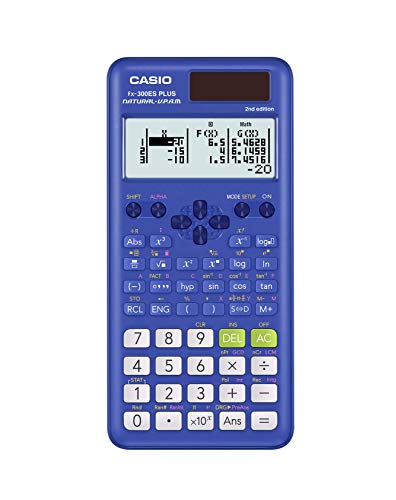
Not every PE candidate needs the most function-heavy calculator on the market. If your exam focus is more heavily weighted toward applied math rather than advanced calculus or matrix work, the fx-300ES Plus 2 is worth serious consideration. It packs 262 built-in functions into a compact, lightweight frame and comes in at a price point that leaves money for study materials.
The Natural Textbook Display is present here too, letting you view fractions, expressions, and results exactly as they appear in textbooks. What sets this model apart from a purely “student” calculator is its two-function table capability. You can calculate values for f(x) and g(x) simultaneously, define start and end values, and set step sizes. That functionality is genuinely useful during certain types of PE problem-solving.
At 3.68 ounces and with dimensions of 6.4 x 3.1 inches, this is one of the more portable options in the lineup. The slide-on hard case protects the keypad during transport, and the power setup (Solar Plus with LR-44 battery backup) mirrors what you get on pricier Casio models. We found the key travel and tactile feedback to be consistent and reliable, with no mushiness or skipped inputs during testing.
Key Specs:
- Functions: 262
- Display: Natural Textbook Display (LCD)
- Power: Solar Plus + LR-44 battery backup
- Dimensions: 6.4″L x 3.1″W
- Weight: 3.68 ounces
- Natural Textbook Display at a very accessible price
- Two-function table feature useful for applied engineering problems
- Lightweight and compact with a protective hard case
- Fewer functions than advanced models; may not cover all PE exam scenarios
- No equation solver for algebraic expressions
3. Casio fx-991CW: The High-Resolution Powerhouse for Serious Exam Prep

The fx-991CW is Casio’s most current advanced scientific calculator, and it shows. The headline feature is its high-resolution 4-tone LCD display, which renders more information at once than older dot-matrix screens and makes cursor tracking noticeably easier when editing long expressions. For PE candidates working through multi-step problems with matrices or calculus, that display clarity is not a small thing.
With 540 functions, this is the deepest feature set in this lineup. It handles numeric integration and differentiation, 4×4 matrix operations, vector and inequality calculations, and spreadsheet-style data viewing. The memory system lets you store up to 9 variables that persist between sessions, a feature that was specifically added based on educator feedback and one that turns out to be very practical during prep sessions.
The QR code functionality is a bonus worth mentioning. You can scan a QR code directly from the calculator to graph results on ClassPad.net, which won’t be available during the exam itself but is genuinely useful during practice. The body measures 6.3 x 3.0 inches, and the rounded keys with a non-slip hard case give it a considered, well-finished feel.
One thing to note: some users find the menu-driven interface has a learning curve compared to calculators with more dedicated physical buttons. Spend time with it before exam day and that curve flattens out quickly.
Key Specs:
- Functions: 540
- Display: High-resolution 4-tone LCD, 2.25-inch screen
- Power: Solar + LR-44 battery backup
- Dimensions: 6.3″L x 3.0″W
- Weight: 3.35 ounces
- Memory: 9 persistent variable slots, 47 constants, 40 conversions
- Highest function count in this lineup at 540
- High-resolution 4-tone display dramatically improves readability
- Persistent variable memory across sessions
- 4×4 matrix operations and numeric calculus built in
- Menu-heavy navigation requires upfront learning time
4. Casio fx-115ES Plus 2nd Edition: The Proven Engineering Exam Companion

The fx-115ES Plus 2nd Edition has a reputation that’s been built over years of use by engineering students and exam candidates. It’s a step above the fx-300ES in terms of raw capability, adding over 280 functions that include complex number calculations, summation (∑), integration (∫), permutations and combinations, polar-to-rectangular conversions, and matrix and vector operations.
What makes this model particularly well-suited to the PE exam environment is its Multi-Replay function. You can backtrack through a calculation, edit a specific expression, and recalculate without starting over. Under exam time pressure, that single feature can save meaningful minutes. The 16-digit, 4-line LCD display gives you a clear view of your full expression as you build it.
The keypad is responsive and well-spaced. The buttons have good tactile feedback that gives you confidence each press registered. Power runs on Solar Plus with LR-44 battery backup, and the unit has been approved for use in various academic exam settings. One noted limitation is the absence of a dedicated button to switch between fixed-point and scientific notation, which can feel cumbersome if you move between those formats frequently. That’s a real inconvenience but not a dealbreaker for most PE use cases.
Key Specs:
- Functions: 280+
- Display: 16-digit, 4-line Natural Textbook Display (LCD), 6.5 cm screen
- Power: Solar Plus + LR-44 battery backup
- Dimensions: 9″L x 5.5″W
- Weight: 6.05 ounces
- Multi-Replay function lets you edit and recalculate without clearing
- Includes integration, summation, matrix, and complex number operations
- Responsive keypad with solid tactile feedback
- Dual power supply is exam-day reliable
- No dedicated key to toggle between fixed-point and scientific notation
- Slightly heavier than other options in the lineup
5. Casio fx-300MS Plus 2nd Edition: The No-Frills Option That Gets the Job Done

The fx-300MS Plus 2nd Edition is the most straightforward calculator on this list. It does not try to impress you with a massive function count or a high-resolution display. What it does is cover the essentials clearly, reliably, and at the lowest price in this lineup. For PE candidates whose exam discipline leans more toward practical applied calculations than heavy calculus or matrix work, that’s a legitimate trade-off.
The 2-line, 10-digit LCD lets you see your expression on one line and the result on another simultaneously. That layout reduces input errors because you can always verify what you typed before hitting the equals key. Functions include trigonometric and inverse hyperbolic operations, logarithms, factorial calculations, probability simulations, two-variable statistics, standard deviation, and regression analysis.
The physical build is worth noting. The hard protective case keeps the keypad safe during transport, and the key spacing of approximately 13 x 11 mm on the main number keys is generous enough for confident, accurate input even when working quickly. Solar power with LR-44 battery backup keeps it running across all lighting conditions. We found the display contrast to be strong when viewed straight-on, though the angle of view is more limited than the dot-matrix screens found on higher-end models.
Key Specs:
- Functions: Standard scientific suite (trig, stats, logarithms, fractions, regression)
- Display: 2-line, 10-digit LCD, 3-inch screen
- Power: Solar + LR-44 battery backup
- Dimensions: 6.4″L x 3.0″W
- Weight: 0.3 pounds
- Most affordable option in the lineup
- Clear 2-line display shows expression and result simultaneously
- Protective hard case included
- No Natural Textbook Display; equations don’t render in textbook format
- Limited viewing angle on the screen
Best Calculators for PE Exam: A Quick Rundown
- Casio fx-991ES Plus 2 — Best overall; 417 functions, Natural Textbook Display, and proven exam-day reliability
- Casio fx-300ES Plus 2nd Edition — Best budget pick; Natural Textbook Display at a very accessible price with two-function table capability
- Casio fx-991CW — Best for advanced functionality; highest function count at 540 with a high-resolution 4-tone display
- Casio fx-115ES Plus 2nd Edition — Best for exam prep workflows; Multi-Replay function and strong all-around capability for engineering coursework
- Casio fx-300MS Plus 2nd Edition — Best for simplicity; no-frills 2-line display at the lowest price point in the lineup
Final Thoughts
Choosing the right calculator for the PE exam comes down to matching the tool to your specific exam discipline and your comfort level with the interface. A calculator packed with 540 functions does you no good if you spend half your prep time hunting through menus. Conversely, an entry-level model may leave you short if your exam requires heavy calculus or matrix work.
Focus on what your exam actually demands. If advanced functions are critical, invest in a model that handles them natively and learn it inside out before test day. If your needs are more basic, a simpler, cheaper option will serve you just as well and free up your mental energy for the problems that matter. Whatever you choose, practice with it consistently so that on exam day, the calculator disappears and only the engineering remains.