Picking the right statistics calculator is harder than most people expect. The wrong tool can slow you down in ways that add up fast, especially when you’re working through AP Statistics, running regression models in college, or solving probability problems under exam conditions. Not all calculators handle statistical functions at the same level, and those differences matter more than the price tag alone suggests.
We tested five of the most popular options on the market, from affordable scientific models to advanced graphing tools. Each one was put through real statistics tasks rather than evaluated on a features list alone. The goal was simple: find out which calculators actually perform when it counts.
To understand why these five made the cut, it helps to see how we evaluated them, and that context starts right below.
How We Selected the Best Calculators for Statistics
Our team evaluated each calculator by running it through a focused range of real-world statistics scenarios, covering descriptive analysis, regression modeling, probability distributions, and multi-step hypothesis testing.
We also factored in how each calculator holds up during timed exam conditions, where speed and ease of use matter just as much as raw function count. Specs alone don’t tell the full story, so hands-on performance shaped every decision.
Here’s what we looked at in detail:
- Statistical function range: Whether the calculator covers one-variable and two-variable statistics, multiple regression types, and standard probability distributions.
- Display readability: How clearly the calculator shows formulas, graphs, and results, particularly in bright classroom or exam settings.
- Ease of use: How quickly a student can locate and execute statistical functions without getting lost in menus.
- Exam eligibility: Whether the calculator is approved for AP, SAT, ACT, IB, and other major standardized tests.
- Build durability: How well the calculator holds up to daily backpack use and extended button-pressing over a full academic year.
- Memory and storage: How much space is available for programs, saved data sets, and user-defined configurations.
- Price to performance: Whether the cost is justified by what the calculator delivers specifically for statistics work.
Every calculator on this list passed the bar across most of these criteria, not just one or two. The picks ahead reflect genuine performance, and each one earned its place for a clear reason.
Best Calculators for Statistics (Expert Ranking & Review)
The five calculators below span a wide range of price points and capabilities. Whether you need something cleared for the SAT next month or a tool that can carry you through four years of university-level math, there is a strong pick here for you.
1. Texas Instruments TI-84 Plus CE: The Classroom Standard That Still Delivers

The TI-84 Plus CE is the most widely used graphing calculator in American high school and college classrooms, and that reputation is backed by genuine capability. It covers AP Statistics in full, supporting regression analysis, probability distributions, hypothesis testing, and basic descriptive statistics right out of the box, with no extra configuration required.
The 3.2-inch full-color backlit LCD makes data and graphs much easier to interpret, especially when you’re comparing overlaid distributions or reading a result quickly under exam pressure. Seven distinct graph styles let you differentiate between plotted functions at a glance. The MathPrint feature displays expressions exactly as they appear in textbook format, which we found reduces input errors meaningfully during complex statistical work.
This calculator is the right choice for high school students preparing for AP Statistics, the SAT, ACT, PSAT, or IB exams. It holds approval for all of them. The rechargeable lithium battery lasts a long time between charges, and 3MB of ROM with 154KB of RAM gives plenty of room for preloaded apps, saved programs, and custom data sets.
At just over seven ounces with a 7.57-inch frame, it fits easily in a pencil case. The learning curve is real for new users, but once you grow comfortable with the menu system, this calculator can carry you from Algebra 2 through early college math without needing to switch tools.
Key Specs:
- Display: 3.2-inch full-color backlit LCD
- Memory: 3MB ROM / 154KB RAM
- Power: Rechargeable lithium battery (Mini-USB charging)
- Dimensions: 7.57″ x 3.4″
- Exam approval: SAT, ACT, PSAT, AP, IB
- Approved for every major standardized exam
- Full-color display makes graphs and overlapping data clear
- Preloaded apps cover statistics, science, and beyond
- Long-lasting rechargeable battery included
- Charges via Mini-USB rather than the more practical USB-C
- Menu system takes time to learn for first-time users
The TI-84 Plus CE sets a high bar for all-around exam readiness, and the next calculator on this list takes a completely different approach to meeting student needs.
2. Casio FX-991ES Plus 2nd Edition: 417 Functions in a Package That Fits Any Budget

For students whose programs or exams don’t allow graphing calculators, the Casio FX-991ES Plus 2nd Edition fills a role that nothing else on this list can. Many university engineering, science, and applied mathematics programs restrict students to scientific calculators only, and this one packs 417 functions into an approachable, well-priced body that handles the full range of common statistics tasks.
The Natural Textbook Display shows fractions, roots, and expressions exactly as they appear in a printed textbook. This isn’t just a visual feature. It genuinely makes it easier to catch entry mistakes before they affect your result, especially when you’re working through multi-step statistical formulas. Coverage includes basic statistics, combinations and permutations, differentiation, integration, vector operations, matrix calculations, and complex number computation.
Dual power through solar and a single LR44 battery means this calculator almost never dies unexpectedly. The color-coded keypad helps you distinguish function categories without reading every key label from scratch, and the two-way slide-on hard case protects the device well during daily transport. At 95 grams, it’s notably lighter than every graphing calculator on this list, and Casio backs it with a 3-year warranty that most competitors in this price range don’t offer.
Key Specs:
- Functions: 417
- Display: Natural Textbook Display, 10+2 digit LCD
- Power: Solar and battery (1 LR44 included)
- Dimensions: 6.38″ x 3.03″
- Weight: 95g
- 417 functions handle nearly every statistics scenario
- Dual solar and battery power means it almost never runs out
- Natural Textbook Display reduces input errors on complex formulas
- Cannot plot graphs or display visual distributions
- Not programmable, which limits advanced or repetitive custom calculations
The Casio FX-991ES Plus is purpose-built for pure calculation. For students who do need visual statistics tools, the next option brings a fresh angle to graphing.
3. NumWorks Graphing Calculator: The Intuitive Option Built for Modern Students

The NumWorks Graphing Calculator looks like no other calculator on this list. The slim white body and crisp 2.8-inch color display (320×240 pixels) make it feel closer to a smartphone than a traditional classroom tool. For students who grew up with touchscreen devices, the app-style menu structure is familiar almost immediately, which makes a real difference when you’re learning new functions under time pressure.
Statistical work is well organized on the NumWorks. Regression, probability distributions, and data analysis tools are grouped logically inside the stats app, so you’re not searching through nested menus to find what you need. The regression tool stood out during testing. Running a linear or polynomial regression here takes fewer steps than on most competing graphing calculators, which is a practical time-saver during exams.
One area where the NumWorks genuinely excels is its equation solver. It handles a wide range of equations with almost no lag, and the results display cleanly on the color screen. The calculator ships with a USB-C charging cable, which is a practical upgrade that most competitors haven’t adopted yet, and firmware updates delivered through a web browser mean new features arrive regularly without buying a new device.
Beyond statistics, the built-in Python shell makes this calculator appealing to students getting into programming alongside their coursework. Math teachers and students alike have noted how much faster the learning curve is compared to older graphing models. Exam approval varies by test, so always verify eligibility before bringing it to a standardized exam.
Key Specs:
- Display: 2.8-inch color LCD (320×240 pixels)
- Power: Rechargeable lithium-ion battery (USB-C cable included)
- Languages supported: 7, including English, French, Spanish, and German
- Dimensions: 6.3″ x 3.2″
- Weight: 220g
- Highly intuitive interface cuts the learning curve significantly
- USB-C charging is more practical than older connector types
- Firmware updates expand features without replacing hardware
- Built-in Python shell supports coding alongside math coursework
Con:
- Exam eligibility varies by test; always verify approval before a standardized exam
With its emphasis on ease of use and modern design, the NumWorks caters to a different type of learner than the next calculator, which prioritizes raw capability and value for money.
4. Casio fx-9750GIII: Maximum Value for AP Statistics and STEM Coursework

Few graphing calculators offer what the Casio fx-9750GIII provides at this price. It delivers full graphing functionality, AP Statistics support, Natural Textbook Display, and MicroPython programmability at a cost that undercuts most of the competition significantly. For budget-conscious students who need a capable graphing calculator without the premium price, this one is one of the most practical choices available.
On the statistics side, this calculator covers probability distributions, regression analysis, spreadsheet functionality, and graph plotting in full. Its Natural Textbook Display presents formulas as they appear in textbooks, which keeps entry errors down during complex calculations. The eActivities feature lets you build interactive study notes that combine text, calculations, and graphs on a single screen, which is a genuinely useful tool for reviewing statistical concepts before a test.
The body is lightweight plastic with a frame slim enough to carry easily in any bag. It runs on four AAA batteries rather than a rechargeable pack, so there’s no cable to track down and no risk of arriving at an exam with a dead battery if you keep fresh ones on hand. With 3MB of flash memory, a USB cable included in the box, and exam approval for AP, SAT, ACT, and IB, the fx-9750GIII delivers solid everyday value.
Key Specs:
- Display: 12.8 cm Natural Textbook Display LCD
- Memory: 3MB flash
- Power: 4 AAA batteries (included)
- Dimensions: 6.6″ x 3.25″
- Exam approval: AP, SAT, ACT, IB
- Excellent value for a fully capable graphing calculator
- AP Statistics support with graphing, probability, and regression
- MicroPython programmability for advanced STEM applications
- Display has no backlight, which creates real challenges in dim settings
- Keys feel soft with limited tactile feedback compared to higher-end models
The fx-9750GIII proves you don’t have to spend a lot to get a lot from a graphing calculator. The final pick on this list is for those who want the most powerful tool money can buy.
5. HP Prime G2: The Premium Choice for Advanced Statistics and STEM Power
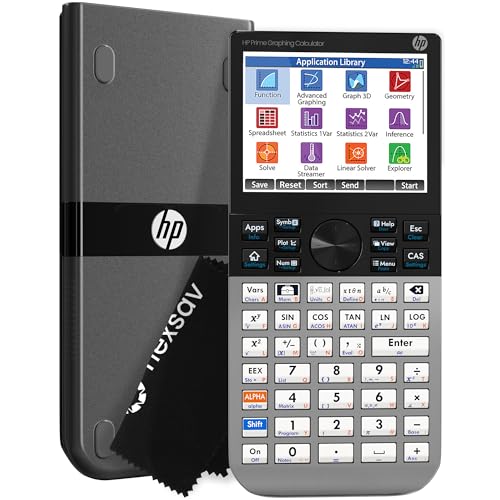
The HP Prime G2 is not a typical graphing calculator. It packs a full Computer Algebra System, a 3.5-inch multi-touch color display, 256MB of flash memory, and a processor fast enough to make graphing and equation solving feel nearly instant. For students who need a calculator that can handle advanced statistics today and carry them through complex engineering or graduate coursework later, this is the one to consider.
The CAS engine is what separates the HP Prime G2 from every other option on this list. It handles symbolic manipulation, meaning you can work with variables and expressions without plugging in numerical values first. Dedicated keys switch between symbolic, graphical, and numerical views quickly, which we found cuts down significantly on wasted time during complex multi-step statistics problems. It also handles regression, probability distributions, dynamic geometry, and spreadsheets without breaking a sweat.
The build quality is a noticeable step above every other calculator reviewed here. The brushed metal faceplate feels dense and sturdy, and the overall construction reflects the premium price point. A slide-on protective cover and a cleaning cloth come in the box. The multi-touch display handles swipes and pinch-to-zoom gestures well, making it much faster to move through large graphs or long data tables than scrolling with physical buttons alone.
A companion mobile app for iOS, Android, and Windows mirrors the full calculator experience, which is a practical bonus for working through homework at your desk and then taking the calculator to class. The HP Prime G2 carries the highest cost on this list by a clear margin, but for students planning to use it from AP Statistics through four years of university, that cost spreads out to a reasonable long-term investment.
Key Specs:
- Display: 3.5-inch multi-touch color LCD
- Memory: 256MB flash
- Power: Rechargeable lithium-ion battery (included)
- Dimensions: 7.25″ x 3.66″
- Exam approval: PSAT, SAT, AP, IB
- CAS engine handles symbolic algebra and calculus at a professional level
- Multi-touch display with pinch-to-zoom for fast graph manipulation
- 256MB flash stores programs, exam configurations, and background images
- HP Prime mobile app mirrors full functionality on iOS, Android, and Windows
- Advanced CAS features carry a real learning curve to master fully
- The highest price point on this list by a significant margin
With a full picture of all five calculators in hand, the summary below makes it easy to find your fit at a glance.
Best Calculators for Statistics: A Quick Rundown
- Texas Instruments TI-84 Plus CE: Best overall for high school students and standardized exam preparation
- Casio FX-991ES Plus 2nd Edition: Best scientific calculator for courses and exams that don’t allow graphing calculators
- NumWorks Graphing Calculator: Best for intuitive use and students who want a modern, app-style graphing experience
- Casio fx-9750GIII: Best value graphing calculator for AP Statistics and STEM coursework
- HP Prime G2: Best for advanced college and graduate-level work requiring maximum computing power
For a broader perspective on what to prioritize when making your final decision, the wrap-up below pulls the key takeaways together.
Final Thoughts
Statistics calculators are not built for the same student or the same course. The most important thing to clarify before buying is whether your coursework and exams require a graphing calculator or permit a scientific one, then match from there.
Display clarity, statistical function depth, and day-to-day usability matter more than raw spec numbers. Build quality and battery reliability make a real difference too, especially when one device needs to survive a full academic year of daily use.
Your best pick depends on where you are right now and where you’re headed next. A high school student in AP Statistics has very different needs from someone working through graduate-level analysis. Match the calculator to what your coursework actually demands, not just to what sounds most capable on paper, and you’ll end up with a tool that earns its place in your bag every single day.