Biostatistics is one of those subjects where the right tool in your hand makes a real difference. Whether you’re crunching regression outputs, working through standard deviation problems, or tackling complex probability distributions, a capable calculator can save you from careless errors and keep your focus where it belongs — on the math itself.
The options on the market range from budget-friendly scientific models to financial calculators with built-in statistical worksheets. Picking the wrong one wastes money and, worse, leaves you reaching for extra steps that a better pick would handle automatically.
We tested and researched these five calculators with biostatistics students and professionals in mind. By the time you finish reading, you’ll know exactly which model fits your course load, your budget, and your exam requirements.
 How We Selected the Best Calculators for Biostatistics
Our team spent time evaluating dozens of handheld calculators, narrowing the field to models that genuinely serve statistical work rather than just checking a box. We focused on real-world performance in statistical and scientific contexts, not just feature lists.
Here are the factors we weighed most heavily:
- Statistical function depth: We looked at whether each model supports one- and two-variable statistics, regression modes (linear, logarithmic, exponential, power), and standard deviation calculations out of the box.
- Display clarity: A four-line or multi-line display makes it far easier to review inputs and catch mistakes mid-calculation. Single-line displays slow you down.
- Exam approval: Biostatistics students often sit for standardized tests. We confirmed which models are approved for exams like the SAT, AP exams, MCAT, actuarial exams, and professional licensure tests.
- Ease of use: We considered how quickly a first-time user can get comfortable with the interface, especially for common statistical tasks.
- Build quality and portability: Calculators used in lab sessions, lectures, and exam halls need to hold up and travel well.
- Value for money: We weighed performance against price to identify which models give you the most capability per dollar.
- Battery reliability: Long-lasting, accessible power matters — especially models that use standard batteries or dual solar power.
Every pick in this list earned its place. These aren’t just popular choices; they’re the right choices for statistics-heavy coursework and professional use.
Best Calculators for Biostatistics (2026 Expert Review)
Below, you’ll find a detailed look at each of the five calculators we selected. The lineup covers a wide range of users, from students on a tight budget to professionals who need deeper analytical capability.
1. Texas Instruments BA II Plus — The Statistics Workhorse for Biostatistics Professionals

The BA II Plus is one of the most trusted calculators in finance and statistics, and it earns that reputation in biostatistics just as well. Its list-based one- and two-variable statistics, paired with four regression modes (linear, logarithmic, exponential, and power), cover the core analytical tools that biostatistics courses demand. You won’t find yourself hunting for a workaround.
Where this calculator really stands out is in its worksheet mode. Built-in worksheets for amortization, compound interest, and cash flow analysis may sound like finance tools, but for students bridging public health economics or clinical research cost modeling, they add real utility beyond the classroom baseline.
The prompted display is a thoughtful feature. It guides you through calculations by showing the current variable and label on screen, so you spend less time consulting the manual and more time working through problems. It’s a small thing that adds up across a long study session.
We found the build solid for everyday use — ABS plastic construction, 10-digit alphanumeric display, and a slide case included for protection. Battery life is notably strong, with users reporting extended periods before needing a replacement CR123A battery.
Key Specs:
- Display: 10-digit, 1-line alphanumeric
- Statistics: One- and two-variable, 4 regression options
- Worksheet modes: Amortization, bond, depreciation, compound interest
- Power: 1 CR123A battery (included)
- Dimensions: 6.49 x 2.99 x 0.69 inches
- Four regression modes directly relevant to biostatistics
- Prompted display reduces input errors
- Approved for CFA, FRM, and CMA exams
- Single-line display limits equation visibility
- Button responsiveness can feel stiff for some users
2. CATIGA CS-121 Scientific and Graphing Calculator — Visual Learners Get a Real Advantage
UNAVAILABLEThe CS-121 takes a different approach from the rest of this list by adding genuine graphing capability. If you’re a biostatistics student who benefits from seeing a distribution or regression curve plotted on screen, this model gives you that visual layer without requiring a TI-84 price tag. Graphs and formulas display simultaneously, which is a practical advantage during coursework.
It runs more than 360 functions, covering fractions, complex numbers, statistics, linear regression, standard deviation, and variable solving. That function set maps closely to what a full biostatistics course requires, from descriptive statistics to introductory inferential work.
The physical design is compact, measuring 7 x 3.3 inches, with a smooth button layout that fits comfortably in one hand. An anti-drop body and included protective case mean it can handle the daily shuffle between backpack and desk without looking worn after a semester.
Key Specs:
- Display: 3-inch LCD
- Functions: 360+
- Statistics: Standard deviation, linear regression, variable solving
- Calculator type: Scientific/Graphing
- Dimensions: 7″L x 3.3″W
- Graphing capability at an accessible price
- 360+ functions including full statistics suite
- Protective case and durable anti-drop body included
- Graphing functions have a steeper learning curve
- Some users report inconsistent button registration
3. Texas Instruments TI-36X Pro — The Best All-Around Scientific Calculator for Stats Courses

The TI-36X Pro is the calculator we’d hand to a biostatistics student who can only own one device. It packs numerical integration, derivative calculation, matrix operations, polynomial equation solving, and a full suite of statistical functions into a non-graphing body that fits in a slim pocket or pencil case. For curricula where graphing calculators are not permitted, this is the most capable legal option available.
The four-line MultiView display is a genuine upgrade over two-line models. Being able to see your equation as you typed it, alongside the result, means fewer costly input errors during timed exams. MathPrint mode renders stacked fractions and exponents exactly as they appear in textbooks, making it easier to verify your work at a glance.
Built-in probability distributions, unit conversions, and a function table mode all matter for biostatistics in ways that basic scientific calculators simply can’t match. We particularly liked the single-mode operation, meaning you won’t need to switch between statistical, complex, and standard modes the way some competing models require.
The TI-36X Pro is approved for the FE exam, PE exam, and many standardized tests where programmable and graphing calculators are banned. That makes it a durable investment across multiple years of academic and professional testing.
Key Specs:
- Display: 4-line MultiView LCD, MathPrint mode
- Solvers: Numeric equation, polynomial, system of linear equations
- Statistics: One- and two-variable, with table mode
- Power: 1 Lithium Metal battery (included)
- Dimensions: 7.22″L x 3.27″W
- Four-line display with MathPrint for clear equation review
- Approved for FE, PE, and many standardized exams
- Single-mode operation for all function types
- Matrix and vector support beyond standard scientific calculators
- No graphing capability
- Some advanced functions require multiple button presses to access
4. Texas Instruments TI-30XS MultiView — The Dependable Entry-Level Pick That Punches Above Its Price

The TI-30XS MultiView is the calculator you buy when you want Texas Instruments quality without paying more than you need to. For introductory biostatistics, general statistics, or courses that don’t require the deeper function set of the TI-36X Pro, this model covers the essentials cleanly and reliably. It handles one- and two-variable statistics, fraction and decimal conversions, and basic scientific functions without any fuss.
The MathPrint feature is the headline here. Viewing calculations in standard math notation, with stacked fractions and exact square roots displayed as they’d appear in a textbook, significantly reduces the chance of misreading your own inputs. The four-line display supports this well.
Dual solar and battery power is a quiet but meaningful feature. We found the battery life impressively long, with consistent performance across extended use. The slide-off face cover doubles as a grip panel stored on the back.
Key Specs:
- Display: 4-line, 16-character LCD, MathPrint mode
- Statistics: One- and two-variable
- Power: Solar and battery (lithium metal)
- Dimensions: 7.25″L x 3.38″W
- Approvals: SAT, MCAT, state licensing exams
- MathPrint display shows equations in textbook notation
- Dual solar and battery power for long-lasting use
- Approved for SAT, MCAT, and professional licensing exams
- Fewer advanced functions than the TI-36X Pro
- Screen has been reported fragile by some users
5. RENUS 8-Pack Scientific Calculator — The Smart Buy for Classrooms and Budget-Conscious Students
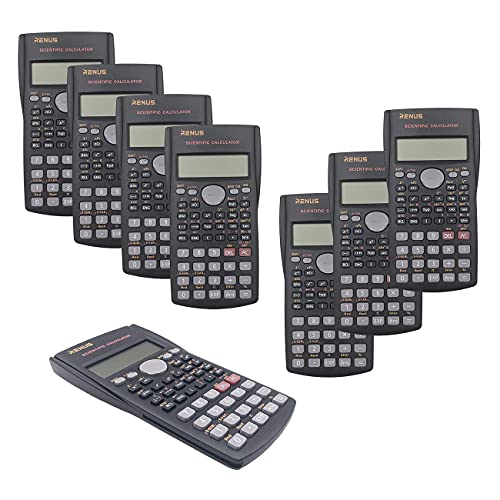
The RENUS 8-Pack changes the value conversation entirely. For instructors stocking a classroom or students who need a reliable backup, this bundle delivers eight functional scientific calculators with 16 AAA batteries included. Each unit handles 240 functions across three modes (COMP, SD, and REG), covering basic arithmetic, standard deviation, and regression calculations for biostatistics coursework.
The 2-line HD display shows both the input and the result simultaneously, and the replay key lets you scroll back and modify previous entries without restarting a calculation from scratch. That feature alone saves meaningful time when catching an error mid-problem.
Each calculator ships with an ergonomically designed sliding hard cover. The AAA battery format is a practical plus since standard batteries are easy to find and replace without tools.
At this price point per unit, the build quality is functional rather than premium. We found them well-suited to classroom settings where heavy use and occasional rough handling are a given. The seller’s customer service track record, based on our review of documented cases, is notably responsive for a budget product.
Key Specs:
- Display: 2-line, 12-digit HD LCD
- Functions: 240, covering COMP, SD, and REG modes
- Statistics: Standard deviation, regression calculations
- Power: 2 AAA batteries per unit (16 included)
- Approvals: SAT, PSAT/NMSQT, AP Chemistry, AP Physics
- Eight calculators per pack for outstanding per-unit value
- Replay key saves time when editing previous entries
- Standard AAA batteries, no tools needed for replacement
- Build feel is lighter than premium single-unit models
- Battery cover can loosen with heavy classroom use
Best Calculators for Biostatistics: A Quick Rundown
- Texas Instruments BA II Plus — Best for biostatistics professionals needing advanced regression and statistical worksheets
- CATIGA CS-121 — Best for visual learners who want graphing capability at an accessible price
- Texas Instruments TI-36X Pro — Best all-around scientific calculator for stats-heavy coursework and multi-exam use
- Texas Instruments TI-30XS MultiView — Best entry-level pick for introductory biostatistics with MathPrint display
- RENUS 8-Pack Scientific Calculator — Best value for bulk purchase, classroom use, or budget-conscious students
Final Thoughts
Choosing the right calculator for biostatistics comes down to three things: the depth of statistical functions you need, whether your exam or course restricts graphing or programmable devices, and how much you’re willing to spend. A four-line display and MathPrint notation are worth prioritizing if you have the choice, since they genuinely reduce errors during complex calculations.
Pick based on where you are in your coursework and where you’re heading. A first-year student has different needs than a working epidemiologist sitting for a licensure exam. Know your requirements, check your exam rules, and choose the model that fits the full picture of how you’ll actually use it. The right calculator won’t do the statistics for you, but it will make sure nothing gets in your way.