College algebra has a way of separating the prepared from the unprepared, and your calculator is a bigger part of that equation than most students realize. Pick the wrong one and you’re fighting your tool instead of focusing on the math. Pick the right one and solving for x feels almost automatic.
This guide covers five calculators that genuinely earn their place on a college algebra student’s desk. Some are graphing powerhouses. Others are lean, affordable scientific calculators that get the job done without any fuss. All five have been evaluated for real-world usefulness, not just spec sheets.
By the time you finish reading, you’ll know exactly which calculator fits your course requirements, your budget, and the way you actually study.
 How We Selected the Best Calculators for College Algebra
We approached this evaluation the way any serious student should approach a major purchase: with a clear set of priorities and no loyalty to brand names. We looked at dozens of models before narrowing things down to these five, weighing practical performance over marketing claims.
Here are the factors that guided our selections:
- Function coverage: Does the calculator handle the core topics in college algebra, including polynomials, systems of equations, exponential functions, logarithms, and statistics?
- Display quality: Can you read expressions and results quickly and accurately, especially under exam conditions?
- Ease of use: How steep is the learning curve? A calculator you can’t operate confidently under pressure isn’t doing you any favors.
- Exam eligibility: Is the calculator approved for standardized tests like the SAT, ACT, or AP exams?
- Power reliability: Will it last through a three-hour final without dying on you?
- Build quality: Does it feel solid enough to survive a semester in a backpack?
- Value: Does the price make sense given what you’re getting?
Every pick on this list passed these tests. You can trust that each one has something real to offer, whether you’re in your first algebra course or working through a full STEM sequence.
Best Calculators for College Algebra (Expert Ranking & Review)
The five calculators below cover a wide range of needs and budgets. Whether you need full graphing capability or just a reliable scientific calculator to get through exams, there’s something here for you.
1. Texas Instruments TI-84 Plus CE: The Gold Standard for College Algebra Students

The TI-84 Plus CE has been the go-to graphing calculator for algebra students for years, and it keeps earning that reputation. It covers pre-algebra all the way through college math, linear algebra, and calculus, making it one of the most versatile tools you can own as a student.
What makes this model stand out from older TI-84 versions is the high-resolution, full-color backlit display. Graphing multiple functions at once is genuinely easy because you can assign each equation its own color and style. That clarity pays off when you’re comparing functions side by side or trying to make sense of a complex graph during a fast-paced lecture.
The body is slim and lightweight at just under half a pound, and it feels well-constructed despite the plastic build. It fits easily in any backpack pocket, and the rechargeable lithium battery means you’re not constantly hunting for AAA batteries the night before a test.
We found the MathPrint feature especially useful for algebra work. It displays fractions, exponents, and radicals exactly as they appear in textbooks, so what you type looks like what’s on your worksheet. That alone reduces input errors significantly.
Key Specs:
- Display: 3.2-inch full-color backlit LCD
- Memory: 3.0MB ROM / 154K RAM
- Power: Rechargeable lithium battery (included)
- Dimensions: 7.57″L x 3.4″W
- Exam Approved: SAT, PSAT, ACT, AP, IB
- Full-color display makes multi-function graphing easy to follow
- MathPrint shows expressions in textbook format
- Approved for all major standardized exams
- Rechargeable battery with excellent longevity
- Uses Mini-USB charging port, not USB-C
- Higher price point compared to scientific calculators
2. Casio fx-115ES Plus 2nd Edition: The Best Scientific Calculator for Algebra and Beyond

If your professor doesn’t require a graphing calculator, or if you want a capable backup that won’t break the bank, the Casio fx-115ES Plus 2nd Edition is a remarkable option. With over 280 built-in functions, it covers everything from basic algebra to statistics, integration, and matrix operations.
The Natural Textbook Display is the feature that sets it apart from cheaper scientific calculators. Fractions look like fractions, roots look like roots, and equations appear exactly the way they’re printed in your textbook. For algebra students who are just getting comfortable with function notation, that visual familiarity reduces confusion and speeds up calculations.
Solar Plus technology with battery backup means this calculator practically never dies. Pop it near a window or under a classroom light and it charges itself. We found this especially reassuring during long exam sessions where the last thing you want to think about is battery life.
The multi-replay function is a hidden gem for algebra students. You can scroll back through previous calculations, edit an expression, and recalculate without starting from scratch. When you realize you entered the wrong coefficient three steps back, that feature saves real time.
Key Specs:
- Display: 4-line, 16-digit LCD with Natural Textbook Display
- Functions: 280+
- Power: Solar Plus with LR44 battery backup
- Dimensions: 9″L x 5.5″W
- Weight: 6.05 oz
- Natural Textbook Display makes inputs easy to verify
- Solar-powered with battery backup for near-unlimited runtime
- Handles simultaneous equations, integration, and matrix operations
- Multi-replay lets you edit and recalculate without restarting
- No graphing capability
- Some users find the display harder to read at certain angles
3. Casio fx-300ES Plus 2nd Edition: Reliable, Affordable, and Surprisingly Capable
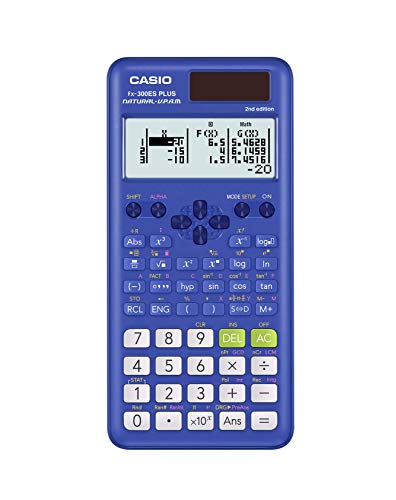
The Casio fx-300ES Plus 2nd Edition might look like a basic classroom calculator, but it punches above its weight for algebra coursework. It was built primarily for middle school through high school, but the 262 built-in functions make it a completely valid choice for introductory college algebra, especially in courses that restrict graphing calculators.
Its physical design is practical and durable. The hard sliding cover protects the keypad during transport, and the solar-with-battery-backup power system means it runs reliably in any lighting. Reviewers consistently point out that the cover includes a helpful quick-reference sticker for common operations, which is genuinely useful when you’re first learning the menu system.
The two-function table feature is one we don’t see discussed enough. You can define f(x) and g(x) and generate a full table of values, setting your own start point, end point, and step size. For algebra students working with linear and quadratic functions, that’s a practical tool for checking work or exploring how a function behaves.
Key Specs:
- Display: 2-line Natural Textbook Display LCD
- Functions: 262
- Power: Solar Plus with battery backup
- Dimensions: 0.5″H x 3.1″W x 6.4″L
- Weight: 3.7 oz
- Natural Textbook Display at an accessible price
- Two-function table for exploring f(x) and g(x) values
- Lightweight with hard protective sliding cover
- Solar-powered with battery backup
- No graphing capability
- Not ideal for courses that go into calculus or engineering math
4. Casio fx-300MS Plus 2nd Edition: The No-Frills Pick That Still Gets the Job Done

The Casio fx-300MS Plus 2nd Edition takes a different approach from the ES models. Instead of Natural Textbook Display, it uses a traditional two-line LCD that shows your expression on the top line and the result on the bottom. It’s a straightforward setup that some students actually prefer for its simplicity and speed.
This calculator covers trig functions, inverse and hyperbolic functions, logarithms, standard deviation, regression analysis, and fraction conversions, which covers the core needs of a college algebra student well. The fraction key lets you enter and convert fractions directly, and you can store up to nine variables plus the last answer for quick recall mid-calculation.
The build is slim and compact, with a hard protective case included. At just 0.3 pounds, it’s one of the lightest options in this roundup. Reviewers who use it in varied lighting conditions praise the boldness and contrast of the display, noting that numbers stay legible even at moderate viewing angles.
One thing we appreciated in testing is the dedicated Delete key. Rather than wiping an entire expression when you make a mistake, you can delete one character at a time. In a timed exam environment, that small feature makes a real difference.
Key Specs:
- Display: 2-line, 10-digit LCD
- Power: Solar with LR44 battery backup
- Dimensions: 6.4″L x 3″W
- Weight: 0.3 lbs
- Includes: Hard protective case
- Clear, high-contrast display readable at multiple angles
- Dedicated Delete key for single-character correction
- Fraction key with mixed number and decimal conversion
- Extremely lightweight and portable
- Traditional 2-line display instead of Natural Textbook format
- Display can be harder to read at steeper angles
5. HP Prime G2: The Power User’s Calculator for Serious STEM Students
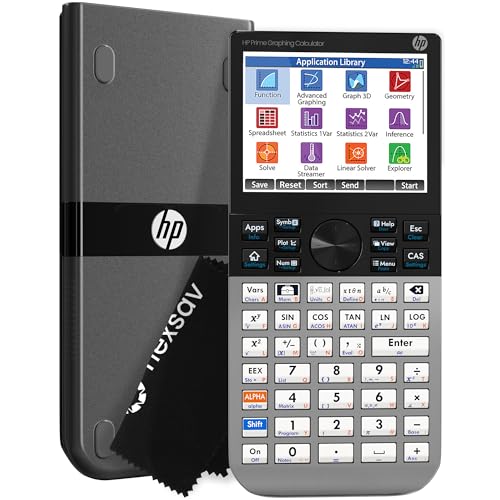
The HP Prime G2 is a different class of calculator entirely. It features a 3.5-inch multi-touch color display, a built-in Computer Algebra System (CAS), dynamic geometry tools, and 256MB of flash memory. For a college algebra student who is also taking or planning to take calculus, physics, or engineering courses, this is a single investment that covers a lot of ground.
The touchscreen experience is genuinely good. You can pinch to zoom on graphs, drag functions around the screen, and interact with your work the way you would on a tablet. The processor keeps up during panning and zooming without lag, which is a meaningful advantage over older graphing models that stutter during dynamic graph manipulation.
The build quality reflects the premium positioning. The faceplate is brushed metal, the buttons use hardened rubber, and the overall device feels dense and solid in your hands. At 7.25″ long, it’s comparable in size to the TI-84 but the metal construction gives it noticeably more presence.
The CAS mode lets the calculator work with symbolic expressions, not just numbers. That means it can simplify algebraic expressions, solve equations symbolically, and handle function operations that go well beyond what standard graphing calculators offer. For students who want a tool that grows with them into more advanced math, the HP Prime G2 is hard to beat.
Key Specs:
- Display: 3.5-inch multi-touch full-color LCD
- Memory: 256MB flash
- Power: Rechargeable lithium-ion battery (included)
- Dimensions: 7.25″L x 3.66″W
- Exam Approved: SAT, PSAT, AP, IB
- Multi-touch color display with pinch-to-zoom
- Full CAS for symbolic algebra and calculus
- Brushed metal build with premium feel
- Includes wireless connectivity options and companion app
- Steeper learning curve than most graphing calculators
- Battery life shorter than some competing models
Best Calculators for College Algebra: A Quick Rundown
- Texas Instruments TI-84 Plus CE – Best overall graphing calculator for college algebra
- Casio fx-115ES Plus 2nd Edition – Best scientific calculator with advanced functions
- Casio fx-300ES Plus 2nd Edition – Best budget-friendly scientific option for intro algebra
- Casio fx-300MS Plus 2nd Edition – Best for no-frills reliability at the lowest price point
- HP Prime G2 – Best for power users and students planning into advanced STEM courses
Final Thoughts
Choosing the right calculator for college algebra comes down to where you are in your academic journey and where you’re headed. If your course requires graphing, or if you’re going to keep using this calculator through calculus and beyond, investing in a graphing model is worth it. If your class allows or even prefers scientific calculators, there are excellent options here that cost a fraction of what graphing models run.
Think about exam requirements first, then function coverage, then budget. Don’t buy more calculator than your current courses need, but don’t buy so little that you’re replacing it next semester either. The right pick is the one that stays useful from the first quiz through the final exam, and ideally well past it.