Picking the right calculator for advanced math is harder than it sounds. There are dozens of options out there, and the wrong choice can leave you fumbling through menus during a timed exam or missing functions you actually need. A good calculator should work with you, not against you.
This guide covers five calculators built for serious math work, from high school algebra and statistics all the way through college-level calculus and engineering. Each one brings something different to the table, whether that’s raw function count, graphing power, or a unique built-in feature you won’t find anywhere else.
We tested and researched each of these models with one goal in mind: to help you spend less time comparing specs and more time actually doing math. Here’s everything you need to know before you buy.
 How We Selected the Best Calculators for Advanced Math
Our team evaluated dozens of calculators across multiple price points, focusing on what students and professionals actually need day to day. We cross-referenced product specs, user experiences, and real classroom use cases to narrow the list down to five standout options.
Here’s what we looked at:
- Function depth: How many math operations does the calculator support, and does that include the advanced stuff like integration, matrix solving, and complex numbers?
- Display quality: Can you read the screen clearly, and does the calculator show math the way it appears in a textbook?
- Exam eligibility: Is the calculator approved for standardized tests like the SAT, ACT, AP, or professional licensing exams?
- Ease of use: How quickly can a new user get productive, and how intuitive is the menu layout?
- Power reliability: Does the calculator use solar, battery, or rechargeable power, and how long does it last under regular use?
- Build quality: Does it feel sturdy enough to survive a backpack and daily handling?
- Value for the price: Does the feature set justify what you’re paying?
Every calculator on this list earned its place based on these criteria. You won’t find any filler picks here. The reviews below are meant to give you an honest, complete picture of what each model does well and where it falls short.
Best Calculators for Advanced Math (2026 Expert Review)
Five calculators made this list, ranging from budget-friendly scientific options to a premium touch-screen graphing powerhouse. Whether you’re a high school student gearing up for the SATs or a college student tackling differential equations, there’s a pick here for you.
1. Texas Instruments TI-30XS MultiView: The Reliable All-Rounder for High School and Beyond

The TI-30XS MultiView has been a classroom staple for good reason. It strikes a careful balance between capability and simplicity, giving students access to the math tools they need without the steep learning curve of more advanced models. For anyone in pre-algebra through statistics, this is a rock-solid choice.
What makes this calculator stand out right away is its MathPrint feature. Expressions appear exactly as they would in a textbook, with stacked fractions, exponents, and square roots showing up in proper form rather than as a single flat line of text. That alone makes it easier to catch mistakes before pressing enter.
The four-line display lets you view multiple calculations at once, which is genuinely useful when you’re comparing results or spotting patterns. You can also scroll back through previous entries and paste them into new calculations, which saves a lot of time during homework sessions.
We found the dual solar and battery power setup to be a practical bonus. The solar cell keeps the calculator running in well-lit classrooms, and the backup battery means you’re never left stranded. It’s also approved for the SAT, MCAT, and many professional licensing exams, so it has real staying power beyond high school.
Key Specs:
- Display: 16-digit, 4-line LCD
- Power: Solar and battery (CR2032)
- Dimensions: 7.25″ x 3.38″
- Weight: 0.51 lbs
- Exam Approved: SAT, MCAT, and select professional licensing exams
- MathPrint mode shows expressions in proper textbook format
- Four-line display for viewing multiple calculations at once
- Approved for a wide range of standardized and licensing exams
- No graphing or CAS capabilities
- Does not support matrix calculations or numerical integration
2. ROATEE 991ES: The Study-Smart Calculator with a Built-In Notepad
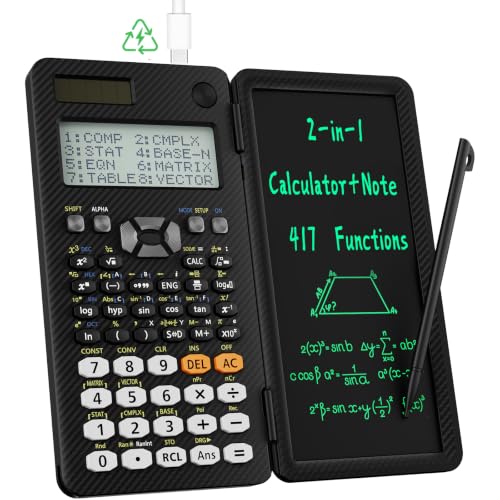
The ROATEE 991ES takes a genuinely fresh approach by combining a full-featured scientific calculator with a reusable LCD writing tablet. It’s designed for students who want to jot down intermediate steps, sketch quick diagrams, or keep a calculation visible while moving on to the next one. That combination is more useful than it might sound on paper.
Under the hood, the 991ES packs 417 functions covering everything from complex number calculations and matrix operations to base-N conversions, regression, and equation solving. The four-line display shows calculations clearly, and the textbook-style input format makes it easy to follow along with what you’re working on.
The notepad is the real differentiator here. Attached to the left side and operated with a stylus, it lets you write out steps, rough sketches, or scratch work right next to the calculator. A lock and unlock switch prevents accidental erasing, which is a small but smart design detail that competing models often miss.
Build quality is solid. The body has an anti-drop design, it’s lightweight enough to carry comfortably, and the whole unit folds closed magnetically. Dual power via a coin battery and a rechargeable option means you won’t be caught off guard before an exam.
Key Specs:
- Functions: 417
- Display: 4-line LCD, 6.2 cm screen
- Power: Battery powered (CR5, rechargeable)
- Dimensions: 6.32″ x 3.28″
- Includes: Stylus pen, carrying case
- Built-in reusable LCD notepad with lockable erase function
- 417 functions covering calculus, matrices, statistics, and more
- Anti-drop body with rechargeable battery option
- Notepad writing area is relatively small
- Some users find the manual incomplete for advanced feature reference
3. HP Prime G2: The Most Powerful Calculator on This List
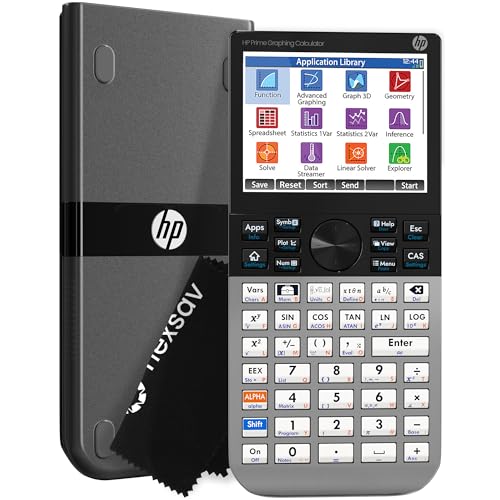
The HP Prime G2 is in a different category from everything else here. It’s a full graphing calculator with a computer algebra system, a 3.5-inch multi-touch color display, 256 MB of flash memory, and processing power that makes other calculators feel sluggish by comparison. If you’re in advanced college mathematics, engineering, or graduate-level work, this is the calculator to have.
The touchscreen is genuinely impressive. You can pinch to zoom on graphs, drag functions around the screen, and interact with mathematical content in a way that’s more intuitive than pressing through a series of menus. The display renders equations, graphs, and tables in full color, and you can switch between symbolic, graphical, and numerical views with dedicated keys.
The CAS (computer algebra system) is where this calculator earns its price. It handles symbolic manipulation, algebraic simplification, calculus operations, and advanced graphing at a level that competes with desktop math software. Students who have used tools like MATLAB or Wolfram Mathematica will recognize the kind of power on offer here.
It’s approved for PSAT, SAT, IB, and select AP exams, and it comes with a protective slide-on cover and a cleaning cloth. The rechargeable lithium-ion battery is a nice touch, though battery life under heavy use has drawn some mixed feedback.
Key Specs:
- Display: 3.5-inch multi-touch color LCD
- Memory: 256 MB flash
- Power: Rechargeable lithium-ion battery
- Dimensions: 7.25″ x 3.66″
- Exam Approved: PSAT, SAT, IB, select AP exams
- Multi-touch color display with pinch-to-zoom
- Full CAS for symbolic math and advanced calculus
- Programmable with 256 MB storage
- Steep learning curve for full feature use
- Battery life under heavy use can be inconsistent
4. Casio fx-115ES Plus 2nd Edition: The Feature-Rich Workhorse at a Low Price

The Casio fx-115ES Plus 2nd Edition is the kind of calculator that makes you wonder why you’d spend more. For the price, it offers over 280 functions, a Natural Textbook Display that shows fractions and equations exactly as they appear in your course materials, and the ability to handle everything from linear regression to numerical integration. It’s a serious scientific calculator without a serious price tag.
The function list here covers a lot of ground. You get complex number calculations, matrix and vector operations, summation, integration, simultaneous equation solving, quadratic and cubic equations, and polar-rectangular conversions. For college students in calculus, physics, statistics, or engineering, this covers most of what you’ll need on a daily basis.
Solar Plus with battery backup is one of the best power setups on the market for a calculator at this level. The solar cell handles regular use, and the LR44 battery keeps it running in low light. We found the display to be sharp and readable, though users with imperfect vision may occasionally struggle with contrast depending on the lighting angle.
One small limitation worth knowing: there’s no dedicated key to quickly toggle between fixed point and scientific notation, which can feel cumbersome if you’re switching back and forth frequently. That aside, this is an exceptional value for anyone from high school through graduate studies.
Key Specs:
- Functions: 280+
- Display: 16-digit, 4-line Natural Textbook LCD, 6.5 cm screen
- Power: Solar Plus with LR44 battery backup
- Dimensions: 9″ x 5.5″
- Weight: 6.05 oz
- Natural Textbook Display shows equations exactly as written
- 280+ functions including integration, matrices, and equation solving
- Solar plus battery backup for reliable power in any environment
- Excellent value for the breadth of features offered
- No quick toggle between fixed point and scientific notation
- Screen contrast can be harder to read at certain lighting angles
5. CATIGA CS-121: The Budget-Friendly Graphing Option for New Users
UNAVAILABLEThe CATIGA CS-121 positions itself as an affordable entry into graphing calculator territory, and for students who need basic graphing capabilities without committing to a premium price, it fills that gap. It supports over 360 functions and can display graphs and formulas simultaneously on its 3-inch LCD screen, which is a genuine convenience for visual learners.
The function list covers fractions, complex numbers, statistics, linear regression, standard deviation, and variable solving, making it reasonably equipped for high school math through early college coursework. Multiple angle measurement and calculation modes give it some flexibility across subjects like geometry, trigonometry, and algebra.
At 7 x 3.3 inches, it has a compact, ergonomic footprint that fits comfortably in one hand or on a desk. The anti-drop body gives it some everyday durability, and the included protective case guards the screen during transport. It comes in several colors, and the overall form factor is clean and portable.
That said, the graphing functionality has drawn mixed feedback. Some users find it works well for standard plotting tasks, while others have run into limitations with more complex graphing needs. It is worth verifying that the specific functions required for your course are supported before relying on it for critical coursework or exams.
Key Specs:
- Functions: 360+
- Display: 3-inch LCD
- Power: Battery powered
- Dimensions: 7″ x 3.3″
- Includes: Protective carrying case
- Supports graphing and scientific functions in one device
- Compact, portable design with included protective case
- Budget-friendly entry point for graphing calculator users
- Graphing capabilities have some limitations for complex functions
- Build material feels less premium compared to other options on this list
Best Calculators for Advanced Math: A Quick Rundown
- Texas Instruments TI-30XS MultiView: Best for exam-approved reliability and everyday high school math
- ROATEE 991ES: Best for students who want a notepad and calculator in one device
- HP Prime G2: Best overall for advanced college math, engineering, and professional use
- Casio fx-115ES Plus 2nd Edition: Best value for a feature-packed scientific calculator
- CATIGA CS-121: Best budget option for students exploring graphing functionality
Final Thoughts
Advanced math puts real demands on your tools. The calculators that hold up under those demands share a few common traits: a clear and readable display, a meaningful function set that matches your coursework, reliable power, and an input method that feels natural rather than frustrating. Prioritize those things first, and you’ll be in good shape.
Your best pick depends on where you are in your studies and what you need your calculator to do. A student preparing for the SAT has very different needs from a graduate engineering student. Take stock of the specific functions your courses require, consider whether graphing or CAS support matters to you, and choose accordingly. The right calculator won’t do the math for you, but it will absolutely make the process faster, cleaner, and a whole lot less painful.