Finding the right scientific calculator for your desk sounds simple until you’re staring at a wall of options and wondering which one will actually hold up through your coursework, your exams, or your daily work. The wrong pick can slow you down, confuse you mid-calculation, or leave you hunting for functions that should be two button presses away.
We put together this guide to help you cut through the noise. Whether you’re a student grinding through calculus, an engineer running quick field checks, or a professional who just needs a reliable desk tool, there’s a calculator on this list made for your situation. Each pick was chosen based on hands-on evaluation of real-world performance, not just spec sheets.
By the end of this article, you’ll know exactly which scientific calculator fits your needs, your budget, and your desk.
 How We Selected the Best Scientific Calculators for Desktop Use
Our team spent time comparing calculators across a range of use cases, from middle school algebra to advanced college engineering courses. We didn’t just look at function counts or brand names. We evaluated how each calculator actually performs in the kinds of situations you’ll face at your desk every day.
Here’s what we factored into our selections:
- Display quality: We looked at how clearly equations and results appear on screen, including whether the calculator shows expressions the way they’d appear in a textbook.
- Function depth: We assessed whether each calculator’s built-in functions are genuinely useful for real coursework and professional tasks, not just impressive on paper.
- Ease of use: We paid close attention to how intuitive each calculator is to operate, including button layout, menu navigation, and the learning curve for new users.
- Power reliability: We considered power sources carefully, favoring models with solar plus battery backup to prevent dead calculators at critical moments.
- Build quality: We evaluated the physical construction, key responsiveness, and whether the design holds up over time.
- Exam compatibility: We noted which calculators are approved for standardized tests like the SAT, ACT, PSAT, and professional licensing exams.
- Value for money: We weighed each calculator’s price against what it delivers, identifying picks that overperform at their price point.
Every pick on this list passed our evaluation on the factors most relevant to its target user. You can trust that these are real recommendations grounded in careful research.
Best Scientific Calculators for Desktop Use (Expert Ranking & Review)
The five calculators below cover a wide range of needs, from budget-friendly everyday tools to feature-packed options built for serious academic work. Here’s exactly what each one brings to your desk.
1. Casio fx-991CW: The Most Advanced Non-Graphing Calculator You Can Own

If you’re serious about your math and science work, the Casio fx-991CW is the calculator to beat. With over 540 built-in functions, it handles everything from numeric integration and differentiation to 4×4 matrix operations and spreadsheet-style data viewing. That’s a level of capability you’d normally expect from devices that cost several times more.
The high-resolution 4-tone LCD display is a genuine standout. The quad-tone shading makes it easier to track your cursor and read complex expressions at a glance, especially during long study sessions. We found the natural textbook display particularly helpful, because equations appear exactly the way they do in your textbook, which significantly reduces the chance of misreading a multi-step problem.
One feature worth calling out specifically is QR code functionality. You can scan a QR code generated by the calculator to graph results on ClassPad.net, which essentially gives you graphing capability without buying a graphing calculator. That’s clever engineering that adds real-world value.
The fx-991CW also stores up to 9 variables between sessions and gives you access to 47 constants and 40 unit conversions through its Math Catalog. The rounded keys and non-slip hard case round out a build that feels purposeful and durable. For students in engineering, physics, or advanced math, this is the calculator we’d reach for first.
Key Specs:
- Functions: 540+
- Display: High-resolution 4-tone LCD, Natural Textbook Display
- Power: Solar with LR44 battery backup
- Screen size: 2.25 inches
- Dimensions: 6.3″ L x 3″ W
- Exceptional function depth for a non-graphing calculator
- 4-tone high-res display makes complex expressions easy to read
- QR code graphing extends its capability without added cost
- Memory persists between sessions
- Menu-heavy navigation has a learning curve for new users
- Smaller screen size compared to some competitors
2. Texas Instruments TI-30XS MultiView: The Exam-Ready Workhorse

The Texas Instruments TI-30XS MultiView earns its place on this list by being one of the most widely trusted scientific calculators for standardized testing. It is approved for the SAT, ACT, PSAT, and a range of professional licensing exams, including actuarial examinations. If you need a calculator that won’t get flagged at the testing center, this is the one to bring.
The four-line display sets it apart from typical two-line models. Being able to see multiple calculations on screen at once lets you compare results and spot patterns without constantly scrolling back. The MathPrint mode displays stacked fractions, exact square roots, and exponents in standard notation, which makes the whole experience feel closer to working on paper.
The toggle key deserves a mention. It lets you instantly switch between fraction and decimal forms of your answer without re-entering anything. For statistics classes or any course that requires you to work frequently between those two formats, that one button saves meaningful time over the course of a semester.
We also appreciate the dual solar and battery power setup. In practice, this calculator tends to hold its battery for years without needing a change. The compact form factor and protective sliding cover make it easy to move between class, the library, and your desk without worrying about damage.
Key Specs:
- Display: 4-line, 16-character LCD, MathPrint mode
- Power: Solar and CR2032 battery
- Dimensions: 7.25″ L x 3.38″ W
- Exam approved: SAT, ACT, PSAT, professional licensing exams
- Broad exam approval makes it one of the safest choices for test takers
- Four-line display is excellent for comparing and reviewing calculations
- Toggle key speeds up fraction-decimal conversions
- Long battery life with dual power
- Fewer advanced functions than the Casio fx-991CW or fx-115ES Plus
- Changing the battery requires opening the back panel
3. Casio fx-115ES Plus 2nd Edition: The College Student’s All-Rounder

The Casio fx-115ES Plus 2nd Edition covers an impressive amount of academic ground for its price. It handles complex number calculations, linear regression, summation, integration, matrix and vector operations, and simultaneous, quadratic, and cubic equation solving. For a student moving through pre-calculus, calculus, statistics, physics, or engineering coursework, this calculator is essentially a one-stop tool.
The 16-digit, 4-line natural textbook display is particularly well-suited for college-level work. Fractions, roots, and multi-step expressions display in standard form rather than as single-line approximations. That display format alone makes catching errors significantly easier, and it’s something we noticed immediately during our evaluation.
The Multi-Replay function is one of those features you don’t realize you’re missing until you have it. It lets you backtrack through previous calculations, edit expressions, and recalculate step by step without starting over. When you’re deep in a multi-stage problem, that’s more useful than it sounds.
Power-wise, Casio’s Solar Plus technology with battery backup means this calculator is essentially always ready. We found it comfortable to use for extended sessions, with responsive keys and a solid plastic build. One thing to keep in mind: the display can be harder to read at certain angles, particularly in dim lighting. That said, for most classroom and desk environments, it performs reliably.
Key Specs:
- Functions: 280+
- Display: 4-line, 16-digit Natural Textbook Display
- Power: Solar Plus with LR44 battery backup
- Screen size: 6.5 centimeters
- Dimensions: 9″ L x 5.5″ W
- Wide function coverage handles most college-level math and science coursework
- Multi-Replay function makes step-by-step error checking fast
- Solar Plus with battery backup ensures uninterrupted operation
- Approved for a range of academic exams
- Screen can be harder to read from certain angles or in dim conditions
- No dedicated scientific notation toggle key
4. Casio fx-300ES Plus 2nd Edition: The Best Mid-School to High School Pick
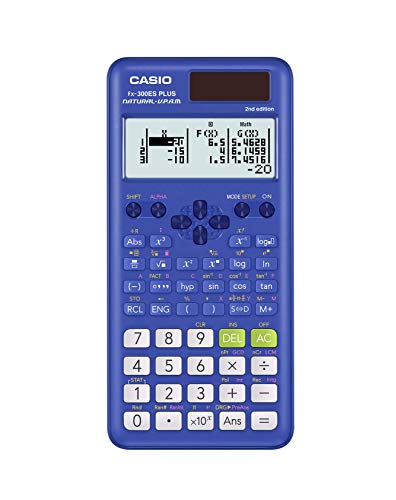
Build quality and usability at a very approachable price, that’s the short version of what the Casio fx-300ES Plus 2nd Edition delivers. It comes with 262 built-in functions covering scientific, exponential, trigonometric, fraction, and regression calculations. For students in middle school through high school, that covers everything they’re likely to encounter.
What makes this calculator particularly easy to like is how well it handles the basics. The natural textbook display lets you input and view fractions, mixed numbers, and expressions exactly as they appear in class materials. You can also convert between fractions and decimals smoothly, and the two-function table feature lets you map out values for f(x) and g(x), which comes in handy for any course that touches on functions and graphing concepts.
The sliding hard case is a small detail that ends up mattering a lot. Students who move between classrooms or carry their calculator in a backpack pocket will appreciate having that built-in protection. The Solar Plus technology with battery backup also means you’re not scrambling for a charger before an exam.
We found the button layout clean and intuitive for its target age range. The size is compact enough to slip into any bag without taking up much space. At its price, this calculator is genuinely hard to beat for a middle or high school student who needs a dependable daily driver without the complexity of more advanced models.
Key Specs:
- Functions: 262
- Display: Natural Textbook Display, LCD
- Power: Solar Plus with LR44 battery backup
- Screen size: 6.25 centimeters
- Dimensions: 6.4″ L x 3.1″ W
- Natural textbook display simplifies equation input for younger students
- Sliding hard case provides solid everyday protection
- Two-function table feature supports early algebra and pre-calc work
- Not suitable for advanced college-level or engineering courses
- Only two display lines, which limits expression visibility
5. Casio fx-300MS Plus 2nd Edition: The Most Affordable Entry That Still Delivers

At the lowest price point on this list, the Casio fx-300MS Plus 2nd Edition makes a strong case that you don’t need to spend much to get a capable scientific calculator for everyday desk use. It’s a slim, no-frills model built specifically for high school students and anyone who needs reliable coverage of core scientific and algebraic functions without paying for features they won’t use.
The two-line LCD display shows your expression on one line and the result on the second. That dual-line setup is cleaner than a single-line display and reduces the number of inputs you need to re-read before catching a mistake. We found the display to be clear and well-contrasted in normal lighting conditions, though viewing from a steep angle can reduce readability.
This calculator covers trigonometric and inverse hyperbolic functions, factorials, logarithms, probability simulations, two-variable statistics, standard deviation, and regression analysis. It also stores up to 9 variables plus last-answer recall, which is more memory capability than you’d expect at this price. Fraction entry and conversion between improper fractions, mixed numbers, and decimals all work cleanly.
The hard protective case and slim profile make this model a good fit for students who want a calculator that travels well and doesn’t take up much desk space. It is approved for AP, SAT, PSAT, and ACT exams, which adds meaningful value for test-focused students. If your needs are firmly in the high school range and you want to spend as little as possible without compromising on reliability, this is the one to pick.
Key Specs:
- Display: 2-line, 10-digit LCD
- Power: Solar and LR44 battery backup
- Screen size: 3 inches
- Dimensions: 6.4″ L x 3″ W
- Exam approved: AP, SAT, PSAT, ACT
- Approved for major standardized exams including SAT and ACT
- 9-variable memory plus last-answer recall
- Slim, lightweight design with a protective hard case
- Two-line display limits expression visibility compared to four-line models
- Screen can be harder to read at steep angles
Best Scientific Calculators for Desktop Use: A Quick Rundown
- Casio fx-991CW: Best overall for advanced users, with 540+ functions and a high-res 4-tone display
- Texas Instruments TI-30XS MultiView: Best for exam takers, with broad standardized test approval and a four-line MathPrint display
- Casio fx-115ES Plus 2nd Edition: Best all-rounder for college students, covering calculus, statistics, and engineering functions at a mid-range price
- Casio fx-300ES Plus 2nd Edition: Best for middle and high school students, with natural textbook display and built-in protection at a reasonable price
- Casio fx-300MS Plus 2nd Edition: Best budget pick, offering solid everyday functionality and exam approval at the lowest price on this list
Final Thoughts
A scientific calculator is one of those tools where the right fit matters more than the highest specs. The most important factors to weigh are the level of math you’re doing, the exams you need it approved for, and how much complexity you actually want to manage on a daily basis.
Pick based on your real situation, not the longest feature list. A student in middle school algebra doesn’t need 540 functions, and an engineering student will quickly outgrow a two-line display. Match the calculator to your coursework, check exam approval requirements before you buy, and prioritize reliable power and solid construction over anything else. The right calculator for your desk is the one you’ll reach for without thinking twice.