If you’ve ever tried to work through a surveying problem, a trigonometry assignment, or a navigation calculation and found yourself fumbling through degree-minute-second conversions, you already know how much the right calculator matters. Not every scientific calculator handles DMS work the same way, and picking the wrong one can turn a straightforward calculation into a frustrating guessing game.
We put together this guide to help you cut through the noise. Whether you’re a high school student tackling trig for the first time or an engineering student who needs a calculator that can keep up with advanced coursework, there’s something here for you. By the time you finish reading, you’ll know exactly which calculator fits your needs and why.
The five calculators reviewed here span a range of price points and capability levels, so you won’t be paying for features you don’t need — or going without ones you do.
 How We Selected the Best Scientific Calculators for Degrees, Minutes, Seconds
Our team spent time evaluating each calculator hands-on, looking beyond the spec sheet to understand how each one performs in real study and work conditions. We compared how each model handles DMS input and conversion, how readable the display is under different lighting, and how the overall build holds up with daily use.
Here are the factors we weighed most heavily:
- DMS functionality: Whether the calculator handles degree, minute, and second conversions accurately and with minimal extra steps.
- Display clarity: How easy it is to read expressions, especially when working through multi-step angle calculations.
- Function count and depth: The breadth of built-in math functions, from basic trig to calculus, statistics, and matrix operations.
- Power reliability: Whether the calculator uses solar, battery, or a combination, and how that affects dependability during exams or long study sessions.
- Build quality and portability: How well the calculator is constructed and how easy it is to carry between class and home.
- Exam approval: Whether the model is permitted for standardized tests like the SAT, ACT, AP exams, or professional licensing exams.
- Value: How much capability you’re actually getting relative to what you’re paying.
Every calculator on this list earned its spot by performing well across the factors that matter most to everyday users. The reviews below give you an honest look at where each one shines and where it falls short.
Best Scientific Calculators for Degrees, Minutes, Seconds (2026 Expert Review)
Five calculators made our final list. Each one brings something different to the table, so read through carefully before making your pick.
1. Casio fx-300MS Plus 2nd Edition – The Budget-Friendly DMS Workhorse

At its core, the Casio fx-300MS Plus 2nd Edition is a dependable, no-fuss scientific calculator that covers all the bases most students need. It handles trigonometric functions, degree conversions, statistics, and fractions without asking you to spend a lot of money or climb a steep learning curve.
The 2-line, 10-digit LCD display is a real practical advantage here. You see both your input and your result at the same time, which makes catching entry errors much easier, especially during time-pressured exam situations. The display contrast is bold enough to read clearly in most lighting conditions, including bright classrooms and outdoor settings.
We particularly liked the physical build on this one. It’s slim, fits neatly into any bag pocket, and comes with a hard protective case that actually holds up over time. The key spacing is tight but workable, and the Delete key for fixing single-character mistakes is a small detail that saves a lot of frustration.
This calculator runs on solar power with a battery backup, which means it keeps working even in dim rooms. It also stores up to 9 variables and recalls your last answer, which comes in handy during multi-step DMS conversions where intermediate values matter.
Key Specs:
- Display: 2-line, 10-digit LCD
- Functions: 240+
- Power: Solar with battery backup (1 LR44)
- Dimensions: 6.4″ x 3″
- Exam approved: AP, SAT, PSAT/NMSQT, ACT
- Bold, high-contrast display reads clearly in most lighting
- Exam-approved for major standardized tests
- Hard protective case included
- Display can be harder to read at an angle
- No natural textbook display
2. Casio fx-991CW – The Advanced Powerhouse for Engineering and Science

If you need a calculator that goes well beyond DMS work and can handle the full demands of college-level science and engineering, the Casio fx-991CW is the one to beat. With 540+ functions, including 4×4 matrix operations, numeric integration and differentiation, and a spreadsheet-style data view, this is a machine built for serious academic use.
The high-resolution 4-tone display sets this model apart from everything else on this list. The quad-tone shading makes it noticeably easier to track your cursor when editing long expressions, and the natural textbook format means fractions, roots, and equations appear exactly as you’d write them by hand. For DMS calculations specifically, that readability makes a genuine difference when you’re working through multi-step angle problems.
One feature that math teachers have specifically requested is the persistent memory. The fx-991CW stores up to 9 variables between sessions, so your saved constants and values don’t vanish when you turn the device off. We also found the QR code function genuinely useful. Scan it with your phone and it opens ClassPad.net to graph your results visually, effectively giving you a graphing capability without the graphing calculator price tag.
The build is solid, with rounded keys that feel tactile and a non-slip hard case that keeps the unit protected. Our one note is that the menu-driven interface takes a little getting used to, especially if you’re coming from a button-heavy calculator. But once the layout clicks, the speed and depth of this device are hard to argue with.
Key Specs:
- Display: High-res 4-tone natural textbook LCD
- Functions: 540+
- Power: Solar with battery backup (1 LR44)
- Dimensions: 6.3″ x 3″
- Matrix operations: Up to 4×4
- 540+ functions including calculus and matrix operations
- Persistent memory between sessions
- QR code graphing via ClassPad.net
- Outstanding display clarity
- Menu navigation has a learning curve
- Some exam bodies flag it as semi-programmable
3. Casio fx-300ES Plus 2nd Edition – The Student Favorite with Textbook Display
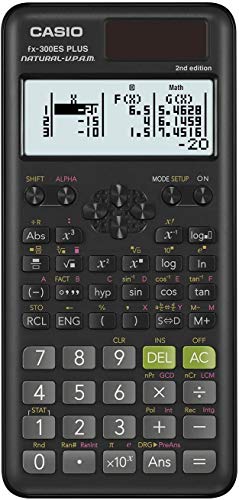
The Casio fx-300ES Plus 2nd Edition occupies a sweet spot between simplicity and power. It brings Casio’s natural textbook display to a price point that most students can afford without hesitation, and it covers the DMS functions, trig, and statistical calculations that middle school through high school coursework demands.
What makes the natural textbook display so useful for DMS work is how it handles fractions and mixed expressions. You enter and read angles the same way you’d write them on paper, which reduces confusion and makes it easier to verify your work at a glance. The Solar Plus technology with battery backup means you’re not scrambling for a charger before a big exam.
We found the two-function table feature particularly underrated. You can define and compute tables of values for f(x) and g(x), which is genuinely useful in trigonometry and geometry courses where you’re analyzing angle behavior across a range. The random number generator is a small but handy extra for stats work.
The build feels sturdy for its price. It ships with a slide-on hard case, and the inside of the cover includes a quick-reference sticker for mode changes and common operations. Students switching from a graphing calculator to a non-graphing model will appreciate that small orientation guide.
Key Specs:
- Display: Natural textbook LCD, 2-line
- Functions: 262
- Power: Solar with battery backup (1 LR44)
- Dimensions: 6.38″ x 3.13″
- Operating system: V.P.A.M.
- Natural textbook display at a budget price
- Two-function table for f(x) and g(x)
- Slide-on hard case with quick-reference guide inside
- No persistent memory between sessions
- Fewer functions than other models on this list
4. IPepul Scientific Calculator with Notepad – The Fun, Practical Pick for Everyday Students

The IPepul Scientific Calculator takes a different approach to the student experience. Instead of competing purely on functions or display technology, it adds a built-in LCD writing tablet and stylus directly to the unit. For students who constantly lose scratch paper or want to jot down intermediate steps during a DMS conversion, that’s a genuinely practical feature.
The calculator itself covers algebra, trigonometry, and other core math areas well enough for middle school, high school, and introductory college work. The 10-digit screen is readable, the buttons are responsive, and the lightweight build makes it easy to toss in a bag without a second thought. The stylus stores neatly in the back of the unit, so you’re not constantly hunting for it.
The design is available in multiple colors, and the compact form factor is similar in size to a smartphone. It runs on button batteries, which are easy to replace without tools.
The notepad is the headline feature, and it works well for quick calculations and written notes. That said, the line thickness on the writing surface is thinner and lighter than the product photos suggest, so it’s better suited to quick jottings than detailed diagrams. If the notepad is your primary reason for buying this over a Casio, manage your expectations accordingly.
Key Specs:
- Display: 10-digit LCD (2.5 inches)
- Power: Battery powered (2 lithium metal batteries included)
- Built-in LCD notepad with stylus
- Dimensions: 6.5″ x 3.27″
- Weight: 120 grams
- Built-in reusable LCD notepad and stylus
- Lightweight and portable
- Available in multiple color options
- Notepad lines are thinner and dimmer than product photos show
- Not approved for standardized exams
5. Casio fx-115ES Plus 2nd Edition – The Top Pick for College Math and Beyond

The Casio fx-115ES Plus 2nd Edition is one of the most capable non-graphing scientific calculators on the market, and it earns that reputation consistently. With over 280 functions, a 4-line natural textbook display, and the ability to solve simultaneous, quadratic, and cubic equations, it’s built for students who are pushing into calculus, physics, and engineering territory.
For DMS calculations specifically, the 4-line display is a major advantage over the 2-line alternatives. You can see more of your expression at once, track intermediate values more easily, and catch errors without constantly scrolling back through your input. Polar-to-rectangular conversions, complex number calculations, and matrix/vector operations all come standard, and the multi-replay function lets you step back through previous calculations and edit expressions without starting over.
We tested it across calculus and physics problems and found the function input genuinely intuitive once you’re past the initial setup. The equation solver handles definite integrals and derivatives with clean input, which is something you’d normally expect only from much pricier graphing models.
The Solar Plus with battery backup is reliable, and the build feels solid without being heavy. One reviewer who used it through a full college chemistry course noted that it handled every calculation thrown at it without a single issue. The one common complaint is that the white colorway picks up grime faster than darker models, but that’s a cosmetic issue rather than a functional one.
Key Specs:
- Display: 4-line natural textbook LCD
- Functions: 280+
- Power: Solar with battery backup (1 LR44)
- Dimensions: 9″ x 5.5″
- Includes: Matrix/vector operations, summation, integration, polar-rectangular conversion
- 4-line display shows more of your expression at once
- Handles calculus, physics, and engineering-level functions
- Multi-replay for backtracking and editing calculations
- Exam approved for a wide range of academic and professional settings
- Light colorway shows dirt with daily use
- No dedicated change-sign button
Best Scientific Calculators for Degrees, Minutes, Seconds: A Quick Rundown
- Casio fx-300MS Plus 2nd Edition: Best budget pick with exam approval and a bold, readable display
- Casio fx-991CW: Best for advanced users who need 540+ functions and persistent memory
- Casio fx-300ES Plus 2nd Edition: Best for students who want a natural textbook display without spending much
- IPepul Scientific Calculator with Notepad: Best for students who want a built-in scratch pad alongside their calculator
- Casio fx-115ES Plus 2nd Edition: Best overall for college-level math, science, and engineering
Final Thoughts
A scientific calculator that handles degrees, minutes, and seconds well isn’t just a convenience. It’s a tool that directly affects how accurately and efficiently you work through real problems. The key factors to prioritize are display readability, the depth of trigonometric and conversion functions, and power reliability, especially for exam use. If your work or coursework goes beyond basic trig, a natural textbook display and multi-line screen will pay dividends every single time you use the device.
Think about where you are right now and where you’re headed. A student in middle school has very different needs from an engineering sophomore or a professional working in the field. Pick the calculator that matches your actual level, not just the one with the most features, and you’ll have a tool that serves you well for years.