Linear algebra is one of those subjects where the right tool can make a real difference. Between matrix operations, systems of equations, vector calculations, and numeric computations, the math gets heavy fast. A calculator that can’t keep up leaves you doing tedious arithmetic by hand when you should be focusing on the concepts.
That’s exactly why this guide exists. We tested and researched the most talked-about scientific calculators to find the ones that genuinely hold their own in a linear algebra course — from intro-level matrix work all the way through more advanced operations. Every pick here was evaluated against the specific demands of the subject.
By the time you finish reading, you’ll know exactly which calculator fits your course level, your budget, and your workflow. The five options below cover a wide range of needs, so there’s a solid match for almost every student.
 How We Selected the Best Calculators for Linear Algebra
Our team spent time comparing calculators across specs, real-world usability, and the practical demands of linear algebra coursework. We didn’t just look at feature lists — we focused on how these tools perform when it counts, like during an exam or a problem set with back-to-back matrix operations.
Here are the factors we weighed most heavily:
- Matrix support: Whether the calculator handles matrix entry, multiplication, determinants, inverses, and higher-dimension operations directly.
- Display quality: How clearly the screen shows equations, stacked fractions, and multi-step expressions — crucial for catching input errors.
- Exam eligibility: Whether the calculator is approved for standardized tests and college exams where graphing or programmable devices are banned.
- Function depth: The total number of built-in functions and whether they include the operations most relevant to linear algebra, such as systems of equations solvers and vector calculations.
- Ease of navigation: How intuitive the interface is, especially for students new to advanced scientific calculators.
- Power reliability: Whether the calculator uses solar, battery, or both — and how that affects long-term dependability in study and exam settings.
- Value for money: Whether the price is justified by the features and build quality, particularly for students on a budget.
Every calculator on this list earned its place by performing well across most of these factors. The reviews below will show you exactly where each one shines and where it falls short.
Best Calculators for Linear Algebra (2026 Expert Review)
These five calculators represent the strongest options currently available for linear algebra students at the high school and college level. Each one has something different to offer — read through carefully so you can match the right pick to your specific situation.
1. Casio fx-991CW — The Most Feature-Packed Non-Graphing Calculator for Serious Students

The Casio fx-991CW sits at the top of this list because it delivers the most complete set of linear algebra tools in a non-graphing package. It handles 4×4 matrix operations, vector calculations, numeric integration and differentiation, and over 540 total functions. That’s a lot of firepower at this price point.
What really sets the fx-991CW apart for linear algebra specifically is its matrix solver. You can work with matrices up to 4 rows by 4 columns, which covers the vast majority of problems you’ll encounter through a standard university-level course. The spreadsheet-style data viewing also makes entering matrix values feel organized rather than chaotic.
The high-resolution 4-tone display is one of the best screens on any non-graphing calculator today. Expressions render the way they look in your textbook — fractions stack properly, symbols display cleanly, and editing a long expression is far easier than it is on older, lower-resolution screens. The cursor tracking is noticeably smooth.
One bonus feature worth mentioning: the calculator’s QR code function lets you scan results and view graphs through ClassPad.net on your phone. It’s not a replacement for a graphing calculator, but it’s a useful bridge when you need a quick visual reference. We also found the hard case and rounded key design to be well-suited for daily carry and exam use.
Key Specs:
- Functions: 540+
- Matrix support: Up to 4×4
- Display: High-resolution 4-tone LCD
- Power: Solar with battery backup
- Screen size: 2.25 inches
- 4×4 matrix operations cover most linear algebra coursework
- High-resolution display makes complex equations easy to read and edit
- QR code graphing extends functionality beyond what the screen alone offers
- Strong exam eligibility record across college-level courses
- Interface requires a learning curve, especially for users coming from older Casio models
- Some advanced functions require more button presses than comparable models
2. Texas Instruments TI-36X Pro — The Best Interface for Engineers and Exam Takers

If you’ve grown up using Texas Instruments calculators, the TI-36X Pro will feel immediately familiar in the best possible way. The four-line MultiView display shows multiple calculations at once, and the MathPrint feature renders equations exactly as they appear in textbooks — stacked fractions, proper exponents, and all.
For linear algebra, the TI-36X Pro includes a dedicated matrix and vector entry window that supports operations including determinants, matrix multiplication, and scalar calculations. The system of linear equations solver is a genuine time-saver during problem sets. We also found its polynomial solver and numeric equation solver useful for the computational side of the course.
The build quality on this calculator is excellent. The buttons have a tactile click that gives clear feedback with every keypress — you always know whether a press registered. That’s a small thing until you’re racing through an exam, and then it matters quite a bit. The overall layout is clean and logical once you spend a few hours with it.
One thing that genuinely impressed us: this calculator outputs exact answers by default. Type in the square root of 8 and it returns a simplified radical rather than a decimal approximation. For a linear algebra course where exact answers are frequently required, this is a bigger deal than it might sound.
Key Specs:
- Display: 4-line MultiView with MathPrint
- Matrix support: Up to 3×3
- Solvers: Numeric equation, polynomial, system of linear equations
- Power: Battery powered
- Dimensions: 7.22″ x 3.27″
- Outputs exact simplified answers by default, including radicals and fractions
- Four-line display and single-mode operation make it feel closer to a graphing calculator
- Tactile, responsive buttons with strong physical feedback
- Widely approved for engineering and standardized exams
- Matrix support caps at 3×3, which may be limiting for advanced coursework
- Silver-colored arithmetic buttons can be harder to read in low light
3. Casio fx-115ES Plus 2nd Edition — Affordable Power for Calculus and Linear Algebra

The Casio fx-115ES Plus 2nd Edition punches well above its price. It covers over 280 functions including matrix and vector operations, complex number calculations, simultaneous equation solving, integration, and differentiation. For students in introductory linear algebra or any course that combines linear algebra with calculus, this calculator is a genuinely capable companion.
At the price it sells for, the feature set here is exceptional. We found it especially strong for students working through Calculus I or II alongside linear algebra, since the same calculator handles both subjects without compromise. The Natural Textbook Display renders fractions, roots, and expressions the way they appear on the page, which reduces transcription errors when copying problems from a textbook.
The build feels solid for the price. It’s compact and lightweight — easy to slide into a bag and forget about until you need it. Solar Plus power with a battery backup means you’re not worrying about the calculator dying mid-exam. The multi-replay function lets you backtrack through previous calculations and edit them, which is handy for catching errors in multi-step matrix problems.
One limitation worth flagging is the display clarity. The screen is less high-contrast than the TI-36X Pro or the fx-991CW, and in certain lighting conditions it can be harder to read quickly. It’s not a dealbreaker, but it’s noticeable if screen legibility is a priority for you.
Key Specs:
- Functions: 280+
- Display: 4-line Natural Textbook Display
- Matrix and vector support: Yes
- Power: Solar Plus with battery backup
- Screen size: 6.5 cm
- Outstanding value for the function count at this price
- Handles simultaneous equations, integration, and matrix operations
- Solar Plus power is reliable and eliminates battery anxiety
- Multi-replay function makes error-checking fast and straightforward
- Display contrast is lower than competing models, which can be harder to read in dim settings
- No quick toggle between fixed-point and scientific notation
4. Casio fx-300ES Plus 2nd Edition — The Solid Entry-Level Pick for Early Linear Algebra
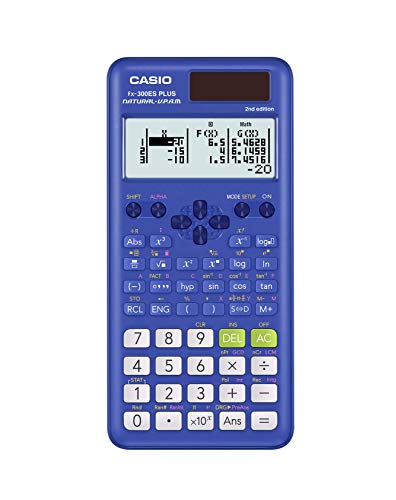
The Casio fx-300ES Plus 2nd Edition is the most approachable calculator on this list. It’s designed primarily for middle school through high school math, but its 262 built-in functions make it genuinely useful for students just entering linear algebra at the introductory level. If you’re in a course that covers basic matrix concepts, systems of equations, and foundational algebra, this calculator can handle it.
Its Natural Textbook Display is a real asset. Expressions appear as they do in a textbook, which makes checking your work significantly easier — especially when dealing with fractions and multi-term expressions. The layout is clean and uncluttered, and the buttons are well-spaced with a satisfying response when pressed.
The fx-300ES Plus also benefits from Solar Plus technology with a battery backup, which means it stays reliable under any lighting condition. It’s slim, lightweight, and fits easily in a backpack pocket. For students who want a no-fuss calculator that handles the basics well without overwhelming them with menus and modes, this is a comfortable starting point.
The honest limitation is its function ceiling. It doesn’t support matrix operations beyond what a basic course requires, and it won’t handle the higher-level linear algebra computations that come up in junior or senior-level university courses. Think of this as the right tool for Algebra I through introductory college math — not a long-term companion for a full STEM degree.
Key Specs:
- Functions: 262
- Display: Natural Textbook Display
- Power: Solar Plus with battery backup
- Dimensions: 0.5″ x 3.1″ x 6.4″
- Weight: 3.7 oz
- Natural Textbook Display makes input and review easy for beginners
- Solar Plus power with battery backup is extremely reliable
- Lightweight and easy to carry daily
- Not suited for advanced matrix operations or higher-level linear algebra
- Function count is noticeably lower than the other calculators in this lineup
5. CATIGA CS-121 — The Budget Graphing Option with Mixed Results
UNAVAILABLEThe CATIGA CS-121 occupies an interesting spot in this lineup. It’s the only calculator here with actual graphing capability, and its 3-inch LCD screen is large enough to display graphs and equations simultaneously. For students who want graphing functionality without paying the premium price of a name-brand graphing calculator, this is the most accessible entry point.
The programmable system is one of its more useful features for students who want to build custom routines rather than memorize button sequences for every operation. Over 280 functions are included, covering fractions, complex numbers, linear regression, permutations, and variable solving. The intuitive interface is designed to support students across multiple course levels without requiring deep familiarity with advanced calculators.
The physical size works in its favor. At 7.12″ x 4.5″, it offers a comfortable workspace, and the large screen makes the graphing output readable enough for a quick check of your work. If your course allows graphing calculators and you’re looking for the most affordable way to get that capability, the CATIGA CS-121 is worth considering.
That said, it comes with caveats. The graphing functions have drawn criticism from some users for inconsistent performance, and the build quality feels less refined than the Casio and Texas Instruments options on this list. For linear algebra specifically, this calculator works best as a supplement rather than a primary exam tool — especially since its exam eligibility varies by institution.
Key Specs:
- Functions: 280+
- Display: 3-inch LCD (graphing capable)
- Calculator type: Scientific and graphing
- Power: Battery powered (2 CR2 batteries)
- Dimensions: 7.12″ x 4.5″
- Graphing capability at a lower price than brand-name graphing calculators
- Large screen displays graphs and equations simultaneously
- Programmable system supports flexible use across course levels
- Graphing functions can be inconsistent in practice
- Build quality is noticeably less durable than the other options on this list
Best Calculators for Linear Algebra: A Quick Rundown
- Casio fx-991CW: Best overall for linear algebra, with 4×4 matrix support and a top-tier display
- Texas Instruments TI-36X Pro: Best for exact answers and exam-approved engineering use
- Casio fx-115ES Plus 2nd Edition: Best value for students combining linear algebra with calculus
- Casio fx-300ES Plus 2nd Edition: Best entry-level pick for introductory courses on a tight budget
- CATIGA CS-121: Best budget option for students who need graphing capability
Final Thoughts
Picking a calculator for linear algebra comes down to two key questions: how advanced is your coursework, and how much do you need from your calculator in the long run? A first-year student working through intro matrix algebra has very different needs from someone tackling applied linear algebra at the graduate level. Matching the tool to your actual course requirements saves you money and frustration.
Think about where you’re headed, not just where you are now. If you’re early in a STEM degree, it’s worth investing in a calculator that will grow with you through calculus and beyond. If you need something for a single course, a reliable mid-range option gets the job done without overspending. The right pick is the one that meets your workload honestly — and stays out of your way while you focus on the math.