A-Level Maths is where things get real. You’re no longer just solving basic equations — you’re dealing with calculus, complex numbers, matrices, statistical distributions, and financial mathematics. The calculator sitting in your pencil case either helps you move faster or slows you down at the worst possible moment.
That’s why picking the right one matters more than most students think. The wrong calculator won’t just be inconvenient; it can actually cost you marks on exams that require specific functions your device doesn’t support. The right one, on the other hand, becomes almost invisible — it just works, every time.
We put together this guide to help you cut through the noise and find the calculator that actually fits your needs. Whether you’re sitting A-Level pure maths, taking on applied statistics, or preparing for financial mathematics modules, there’s a strong option on this list for you.
 How We Selected the Best Calculators for A-Level Maths
Our team evaluated dozens of scientific and financial calculators before settling on these five. We focused not just on raw feature counts, but on how each calculator performs under real exam conditions — where clarity, speed, and reliability matter most.
Here are the key factors we considered:
- Exam approval: Whether the calculator is permitted in A-Level and related standardised exams, which immediately disqualifies many otherwise capable devices.
- Display quality: How clearly equations, fractions, and results are shown on screen, especially when working through multi-step problems.
- Function range: Whether the calculator covers A-Level topics including trigonometry, calculus, statistics, matrices, and complex numbers.
- Ease of use: How quickly a new user can get productive, and how intuitive the menu structure and key layout feel.
- Build quality: Physical durability, key responsiveness, and whether the device holds up to months of daily use.
- Power reliability: Battery life and whether the device supports solar power as a backup, which matters during long exam sessions.
- Value for money: Whether the price aligns with what you actually get in terms of capability and longevity.
Every calculator on this list earned its place. These aren’t filler picks — they’re the options we’d hand to a student the night before an exam without hesitation.
Best Calculators for A-Level Maths (2026 Expert Review)
Five calculators made this list, covering everything from specialised financial tools to high-function scientific models. Here’s a closer look at each one and where it shines.
1. Texas Instruments BA II Plus: The Go-To for Financial Mathematics Modules

If your A-Level programme includes any financial mathematics, the Texas Instruments BA II Plus is the calculator to own. It handles time-value-of-money calculations, cash flow analysis, amortisation, bond pricing, and compound interest — all through dedicated worksheet modes that walk you through each variable one at a time. For students tackling pension calculations, loan structures, or investment returns, this is the tool that makes those problems manageable.
The BA II Plus operates in two modes. Standard mode covers everyday maths plus trigonometric functions and basic time-value-of-money operations. Worksheet mode unlocks specialised tables for amortisation, bonds, depreciation, and more. Previous worksheet values are stored in memory, so you don’t have to re-enter figures when reworking a problem — a real time-saver mid-exam.
Built with ABS plastic and a professional layout, this calculator has a compact, no-frills look. The 10-digit, single-line alphanumeric display shows you the current variable and its label as you work through prompted calculations. It ships with a slide case to protect the screen and runs on a single CR123A battery.
We found the interface intuitive once you’ve spent a few hours with it. The prompted display removes most of the guesswork from financial calculations, and the built-in list-based statistics with four regression options — linear, logarithmic, exponential, and power — add extra depth for students working across quantitative modules. It’s also approved for the CFA, FRM, and CMA exams, which means it has a long life beyond A-Levels.
Key Specs:
- Display: 10-digit, single-line alphanumeric LCD
- Power: 1 CR123A battery (included)
- Dimensions: 6.49 x 2.99 x 0.69 inches
- Worksheet modes: Amortisation, bond, depreciation, compound interest, cash flow
- Statistics: One and two-variable, four regression types
- Dedicated financial worksheets make complex TVM problems far faster to solve
- Prompted display guides you through variables so you’re less likely to make input errors
- Exam approved for multiple professional and standardised exams beyond A-Level
- Single-line display means you can’t see full expressions the way you can on multiline scientific models
- Specialised focus makes it less useful for pure maths topics like calculus or matrices
2. Texas Instruments TI-36X Pro: The Powerhouse That Does Exact Maths

The TI-36X Pro is the kind of calculator that surprises you. Type in the square root of 8, and instead of handing you a long decimal, it gives you 2√2 — a simplified, exact radical. That alone separates it from most scientific calculators at any price point. For A-Level students working through calculus problems or algebraic proofs where teachers want exact answers, this capability is genuinely useful.
This is a four-line display calculator with MathPrint, which means fractions, integrals, and other expressions render the way they look in your textbook. You can scroll through previous calculations, reuse results, and view your equation history even after powering off. The interface will feel familiar if you’ve used any TI graphing calculator — the menus are structured the same way, just without the graph screen.
The function list is substantial. The TI-36X Pro handles numeric derivatives and definite integrals, polynomial and linear equation solvers, matrices up to 3×3, vectors in three dimensions, complex numbers, unit conversions, and a library of built-in scientific constants. It also features a function table that lets you generate y-values across a range of x-inputs — useful for sketching curves without a graphing calculator.
At 7.22 x 3.27 inches, the build is slim and light. One minor complaint we noted: the silver arithmetic buttons can be hard to read in certain lighting conditions, though this is easily addressed. The calculator is exam-approved for courses where graphing technology is not permitted, making it a strong and versatile choice for A-Level sittings.
Key Specs:
- Display: 4-line LCD with MathPrint
- Power Source: Battery (1 lithium metal, included)
- Dimensions: 7.22″L x 3.27″W
- Solvers: Numeric equation, polynomial, system of linear equations
- Advanced functions: Numeric integration and differentiation, matrices, vectors, complex numbers
- Exact answer output for radicals and pi-based results is rare at this price
- Four-line MathPrint display shows expressions exactly as written, reducing input errors
- Broad function coverage handles the full range of A-Level pure and applied topics
- Silver key labels can be difficult to read under poor lighting
- Steeper learning curve than simpler scientific models, especially for first-time users
3. Casio fx-115ES Plus 2nd Edition: 280-Plus Functions in One Affordable Package

The Casio fx-115ES Plus 2nd Edition punches above its price. With over 280 built-in functions, Natural Textbook Display, and Solar Plus power with battery backup, it covers virtually everything an A-Level student needs in one lightweight package. It handles complex number calculations, linear regression, summation, integration, permutations and combinations, polar-to-rectangular conversions, and matrix and vector operations — a list that maps closely onto the A-Level Further Maths specification.
What makes the display stand out is how Casio’s Natural Textbook Display renders your input. Fractions stack properly. Square roots appear under the radical sign. Integrals look like integrals. When you’re checking your work under exam pressure, being able to scan a clearly formatted expression is a genuine advantage over calculators that compress everything onto a single line.
The 4-line, 16-digit LCD is easy to read, and the Multi-Replay function lets you backtrack through previous calculations and edit expressions without starting over. The solar-plus-battery setup means you won’t find yourself hunting for a charger the night before an exam. The white plastic body has a clean, compact profile at 9 x 5.5 inches.
We tested its integral and derivative functions and found them accurate and quick. For students in Calculus I, Statistics, or Physics who need numerical answers fast, the fx-115ES Plus holds its own confidently. The button responsiveness is generally good, though a small number of users report that the keys can feel slightly soft compared to TI models. That said, for the coverage you get at this price, the trade-off is easy to accept.
Key Specs:
- Display: 4-line, 16-digit LCD with Natural Textbook Display
- Power: Solar Plus with LR44 battery backup
- Dimensions: 9″L x 5.5″W
- Functions: 280-plus, including integration, complex numbers, matrices, regression
- Warranty: 1-year limited parts and labour
- Natural Textbook Display renders expressions cleanly, exactly as written
- Over 280 functions covers A-Level pure, applied, statistics, and further maths topics
- Solar plus battery backup means power is never a concern during long sessions
- Button feel can seem slightly soft compared to competing TI models
- No quick scientific notation toggle — switching notation requires going through mode settings
4. Texas Instruments TI-30XS MultiView: The Exam-Safe All-Rounder

The TI-30XS MultiView earns its place on this list through sheer reliability and accessibility. It’s approved for a wide range of standardised exams — SAT, MCAT, state licensing exams, and more — which makes it a safe choice for A-Level students who want one calculator that works across multiple testing environments without risking a rules violation. It’s also one of the best-selling scientific calculators on the market for good reason.
The MathPrint mode lets you enter and view calculations in standard math notation: stacked fractions, exact square roots, and exponents all display as you’d expect them to look on paper. The four-line screen gives you enough room to see your current expression and recent history at the same time, which is useful when you’re working through a multi-step problem and want to check your last result.
The toggle key is a small but practical feature: tap it to switch between fraction and decimal forms instantly. The table function lets you enter a formula and generate a column of x and y values automatically. Scrolling through previous entries to investigate patterns or paste into a new calculation keeps the workflow fast. At 7.25 x 3.38 inches with a metal-reinforced plastic build, it feels solid and fits easily into any pencil case.
One thing to keep in mind: the TI-30XS MultiView is a strong general-purpose scientific calculator, but it doesn’t offer the solver functions, matrix operations, or integration capabilities of the TI-36X Pro. For students whose A-Level topics stay within algebra, statistics, geometry, and general science, it covers everything needed without unnecessary complexity.
Key Specs:
- Display: 4-line, 16-digit LCD with MathPrint
- Power: Solar and battery
- Dimensions: 7.25″L x 3.38″W
- Features: Fraction and decimal toggle, table function, entry scrolling and paste
- Build: Metal and plastic enclosure
- Broad exam approval makes it safe to use across many different testing environments
- MathPrint display shows expressions in standard notation for easy review
- Durable build with responsive keys that hold up well to daily student use
- Easy to learn — minimal setup time, very accessible for younger A-Level students
- No matrix or integration functions — less capable than the TI-36X Pro for advanced topics
- Fewer total functions than the Casio fx-115ES Plus at a similar price
5. Casio fx-300ES Plus 2nd Edition: The Best Entry-Level Pick for Core A-Level Topics
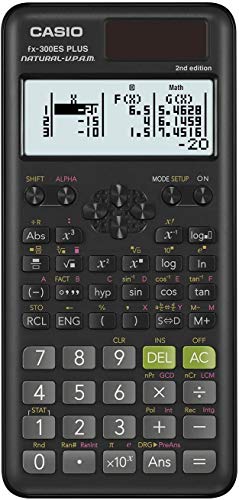
Not every A-Level student needs a calculator loaded with 280-plus functions. If your coursework stays within algebra, trigonometry, statistics, geometry, and general maths, the Casio fx-300ES Plus 2nd Edition gives you everything you need in one of the lightest and most affordable packages on this list. It’s a practical, no-nonsense choice for students who want dependable performance without spending more than necessary.
The 262 built-in functions cover the key areas: scientific and exponential calculations, trigonometry, fractions, regression analysis, and statistics. The Natural Textbook Display shows fractions and expressions as they appear in your textbook, and the two-function table feature lets you calculate values for both f(x) and g(x) simultaneously — useful for comparison problems in applied maths. The Solar Plus technology with battery backup keeps it running reliably through long exam sessions.
At 6.38 x 3.13 inches and just 0.23 pounds, this is the most portable calculator on our list. The hard sliding cover protects the keys and also carries a handy reference guide inside — a small detail that makes it easier to get up to speed quickly. The key spacing is comfortable, and the build quality is solid for the price point.
We found the display crisp and the button action responsive. Students transitioning from a graphing calculator will notice a slight learning curve — particularly around entering expressions — but most adapt quickly. The fx-300ES Plus 2nd Edition is the right fit for core A-Level Maths students who don’t need full calculus or matrix capabilities but want a reliable, exam-ready calculator that won’t let them down.
Key Specs:
- Display: 4-line LCD with Natural Textbook Display
- Power: Solar Plus with LR44 battery backup
- Dimensions: 6.38″L x 3.13″W
- Functions: 262 built-in
- Weight: 0.23 pounds
- Lightest and most compact option on this list — fits any bag without taking up space
- Natural Textbook Display presents equations cleanly for easier verification
- Excellent value for students who need core A-Level coverage without paying for extras
- Fewer advanced functions — no integration, complex numbers, or matrix operations
- Two-line display limits how much expression history you can see at once
Best Calculators for A-Level Maths: A Quick Rundown
- Texas Instruments BA II Plus — Best for financial mathematics modules and TVM calculations
- Texas Instruments TI-36X Pro — Best for exact answers and advanced pure maths functions
- Casio fx-115ES Plus 2nd Edition — Best overall for function range and display quality
- Texas Instruments TI-30XS MultiView — Best for exam versatility and ease of use
- Casio fx-300ES Plus 2nd Edition — Best entry-level option for core A-Level coverage
Final Thoughts
The best A-Level calculator is the one that matches your specific modules, not just the one with the most features. If your coursework leans into financial maths, a dedicated TVM calculator will serve you far better than an advanced scientific model. If you’re tackling Further Maths or need exact algebraic outputs, a more powerful scientific calculator is worth the investment. And if you’re covering standard A-Level topics on a tighter budget, a solid entry-level model gets the job done without unnecessary expense.
Take stock of your syllabus before you buy. Think about which exam environments you’ll be sitting in, what function depth your papers actually require, and how much time you’re willing to invest in learning a new device. Get that match right, and your calculator stops being a tool you think about — and starts being one that just works when it matters most.