Picking the right calculator for higher maths is not as simple as grabbing whatever is on the shelf. The wrong tool can slow you down during exams, leave you missing key functions mid-problem, or just make an already tough subject feel even harder. Students in calculus, engineering, statistics, and advanced sciences need a device that can keep up with them, not the other way around.
We spent time researching, comparing, and closely evaluating the most-purchased scientific calculators in this category so you do not have to start from scratch. Whether you are prepping for a licensing exam, pushing through a Ph.D. program, or simply taking your first college-level calculus course, there is a calculator on this list that fits your situation.
This guide breaks down five of the best calculators for higher maths, covering what each one does well, where it falls short, and who it suits best. By the time you finish reading, you will know exactly which one belongs in your bag.
 How We Selected the Best Calculators for Higher Maths
Our team evaluated dozens of scientific calculators currently available, narrowing the list down by cross-referencing real-world performance data, verified buyer feedback, and hands-on feature comparisons. We focused specifically on devices suited to higher-level coursework rather than basic arithmetic tools dressed up as scientific calculators.
Here are the key factors we considered:
- Function count and depth: We looked at how many functions each calculator offers and whether those functions actually serve higher maths needs like integration, differentiation, matrix operations, and complex number handling.
- Display quality: A clear, readable display matters more than most people realize. We evaluated screen resolution, line count, and how naturally equations are presented.
- Exam eligibility: Many students need calculators cleared for standardized tests and professional licensing exams. We checked which devices meet those requirements.
- Ease of use: A calculator packed with features is useless if navigating those features wastes precious time. Intuitive menu layouts and logical key placement were weighted heavily.
- Power reliability: Running out of battery mid-exam is a nightmare. We prioritized calculators with solar power, battery backup systems, or both.
- Build quality and portability: Devices that feel flimsy or break easily are not worth recommending. We considered durability, weight, and whether the design is practical for daily carry.
- Value for money: Higher price does not always mean better performance. We assessed what each calculator actually delivers relative to its cost.
Every pick on this list earned its place based on these criteria, not just popularity. With that process in mind, here is what made the cut.
Best Calculators for Higher Maths (Expert Ranking & Review)
The five calculators below represent the strongest options available right now for students and professionals tackling higher maths. Each review covers the features that matter most for serious academic and exam use, with honest notes on where each device performs and where it has room to grow.
1. Casio fx-991CW: The Powerhouse for Serious Maths Students

If you are stepping into engineering, physics, or advanced calculus, the Casio fx-991CW is the calculator that earns its place on your desk first. It packs 540-plus functions into a single device, covering everything from numeric integration and differentiation to 4×4 matrix operations and vector calculations. For students who regularly deal with complex expressions, this is a level of capability that goes well beyond what most non-graphing calculators offer.
The high-resolution 4-tone LCD display is a genuine standout feature. Quad-tone shading makes cursor tracking easier and gives the screen a clarity that rivals calculators at much higher price points. Equations appear exactly as they would in a textbook, which cuts down on input errors and makes it far easier to review your work before hitting equal.
We found the QR code functionality to be a smart addition. Scanning the code takes you to ClassPad.net, where you can graph results on your phone or laptop without needing a dedicated graphing calculator. It is a practical workaround that genuinely extends what this device can do. The rounded keys and included hard case round out a build that feels ready for both everyday study sessions and high-stakes exam conditions.
One thing to keep in mind: the CW represents a full interface redesign from its predecessor, the fx-991EX. Some functions that used to be single-button presses now require going through the Math Catalog. There is a short adjustment period, especially if you are coming from an older Casio model.
Key Specs:
- Functions: 540+
- Display: High-resolution 4-tone LCD, 2.25 inches
- Power: Solar with LR44 battery backup
- Dimensions: 6.3″ L x 3″ W
- Weight: 3.35 oz
- Warranty: 1-year limited
- Exceptional function count for a non-graphing scientific calculator
- High-resolution 4-tone display offers outstanding clarity
- QR code graphing extends functionality without extra cost
- Hard case and durable build ready for exam conditions
- Interface redesign has a learning curve for those used to older Casio models
- Some functions require extra keystrokes compared to the previous generation
2. Casio fx-115ES Plus 2nd Edition: The Versatile Workhorse for College-Level Courses

The Casio fx-115ES Plus 2nd Edition has earned a devoted following among college students for good reason. It covers over 280 functions, including complex number calculations, linear regression, summation, integration, permutations, combinations, polar-rectangular conversions, and matrix and vector operations. For anyone working through statistics, pre-calculus, calculus, physics, or engineering courses, that function set covers the vast majority of what you will actually need.
Where this calculator truly earns its reputation is in day-to-day usability. The Natural Textbook Display shows fractions, roots, and expressions exactly as they appear in printed textbooks. You type the expression the way you learned it, and the calculator shows it back to you the same way. That alone saves time and reduces transcription errors, especially during timed exams.
The Multi-Replay function lets you backtrack through previous calculations, edit an expression, and recalculate without starting from scratch. For long problem sets where you need to tweak one variable at a time, this is a genuine time-saver. The Solar Plus technology with battery backup means you are never hunting for a charging cable before an exam.
One limitation worth noting is that the calculator does not include a quick toggle for switching between fixed-point and scientific notation with a single dedicated key. Getting there requires a few extra steps through the mode settings, which can feel cumbersome during fast-paced calculations.
Key Specs:
- Functions: 280+
- Display: 4-line LCD, 6.5 cm screen
- Power: Solar Plus with LR44 battery backup
- Dimensions: 9″ L x 5.5″ W
- Weight: 6.05 oz
- Warranty: 1-year limited parts and labor
- Over 280 functions cover nearly all college-level science and math needs
- Natural Textbook Display reduces input errors significantly
- Multi-Replay function makes editing and recalculating fast
- Solar Plus power means zero charging anxiety
- No dedicated single-key toggle for scientific notation
- Slightly bulkier and heavier than some alternatives in this category
3. Texas Instruments TI-30XS MultiView: The Exam-Approved Reliable Choice

The TI-30XS MultiView from Texas Instruments has built a reputation as one of the most trusted scientific calculators for standardized testing. It is approved for use on the SAT, ACT, PSAT, and numerous professional licensing exams including state-level tests in medicine, law, and engineering. If exam eligibility is a hard requirement for you, this calculator clears that bar consistently and reliably.
The four-line display and MathPrint mode allow you to enter and view calculations in standard math notation, including stacked fractions, exponents, and exact square roots. Being able to see your full expression on screen before you commit to an answer is a significant advantage, particularly in high-pressure testing environments where a misread input can cost you points.
We were impressed by how much thought went into workflow features. The toggle key lets you flip instantly between fraction and decimal representations. The x,y table function lets you explore values for a given function either automatically or by entering specific x values, which is genuinely useful for pre-calculus and algebra work. Scrolling through previous entries to find and paste expressions into new calculations adds another layer of efficiency that casual users often overlook.
The TI-30XS does not have quite the same function depth as the top Casio models in this guide. Some users find certain shortcuts require more keystrokes than they would prefer. That said, its durability, consistent performance, and near-universal exam acceptance make it hard to argue against for anyone whose primary concern is exam readiness.
Key Specs:
- Display: 4-line LCD, 5 cm screen
- Power: Solar and battery
- Dimensions: 7.25″ L x 3.38″ W
- Weight: 0.51 lbs
- Compatible: SAT, ACT, state licensing exams
- Warranty: 1-year limited
- Widely approved for standardized and professional licensing exams
- MathPrint mode displays expressions in natural textbook notation
- x,y table function useful for algebra and pre-calculus exploration
- Durable build with a protective face cover that snaps to the back
- Fewer advanced functions compared to the Casio fx-991CW
- Some common operations require more keystrokes than competing models
4. Casio fx-300ES Plus 2nd Edition: The Best Entry Point for Higher Maths
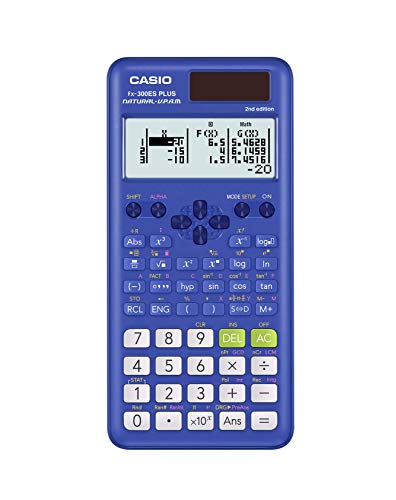
The Casio fx-300ES Plus 2nd Edition does not try to be the most advanced calculator in the room. What it does instead is cover the essential functions for middle school through early college maths in a package that is approachable, affordable, and genuinely well-made. With 262 built-in functions, it handles trigonometry, logarithms, fractions, regression analysis, statistics, and more.
Its Natural Textbook Display shows fractions as actual stacked fractions, roots as proper radicals, and expressions the way they appear in print. The ability to display results as fractions, exact decimal values, or in terms of pi is particularly useful for students in algebra and early calculus who need to see exact answers rather than approximations. A helpful reference guide is printed on the inside of the sliding hard case, which is a small but genuinely practical touch for students still learning the layout.
One standout utility feature is the two-function table, which lets you calculate values for both f(x) and g(x) simultaneously. You can define the step size, start value, and end value, which makes plotting and pattern analysis much faster than punching in individual values by hand. The random number generator is another feature that statistics students will find handy for simulations and probability work.
This is not the calculator for someone working through graduate-level engineering problems. It does not offer 4×4 matrix support or numeric calculus functions. But for students in pre-algebra through early college courses, it covers exactly what they need without unnecessary complexity.
Key Specs:
- Functions: 262
- Display: Natural Textbook Display LCD, 6.25 cm screen
- Power: Solar Plus with LR44 battery backup
- Dimensions: 6.4″ L x 3.1″ W
- Weight: 0.23 lbs
- Warranty: 1-year limited
- 262 functions cover all core needs for pre-algebra through early college maths
- Two-function table accelerates pattern analysis and plotting
- Lightweight and compact with a protective sliding hard case
- Solar Plus power with battery backup for uninterrupted use
- Not suited for advanced topics like 4×4 matrices or numeric calculus
- Two-line display shows less on screen at once than four-line competitors
5. iPepul Scientific Calculator with Notepad: The Practical Combo Tool for Organized Learners

The iPepul Scientific Calculator with Notepad takes a different approach from every other device on this list. Rather than competing purely on function count, it combines a 10-digit scientific calculator with a built-in LCD writing tablet and stylus. The idea is simple and genuinely useful: instead of scrambling for scratch paper mid-problem, you write your working notes directly on the side panel and erase them with a single button press when you are done.
At just 120 grams and roughly the size of a smartphone, this is the most portable option in this roundup by a clear margin. The 2.5-inch screen is easy to read, and the buttons are comfortable and responsive for a device in this size category. It handles the standard scientific calculator functions expected for algebra, basic trigonometry, and introductory statistics, making it a practical fit for middle school through early college-level coursework.
The design puts a genuine premium on convenience. There is no charging cable to worry about, battery replacement requires no screwdriver, and the one-press erase feature on the notepad keeps things moving without interruption. For students who do most of their work on paper and just need a reliable calculating companion that also holds a few working notes, this device delivers a combination that nothing else on this list can match.
The tradeoff is that the notepad display is noticeably dimmer than the product photography suggests. Lines written on it are thin and light, which can make reading notes back in certain lighting conditions harder than expected. It is also not the right tool for students who need advanced functions like matrix operations, numeric integration, or complex number calculations.
Key Specs:
- Display: 10-digit LCD, 2.5 inches
- Notepad: Built-in LCD writing tablet with stylus
- Power: 2 lithium button batteries (included, screwless replacement)
- Dimensions: 6.5″ L x 3.27″ W
- Weight: 120 g
- Warranty: 1 year
- Built-in LCD notepad eliminates the need for scratch paper
- Extremely lightweight and compact for daily carry
- Screwless battery replacement for fast, easy maintenance
- Notepad display is dimmer than advertised, with thin, faint lines
- Not suitable for advanced maths requiring matrix, calculus, or complex number functions
Best Calculators for Higher Maths: A Quick Rundown
- Casio fx-991CW: Best overall for advanced functions, with 540-plus capabilities and a high-resolution 4-tone display.
- Casio fx-115ES Plus 2nd Edition: Best for college-level coursework, with 280-plus functions, Multi-Replay, and Solar Plus power.
- Texas Instruments TI-30XS MultiView: Best for exam eligibility, with near-universal approval for standardized and professional licensing tests.
- Casio fx-300ES Plus 2nd Edition: Best entry-level option, covering all core functions for pre-algebra through early college maths at a lightweight price.
- iPepul Scientific Calculator with Notepad: Best for portability and note-taking, with a built-in LCD writing tablet and smartphone-sized form factor.
Final Thoughts
The best calculator for higher maths is not one-size-fits-all. What matters most is matching the device to what you actually need it to do. If you are in an advanced engineering or science program, prioritize function depth and display quality. If standardized exams are on your horizon, exam approval status should be at the top of your checklist. If you are just getting started with college-level maths, a lighter, more approachable device will serve you better than something loaded with features you will not use for years.
Think about where you spend most of your time studying, which courses you are currently in, and whether exam approval is a hard requirement for you. A calculator is a tool, and the right tool is the one that fits your workflow without getting in the way. Pick the one that matches your actual situation and let it do what it was built to do.