Picking the right calculator for a math major is more important than most people think. You are not just punching in numbers. You are solving integrals, working through matrix operations, running statistical analyses, and doing it all under exam pressure where every second counts. The wrong tool can slow you down at the worst possible time.
There is no shortage of options on the market, but not every scientific calculator can keep up with college-level coursework. Some look impressive in the box but fall apart the moment you need something beyond basic algebra. We went through the most popular picks and put together this guide so you do not have to guess.
Whether you are in your first semester of Calculus or pushing through advanced coursework in linear algebra and statistics, this list has something for you. The five calculators below cover different price points and capability levels, so you can find exactly what fits your needs.
 How We Selected the Best Calculators for Math Majors
Our team spent time evaluating the most widely used scientific calculators available for college math students, cross-referencing specs against what real math coursework demands. We looked beyond marketing claims and focused on what actually matters when you are sitting in front of a problem set or preparing for an exam.
Here are the factors we weighed:
- Function count and depth: A calculator for math majors needs to go well beyond basic trig. We looked for support for calculus operations, matrix math, complex numbers, and statistical tools.
- Display quality: We prioritized natural textbook display, which lets you enter and read expressions the way they actually appear in your textbooks, reducing input errors significantly.
- Exam eligibility: Many standardized exams and college courses have strict calculator policies. We confirmed which models are cleared for common academic and licensing exams.
- Ease of navigation: Raw function count means nothing if the interface gets in your way. We evaluated how efficiently each model lets you move through calculations.
- Build quality and durability: A calculator that breaks mid-semester is a liability. We considered casing strength, key responsiveness, and overall build integrity.
- Power reliability: Battery-only models can die at the worst time. We noted which calculators use solar power with battery backup for uninterrupted use.
- Value for the investment: Math majors are students first. We considered whether each calculator delivers meaningfully for what it costs.
Every pick on this list passed across multiple categories, not just one. These are calculators that can genuinely carry you through a demanding math curriculum.
Best Calculators for Math Majors (2026 Expert Review)
Below you will find five strong options, ranked from most feature-packed to most accessible. Each review covers what the calculator does well, who it suits best, and what to keep in mind before buying.
1. Casio fx-991CW: The High-Performance Workhorse for Serious Math Students

The Casio fx-991CW sits at the top of this list for a reason. With 540-plus built-in functions, it covers more ground than almost any non-graphing calculator on the market. Numeric integration, numeric differentiation, 4×4 matrix operations, vector calculations, inequality solving, and spreadsheet-style data viewing are all on board. For a math major who lives in these topics daily, that is not a nice-to-have. It is a necessity.
The display is where this calculator genuinely stands out. The high-resolution 4-tone LCD screen shows more information at once than most competitors, and the quad-tone shading makes cursor tracking and expression editing noticeably easier. Fractions, square roots, and complex expressions appear exactly as they do in your textbook, which cuts down on interpretation errors when you are working fast.
Build-wise, the fx-991CW is compact and lightweight, and it comes with a non-slip hard case that protects the keypad during transport. The rounded key design feels comfortable during long study sessions. It is a thoughtfully built device that holds up well with regular daily use.
One standout feature worth highlighting is the QR functionality. Scanning the generated code takes your results directly to ClassPad.net for graphical visualization on your phone or laptop. No separate graphing calculator needed. We found this particularly useful for visualizing functions during study sessions without spending on a full graphing model.
Key Specs:
- Functions: 540+
- Display: High-resolution 4-tone LCD, Natural Textbook Display
- Power: Solar with LR44 battery backup
- Screen size: 2.25 inches
- Dimensions: 6.3″ x 3″
- Weight: 3.35 oz
- Exceptional function depth covering calculus, matrices, and statistics
- High-resolution display with quad-tone shading for easy reading
- QR code feature enables graphing without a separate calculator
- Includes non-slip protective hard case
- Interface takes time to learn for new users
- Some exam boards may flag it as semi-programmable; confirm with your institution
2. Casio fx-115ES Plus 2nd Edition: The Trusted All-Rounder for College Coursework

If you are looking for a calculator that handles the full range of college math without the learning curve of the fx-991CW, the Casio fx-115ES Plus 2nd Edition is the pick. It covers over 280 functions including complex number calculations, matrix and vector operations, summation, integration, permutations and combinations, and polar-rectangular conversions. That is a strong toolkit for anything from Calculus I through Statistics.
The natural textbook display is a real advantage here. Fractions stack properly, exponents sit where they belong, and multi-step expressions read cleanly on the 4-line LCD. The multi-replay function lets you backtrack through your work, edit previous expressions, and recalculate step-by-step, which is invaluable when you need to find where a calculation went wrong.
The Solar Plus power system is one of the more underrated features on this model. It draws from ambient light with a battery as backup, meaning you are essentially never reaching for a charger. For students pulling late study sessions in varying lighting conditions, that kind of reliability matters more than it might seem.
We particularly appreciated how well it handles simultaneous equations and quadratic or cubic equation solvers. These are exactly the kinds of tools that save time during exams and practice problems, and the fx-115ES Plus executes them cleanly and quickly.
Key Specs:
- Functions: 280+
- Display: 4-line LCD, Natural Textbook Display
- Power: Solar Plus with LR44 battery backup
- Screen size: 6.5 cm
- Dimensions: 9″ x 5.5″
- Weight: 6.05 oz
- Strong function set covering calculus, statistics, and linear algebra
- Solar Plus power means near-zero risk of running out mid-exam
- Multi-replay function makes error checking fast and straightforward
- No quick toggle for switching between fixed point and scientific notation
- Display visibility can vary significantly depending on lighting angle
3. Texas Instruments TI-30XS MultiView: The Exam-Ready Staple with Broad Approval

The TI-30XS MultiView has one thing going for it that no spec sheet can capture: it is accepted nearly everywhere. SAT, MCAT, professional licensing exams, and a wide range of college courses all clear this calculator. For a math major who needs one device that clears every hurdle without any administrative back-and-forth, that is a genuinely important advantage.
The four-line MathPrint display is the headline feature, and it earns the attention. You can enter expressions exactly as you would write them by hand, with stacked fractions, exponents, and exact square roots all rendered naturally. Scrolling back through previous entries to review, compare, or paste results into a new calculation is fast and intuitive, and we found this particularly helpful when checking work across multi-step problems.
It handles one- and two-variable statistics, fraction and decimal conversion, step-by-step fraction simplification, and function table generation for x-y value pairs. The toggle key for switching between fraction and decimal views is one of those small features that becomes surprisingly useful in practice. The calculator runs on both solar and battery power, so you get reliable backup in low-light conditions.
Key Specs:
- Display: 4-line LCD, MathPrint mode
- Power: Solar and battery
- Screen size: 5 cm
- Dimensions: 7.25″ x 3.38″
- Weight: 0.51 lb
- Enclosure: Metal and plastic
- Accepted for SAT, MCAT, and most professional licensing exams
- Four-line MathPrint display with natural expression input
- Scroll and paste from previous entries speeds up multi-step work
- Fewer advanced functions than the Casio models above
- Some common shortcuts require more keystrokes than competing calculators
4. Casio fx-300ES Plus 2nd Edition: The Reliable Entry Point for Foundational Math
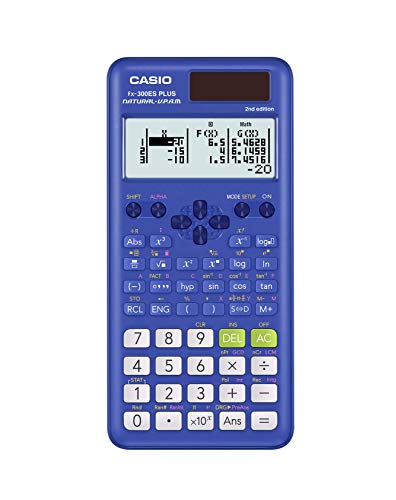
Not every math major needs the most powerful calculator on day one. If you are in your first year handling algebra, pre-calculus, geometry, trigonometry, or general statistics, the Casio fx-300ES Plus 2nd Edition does the job efficiently and affordably. It carries 262 built-in functions and runs Casio’s natural textbook display, so equations appear just as they do in your course materials.
The calculator is compact and genuinely lightweight at 0.23 pounds, fitting easily into any backpack pocket without adding bulk. The sliding hard case protects the keypad and includes a helpful reference guide on the inside cover for quick mode changes and fraction conversions. It is a practical design choice for students who are always moving between classes and study spaces.
Beyond the basics, the fx-300ES Plus supports regression analysis, trigonometric functions, logarithms, fraction arithmetic, and a two-function table that lets you evaluate f(x) and g(x) with custom step values. The random number generator adds a useful tool for probability exploration. Solar power with battery backup keeps it running without interruption.
Key Specs:
- Functions: 262
- Display: LCD, Natural Textbook Display
- Power: Solar with LR44 battery backup
- Screen size: 6.25 cm
- Dimensions: 6.4″ x 3.1″
- Weight: 0.23 lb
- Natural textbook display at a very accessible price
- Compact and lightweight with protective sliding case
- Handles regression, trig, and two-function tables well
- Function set is not deep enough for upper-level college coursework
- Two-line output only; less information visible at once than higher-end models
5. CATIGA CS-121: The Budget-Friendly Graphing Option for Visual Learners
UNAVAILABLEThe CATIGA CS-121 occupies a specific niche in this lineup. It is the only model here with graphing capability, and it comes in at a significantly lower price than dedicated graphing calculators from major brands. For a student who wants to visualize functions and explore graphs without spending on a premium graphing model, it is worth a look.
The CS-121 offers 360-plus functions covering fractions, complex numbers, statistics, linear regression, standard deviation, and variable solving. The 3-inch LCD screen can display graphs and formulas simultaneously, which is genuinely useful when you need to see the shape of a function alongside its equation. Multiple angle, calculation, and display modes give it flexibility across subjects from algebra through calculus.
The body is built to be ergonomic at 7 by 3.3 inches, and it comes with a protective case for the screen and buttons. The anti-drop body design adds a measure of durability for everyday carry. It runs on battery power with a 365-day warranty and responsive customer support from the manufacturer.
That said, honesty matters here. Customer feedback on the graphing functions specifically is mixed, with some users finding them less capable than expected. For core scientific calculations, it performs reliably. For heavy graphing use, your expectations should be calibrated accordingly.
Key Specs:
- Functions: 360+
- Calculator type: Scientific and graphing
- Display: 3-inch LCD
- Power: Battery
- Dimensions: 7″ x 3.3″
- Includes protective carrying case
- Graphing capability at a budget-friendly price point
- Simultaneous display of graphs and formulas
- Wide function set including statistics and complex numbers
- Graphing performance receives mixed feedback
- Battery only; no solar option
Best Calculators for Math Majors: A Quick Rundown
- Casio fx-991CW: Best overall for advanced math majors, with 540-plus functions and a high-resolution display
- Casio fx-115ES Plus 2nd Edition: Best for college coursework with reliable solar power and strong multi-function depth
- Texas Instruments TI-30XS MultiView: Best for exam eligibility and broad institutional acceptance
- Casio fx-300ES Plus 2nd Edition: Best entry-level option for foundational math courses
- CATIGA CS-121: Best budget graphing option for students who want visual function exploration
Final Thoughts
The best calculator for a math major is the one that matches where you actually are in your studies and where you are headed. Function count matters for upper-level coursework, but exam eligibility, display clarity, and day-to-day usability matter just as much. A calculator you cannot figure out under pressure is not doing you any favors, no matter how many features it has.
Think about your current courses, your upcoming exams, and the specific operations you reach for most often. Spend a little time with your pick before exam season hits, so the interface feels natural when it counts. Any of the options on this list will serve you well if matched thoughtfully to your actual needs.