Grade 8 is where math starts to get serious. Fractions, algebra, geometry, trigonometry — suddenly a basic four-function calculator just doesn’t cut it anymore. You need something that can keep up with what’s being taught in class, handle the functions your teacher expects, and actually make sense to use when you’re stressed out in the middle of a test.
We compared some of the most popular scientific calculators used by middle school students and put together this guide to save you the guesswork. Every pick here covers the core skills your eighth grader needs, from fraction entry and trig functions to statistics and unit conversions.
Whether you’re a parent shopping for your kid’s school year or a student picking your own tool, this guide covers everything you need to make a confident choice.
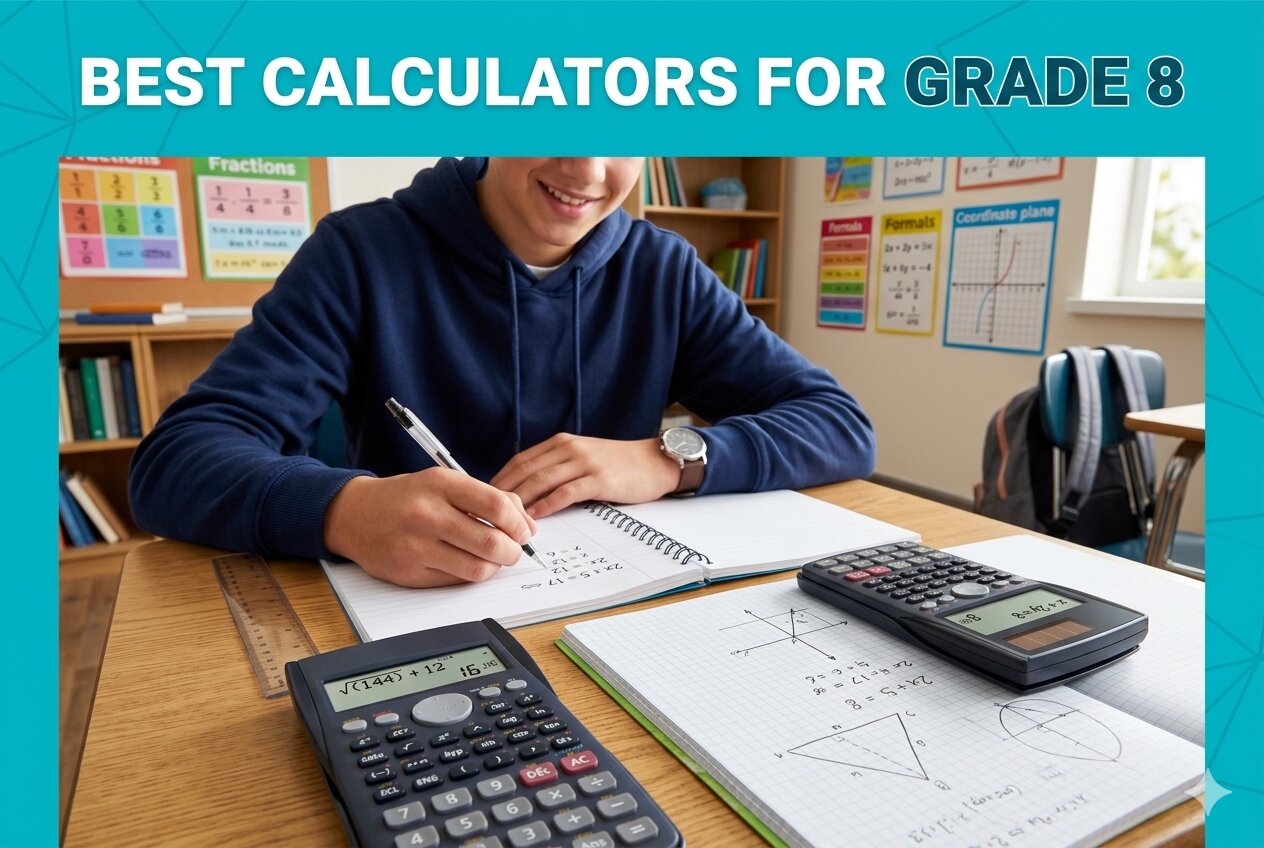 How We Selected the Best Calculators for Grade 8
We looked at dozens of scientific calculators and focused on the ones that are actually practical for Grade 8 coursework. The goal was simple: find calculators that are easy to learn, built to last, and cover what students genuinely need in class.
Here’s what we evaluated:
- Curriculum coverage: The calculator had to handle Grade 8 math, including fractions, algebra, basic trig, statistics, and unit conversions.
- Display quality: A readable display reduces errors. We prioritized calculators with clear, well-lit screens that show both input and output.
- Ease of use: Button layout, labeling, and logical key placement matter more than raw function count for students learning on the fly.
- Exam eligibility: Calculators approved for standardized tests like the SAT, ACT, PSAT, and AP exams give students a long-term return on their purchase.
- Power source: Solar-powered or dual-power models are more reliable in class because you’re not racing against a dying battery.
- Build quality: Middle schoolers are not gentle with their stuff. We considered how well each calculator holds up to daily backpack life.
- Value: Price matters. We looked for calculators that punch above their weight without asking parents to overspend.
Every pick on this list passed these filters. These aren’t just popular choices — they’re calculators that genuinely work for Grade 8.
Best Calculators for Grade 8 (Expert Ranking & Review)
The five calculators below represent a strong cross-section of what’s available for middle school students right now. From budget-friendly basics to feature-packed models with four-line displays, there’s a solid option here for every kind of student and every kind of budget.
1. Texas Instruments TI-30XIIS: The Reliable All-Rounder Every Grade 8 Student Can Count On

The TI-30XIIS has been a classroom staple for years, and there’s a very good reason it holds the number one spot in scientific calculators on Amazon. It covers every math topic a Grade 8 student will encounter, from basic algebra and fractions to trigonometry, statistics, and scientific notation. This is a calculator that will carry your child through middle school and into high school without skipping a beat.
The two-line display is genuinely useful. It shows your entry on the top line and the result on the bottom, so students can review what they typed before confirming an answer. That alone reduces careless mistakes, especially during timed tests. We found this feature particularly helpful for students still building confidence with multi-step problems.
The body is compact, fits neatly in a pencil case, and comes in several colors, which makes it easy to identify in a classroom or a crowded backpack. It measures 6.12 inches by 3.23 inches and weighs just 0.26 pounds — practically weightless.
It runs on both solar and battery power, so lighting conditions in the classroom are never a concern. It also carries a one-year limited warranty and is approved for use on the SAT, ACT, and AP exams, meaning this purchase stays useful long after Grade 8 is over.
Key Specs:
- Display: 2-line LCD
- Power: Solar and battery (CR123A)
- Functions: Algebra, trig, statistics, fractions, scientific notation
- Exam approved: SAT, ACT, AP
- Dimensions: 6.12″ x 3.23″
- Warranty: 1-year limited
- Two-line display catches input errors before they happen
- Dual solar and battery power for all classroom conditions
- Approved for major standardized tests
- Compact and lightweight
- Some users have reported buttons requiring firmer pressure over time
- No fraction-to-decimal toggle key (available on upgraded TI models)
2. Texas Instruments TI-30XS MultiView: The Step-Up Pick for Students Who Want More Screen

If the TI-30XIIS is the dependable workhorse, the TI-30XS MultiView is its more capable sibling. The four-line display is the biggest differentiator. It lets students enter more than one calculation at a time, compare results side by side, and scroll through previous entries to spot patterns. For a Grade 8 student working through algebraic problem sets or reviewing test mistakes, this is a meaningful advantage.
The MathPrint feature is a genuine standout. Fractions appear stacked as they would on paper, square roots display under a radical sign, and exponents sit where they belong — up top. Students who struggle to translate calculator notation into textbook math will find this display style much more intuitive.
Beyond the display, this calculator handles everything the Grade 8 curriculum requires. One and two-variable statistics, fraction simplification (step by step), fraction and decimal conversions, and a table feature for exploring x and y values of a given function are all built in.
At 7.25 inches by 3.38 inches, it’s slightly larger than the TI-30XIIS, but still portable enough to tuck into any pencil case or binder pocket. It runs on solar and battery power and comes with a snap-off cover that stores on the back of the unit.
Key Specs:
- Display: 4-line LCD with MathPrint
- Power: Solar and battery (Lithium)
- Functions: 1 and 2-variable statistics, fractions, table of values, MathPrint
- Exam approved: SAT, ACT, AP, state licensing exams
- Dimensions: 7.25″ x 3.38″
- Warranty: 1-year limited
- Four-line MathPrint display shows math as it appears in textbooks
- Table function helps students explore functions visually
- Dual power source for all conditions
- Step-by-step fraction simplification
- Larger size may feel bulky for younger students
- Secondary function key placement requires some adjustment time
3. Texas Instruments TI-30Xa: The No-Fuss Budget Pick That Gets the Job Done

Not every family wants to spend $16 or more on a middle school calculator, and they shouldn’t have to. The TI-30Xa does what Grade 8 math demands at a price that’s hard to argue with. It handles fractions in traditional numerator over denominator format, performs trig functions, logarithms, roots, powers, and factorials, and covers the conversions your child will need: degrees to radians, fractions to decimals, and polar to rectangular.
The single-line, 10-digit display keeps things simple. There’s no MathPrint, no scrolling through previous entries, just clean, direct calculation. For a student who already understands how scientific calculators work, or one who prefers fewer distractions, this stripped-back design is actually a feature rather than a drawback.
The build is solid. The buttons feel responsive and are clearly labeled, and the included slide case snaps on and off easily for protection between uses. Battery-powered only, which means no worrying about solar sensitivity in a dim classroom — just swap the battery when it dies, which won’t be often.
We found the TI-30Xa particularly well-suited to students who need a reliable calculator for general math and pre-algebra without the extra features they’ll never use. It’s also the most compact option on this list, at 6.12 by 3.14 inches.
Key Specs:
- Display: 1-line, 10-digit LCD
- Power: Battery (CR123A, included)
- Functions: Trig, logarithms, roots, fractions, 1-variable statistics, unit conversions
- Includes: Slide case
- Dimensions: 6.12″ x 3.14″
- Warranty: 1-year limited
- Lowest price on this list with no sacrifice in core function coverage
- Responsive buttons and clear labeling
- Slide case included for protection
- Compact and easy to carry
- Single-line display makes multi-step equation review harder
- No solar power option
4. Casio fx-300ES Plus 2nd Edition: The Textbook-Style Display That Makes Math Click
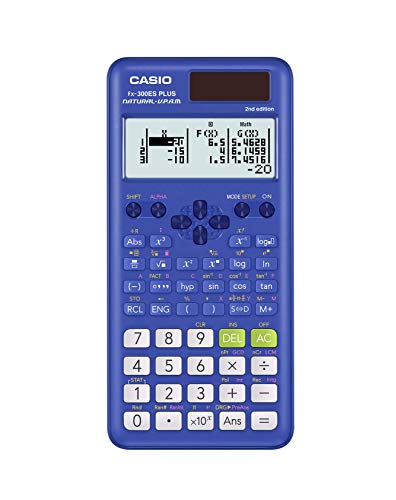
The Casio fx-300ES Plus 2nd Edition approaches scientific calculation from a different angle than the TI options above. Its Natural Textbook Display renders fractions as stacked fractions, square roots with radical symbols, and exponents in superscript — exactly as they appear in a printed textbook. For Grade 8 students still cementing their understanding of how math expressions look and behave, this display style can be a real confidence booster.
With 262 built-in functions, it covers substantially more ground than the TI-30Xa and holds its own against the TI-30XIIS. The function library includes trig, logarithms, exponential calculations, fractions, statistics, and regression analysis. There’s also a two-function table that lets students calculate values for f(x) and g(x) simultaneously, which is excellent for exploring function behavior in early algebra.
The solar-plus-battery setup means it works in virtually any lighting condition, and the hard slide-on case protects the keypad between classes. At 6.4 inches by 3.1 inches and just 3.68 ounces, it’s lightweight and backpack-friendly.
One particularly practical feature: the inside of the sliding cover has a reference sticker with guides for mode changes and fraction conversion. That small addition has real value for students who are new to scientific calculators and don’t want to dig through a manual every time they hit an unfamiliar function.
Key Specs:
- Display: Natural Textbook Display (2-line input)
- Power: Solar Plus with battery backup (LR44 included)
- Functions: 262, including trig, stats, regression, fractions, two-function table
- Includes: Hard slide-on case with reference sticker
- Dimensions: 6.4″ x 3.1″
- Warranty: 1-year limited
- Natural Textbook Display shows fractions and expressions as they appear in books
- 262 functions cover well beyond Grade 8 requirements
- Solar and battery power for any environment
- Reference sticker on case interior helps new users
- Learning curve for students coming from basic calculators
- Display angle can make reading harder from certain positions
5. Casio fx-300MS Plus 2nd Edition: The Well-Priced Workhorse Built for Middle School and Beyond

The Casio fx-300MS Plus 2nd Edition rounds out this list as a well-built, affordably priced option that doesn’t cut corners where it counts. Its 2-line LCD shows both the expression and the result at once, supports trig, inverse and hyperbolic functions, factorials, logarithms, probability simulations, and two-variable statistics with standard deviation and regression analysis. That’s more than enough for everything a Grade 8 curriculum can throw at a student.
The fraction key makes entry fast and natural. Students can convert between improper fractions, mixed numbers, and decimals without jumping through hoops. The calculator also stores up to nine variables plus last-answer recall — useful for multi-step problems where you need to carry a result forward.
Build quality is a strength here. The hard protective case keeps the keypad safe during transport, and the solar-plus-battery power setup is a consistent performer in any lighting. Buttons are well-spaced and give good tactile feedback. One reviewer noted the key spacing specifically and found it perfectly usable even with thinner gloves — a minor but telling sign of thoughtful physical design.
For students who prefer a cleaner layout without the textbook-style rendering of the fx-300ES Plus, the 2-line display on this model is crisp and easy to read head-on. It’s approved for use on AP, SAT, PSAT, and ACT exams, which extends its value well past eighth grade.
Key Specs:
- Display: 2-line, 10-digit LCD
- Power: Solar and battery (LR44 included)
- Functions: Trig, inverse/hyperbolic functions, logarithms, 2-variable stats, probability, fractions, 9-variable memory
- Exam approved: AP, SAT, PSAT, ACT
- Dimensions: 6.4″ x 3″
- Warranty: 1-year limited
- Two-variable statistics and probability built in
- Approved for all major standardized tests
- Hard case included and solar plus battery powered
- 9-variable memory plus last-answer recall
- Display readability drops at steep angles
- No Natural Textbook Display (unlike the fx-300ES Plus)
Best Calculators for Grade 8: A Quick Rundown
- Texas Instruments TI-30XIIS — Best overall for Grade 8; reliable two-line display and dual power in a compact body
- Texas Instruments TI-30XS MultiView — Best for visual learners; four-line MathPrint display and table function for exploring equations
- Texas Instruments TI-30Xa — Best budget pick; covers all the essentials at the lowest price on this list
- Casio fx-300ES Plus 2nd Edition — Best for textbook-style display; 262 functions with Natural Textbook Display and a handy reference sticker
- Casio fx-300MS Plus 2nd Edition — Best for statistics and memory; two-variable stats, nine-variable storage, and exam approval across the board
Final Thoughts
Picking the right calculator for Grade 8 comes down to a few things: how your student learns, what the teacher requires, and how much you want to spend. A textbook-style display helps visual learners who need to see math the way it’s written on the page. A simpler layout works better for students who just need reliable access to the right functions without extra complexity. Exam approval matters if you’re thinking past eighth grade, and dual power is always worth prioritizing so a dead battery never derails a test.
Every calculator on this list handles Grade 8 math with room to spare. Trust your student’s learning style, check with their teacher if the school has a specific model requirement, and pick the one that fits your budget. The right calculator becomes a tool your child will reach for every day — and that’s worth getting right.