Picking the wrong calculator for accounting or finance work is a more painful experience than most people expect. You end up fighting the tool instead of the numbers, losing time on tasks that should take seconds, and second-guessing every result you produce.
The market is full of options, and the differences between them matter a lot depending on what you actually do with your calculator day to day. A bookkeeper running payroll has different needs from a finance student cramming for a professional exam. A desk-bound accountant is in a completely different situation from someone who needs something portable and quick.
This article cuts through the noise. We researched and compared five of the most popular calculators used in accounting and finance today, covering printing models, financial calculators, and budget-friendly options so you can find the one that genuinely fits your workflow.
 How We Selected the Best Calculators for Accounting & Finance
Our evaluation process started with a clear goal: find calculators that actually hold up under real accounting and finance tasks, not just ones that look good on a spec sheet. We compared each model across practical factors that matter to professionals and students alike, looking at how well each unit performs the core functions that come up repeatedly in daily financial work.
- Financial function depth: Whether the calculator handles time-value-of-money, NPV, IRR, amortization, and statistical calculations relevant to accounting and finance work.
- Display clarity: How easy it is to read inputs and outputs, especially during fast-paced data entry or exam conditions.
- Key quality and layout: Whether the keys are well-spaced, responsive, and comfortable for extended sessions of number-crunching.
- Power reliability: How the calculator handles its power source, whether battery, solar, or dual-powered, and whether it keeps running when you need it most.
- Portability and build: Physical size, weight, and how well the unit holds up with regular use in an office or classroom setting.
- Exam and professional approval: Whether the calculator is cleared for use on major professional and academic exams such as the CFA, FRM, or CMA.
- Value for money: How much functionality you actually get relative to what you pay, which is especially important across the wide price range in this category.
Every pick on this list was chosen because it earns its place in a real accounting or finance environment. The reviews that follow reflect exactly the factors above, so you will always know which strengths and trade-offs matter most for each model.
Best Calculators for Accounting & Finance (Expert Ranking & Review)
The five calculators below cover the full spectrum of accounting and finance needs, from print-verified desk work to high-stakes financial exams. Here is what we found after putting each one through its paces.
1. Casio HR-170RC Plus: The Desk Accountant’s Most Reliable Partner
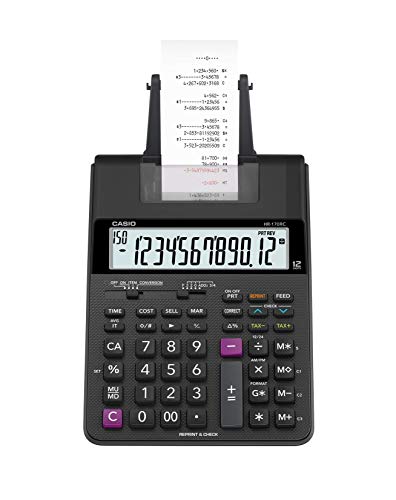
If you regularly work with long columns of numbers and need a physical record of every calculation, this printing calculator is built specifically for that job. The HR-170RC Plus prints at 2.0 lines per second with dual-color output, showing positive values in black and negative values in red, so spotting errors at a glance becomes second nature.
The Check and Correct feature is one of the standout elements here. You can review and correct up to 150 steps before anything hits the paper, and then re-print after the correction. For bookkeepers and accountants who need a clean audit trail, that capability alone is worth the price of admission.
The physical build is practical and well-thought-out. Plastic keys are clearly spaced and sized for comfort, the 12-digit LCD is easy to read, and the unit runs on either battery or an AC cord so you are never caught without power at a critical moment. A clock and calendar function lets you print time-stamped tapes, which is genuinely useful for tax and compliance work.
Beyond the basic printing functions, the HR-170RC Plus also handles cost/sell/margin calculations, mark-up and mark-down keys, currency exchange, subtotal and grand total functions, and a percent key. We found the combination of printing speed and business function depth makes it one of the most complete desk tools in this category.
Key Specs:
- Print speed: 2.0 lines per second
- Display: 12-digit LCD
- Printing: Dual-color (black/red)
- Check and Correct: Up to 150 steps
- Power: Battery and AC cord
- Compatible with: IR-40T ink roller, 2 1/4″ paper rolls
- Dual-color printing makes it easy to spot negative values instantly
- Check, Correct, and Re-Print function saves time and reduces errors
- Packed with business functions including cost/sell/margin and currency exchange
- Runs on both battery and AC so power interruptions are a non-issue
- Requires ongoing purchase of paper rolls and ink ribbons
- LCD screen has no backlight, which can make reading difficult in low-light conditions
2. Texas Instruments BA II Plus: The Gold Standard for Finance Professionals

The BA II Plus has been the go-to financial calculator for finance students and working professionals for decades, and it earns that reputation every time. It is the number one best-selling financial calculator in its category on Amazon and is approved for use on the CFA, FRM, and CMA exams, which tells you a great deal about how seriously the professional finance world takes it.
This calculator operates in two modes. Standard mode covers common math and time-value-of-money functions like loan and mortgage calculations. Worksheet mode steps things up considerably, with built-in tables for amortization, bond analysis, depreciation, and compound interest. All previous worksheet values are stored in memory, so you do not have to re-enter data every time you return to a calculation.
We found the prompted display particularly useful for anyone still getting comfortable with financial calculations. It shows you the current variable and label as you work through a problem, which removes a lot of the guesswork that trips up newer users. The unit also handles one- and two-variable statistics with four regression options including linear, logarithmic, exponential, and power.
The build is solid plastic in a slim, professional form factor. It comes with a protective slide case, runs on a single CR123A battery, and weighs just 3.8 ounces, making it easy to carry between classes or into exam rooms.
Key Specs:
- Display: 10-digit alphanumeric, 1 line
- Functions: TVM, NPV, IRR, amortization, depreciation, bond analysis, statistics
- Exam approval: CFA, FRM, CMA
- Power: 1 CR123A battery
- Weight: 3.8 ounces
- Includes: Protective slide case
- Approved for the CFA, FRM, and CMA professional exams
- Worksheet mode covers amortization, bonds, depreciation, and compound interest
- Prompted display guides you through calculations step by step
- Not intuitive out of the box; a learning curve exists for new users
- Some users report the buttons require heavier-than-expected pressure to register
3. Sharp EL-334WB: The Smartly Priced Desktop Workhorse

Not every accounting task demands a financial calculator loaded with exam-level functions. Sometimes you need a clean, reliable desktop unit that handles cost and margin math quickly, sits neatly on your desk, and never lets you down. The Sharp EL-334WB fills that role better than almost anything else at its price point.
The 12-digit display sits on a kickstand that tilts the screen to a comfortable viewing angle, which is a small detail that makes a real difference during extended work sessions. The extra-large LCD shows crisp, clearly formed digits, and the backspace key lets you correct single-digit errors without clearing your entire entry.
Cost/sell/margin keys are the standout feature for accounting and retail finance use. Enter any two of the three variables and the third appears automatically, making profit margin calculations fast and foolproof. The unit also includes a grand total key, double-zero key, automatic tax keys, four-key independent memory, and a percent key. We appreciated the fact that all of these functions are accessible without hunting through menus or pressing secondary function keys.
Power comes from solar with a battery backup, which means this calculator will keep working in dim lighting conditions and will not die mid-session because of a depleted battery. The twin-power design is particularly practical for an office desk where sunlight is not always guaranteed.
Key Specs:
- Display: 12-digit LCD with kickstand tilt
- Power: Solar with LR44 battery backup
- Dimensions: 6.6″ x 4.4″
- Functions: Cost/sell/margin, grand total, tax, backspace, 4-key memory
- Weight: 0.31 pounds
- Warranty: 1 year
- Cost/sell/margin keys make profit calculations instant
- Twin-power design works in any lighting condition
- Kickstand display reduces neck and eye strain during extended use
- No currency conversion or advanced financial functions
- No protective cover included
4. HP 10bII+: The Compact Financial Calculator Built for Clarity

The HP 10bII+ sits in a comfortable middle ground between the entry-level business calculator and the full-blown professional financial calculator. It covers over 100 business, finance, and statistical functions, handles time-value-of-money calculations, and is approved for major professional exams including the CFA, making it a credible option for both students and working finance professionals.
Where this calculator really earns points is in its day-to-day usability. The layout is clean and logically organized, with dedicated keys for the functions you reach for most often. We found it notably intuitive for users who are not financial calculation experts but still need accurate results quickly. The display is a 2-inch LCD that shows clear, readable numbers in a compact form factor that fits easily in a bag or briefcase.
The physical design is slim and portable at just 3 ounces, and the 6″ x 3″ footprint keeps it from crowding your desk or workspace. The unit uses two CR2 batteries and includes them in the box. One consistent observation from our testing is that the function documentation is clear and straightforward, and a wealth of tutorial resources exist online for anyone who wants to work through the more advanced features.
Key Specs:
- Display: 2-inch LCD
- Functions: 100+ including TVM, IRR, amortization, statistics
- Power: 2 CR2 batteries (included)
- Dimensions: 6″ x 3″
- Weight: 3 ounces
- Exam approval: CFA
- Clean, intuitive layout makes financial calculations accessible
- Compact and lightweight enough to carry anywhere
- Approved for the CFA exam
- Over 100 functions covering finance, statistics, and business math
- Battery life can be inconsistent depending on usage patterns
- Single-line display means less context visible per calculation compared to multi-line models
5. Helect 2-Line Engineering Scientific Calculator: The Budget Pick That Punches Above Its Weight

For accounting students or finance professionals who need scientific calculation capability without spending much, the Helect 2-Line Scientific Calculator is one of the most cost-effective options you will find. It packs 240 scientific functions into a pocket-sized, scratch-protected unit that costs a fraction of what most branded calculators run.
The 2-line display is the feature that makes the biggest practical difference here. You see your full input on the top line and the result on the bottom simultaneously, which reduces re-entry errors and keeps your work moving. The widescreen HD LCD is clear when viewed straight-on, and the responsive buttons are well-sized and comfortable to use for extended periods.
Three angle modes (degrees, radians, and grads) and scientific/engineering notation modes make this a genuinely capable tool for accounting students working through financial math courses that venture into quantitative territory. The solid sliding protective case covers both sides of the calculator, protecting the keys and screen from the wear and tear of daily carry in a bag or backpack.
Where it falls short is on the specialized financial function side. It does not offer dedicated TVM keys, amortization worksheets, or professional exam approval. It runs on a single AA battery, and some users have noted the RCL memory function behaves slightly differently from major brand calculators, so it rewards careful use. For a budget tool covering the scientific and statistical side of accounting studies, though, it is hard to fault the value on offer.
Key Specs:
- Display: 2-line HD LCD
- Functions: 240 scientific and statistical functions
- Power: 1 AA battery
- Includes: Sliding protective case
- Angle modes: Degrees, radians, grads
- Weight: 180 grams
- Exceptional value for 240 scientific functions at this price
- 2-line display shows input and result simultaneously
- Protective sliding case included
- Good button responsiveness and comfortable grip
- No dedicated financial functions (TVM, amortization, NPV/IRR)
- RCL memory behavior differs slightly from name-brand calculators
Best Calculators for Accounting & Finance: A Quick Rundown
- Casio HR-170RC Plus: Best for desk accountants and bookkeepers who need a printed paper trail
- Texas Instruments BA II Plus: Best for finance professionals and exam candidates (CFA, FRM, CMA)
- Sharp EL-334WB: Best value desktop calculator for day-to-day cost and margin work
- HP 10bII+: Best compact financial calculator for portability and ease of use
- Helect 2-Line Scientific Calculator: Best budget option for accounting students needing scientific functions
Final Thoughts
The right calculator for accounting and finance work comes down to what you actually spend your time doing. If you need a printed record of every transaction, a dedicated printing calculator is the obvious choice. If professional exam credentials or advanced financial modeling are part of your daily life, a purpose-built financial calculator with exam approval is the only sensible pick. For desk-bound business math without the complexity, a reliable solar-powered business calculator gets the job done without fuss.
Think carefully about your actual use case before you buy. A student preparing for the CFA has completely different needs from a small business owner tracking margins or a recent graduate brushing up on statistical functions. Match the tool to your real workflow, factor in your budget, and you will end up with a calculator that earns its place on your desk every single day.